---
title: "Examples of identity rules using unique identifiers"
slug: "examples-of-identity-rules-using-unique-identifiers"
abstract: "Provides examples of identity rules and IDENTITY events that use unique identifiers to perform identity resolution in Sitecore CDP."
---
# Examples of identity rules using unique identifiers
This topic includes examples of *identity rules* and `IDENTITY` events that use unique identifiers to perform identity resolution.
The examples in this topic are relevant to both the [Sitecore CDP 2.0 data model and the 2.1 data model](https://doc.sitecore.com/cdp/en/developers/api/developing-with-sitecore-cdp.html#data-models). If you are unsure of the data model your organization uses, ask your Sitecore representative.
You can verify a tenant's identity rules in system settings.
Organizations can use the `identifiers` array of JSON objects to identify guests in Sitecore CDP. An identifier is a unique string used to identify the guest, such as a unique ID from a Customer Relationship Management (CRM) system or loyalty program. Identifiers are not created by Sitecore CDP, they are created by your organization and sent to Sitecore CDP.
We recommend that you [familiarize yourself with identity resolution](https://doc.sitecore.com/cdp/en/users/sitecore-cdp/managing-guests-in-sitecore-cdp/identifying-guests-in-sitecore-cdp/understanding-identity-resolution-in-sitecore-cdp.html "Understanding identity resolution in Sitecore CDP") before you review the examples.
Single identity rule
Your organization can configure a single identity rule that uses a unique identifier to identify a guest as a **customer**.
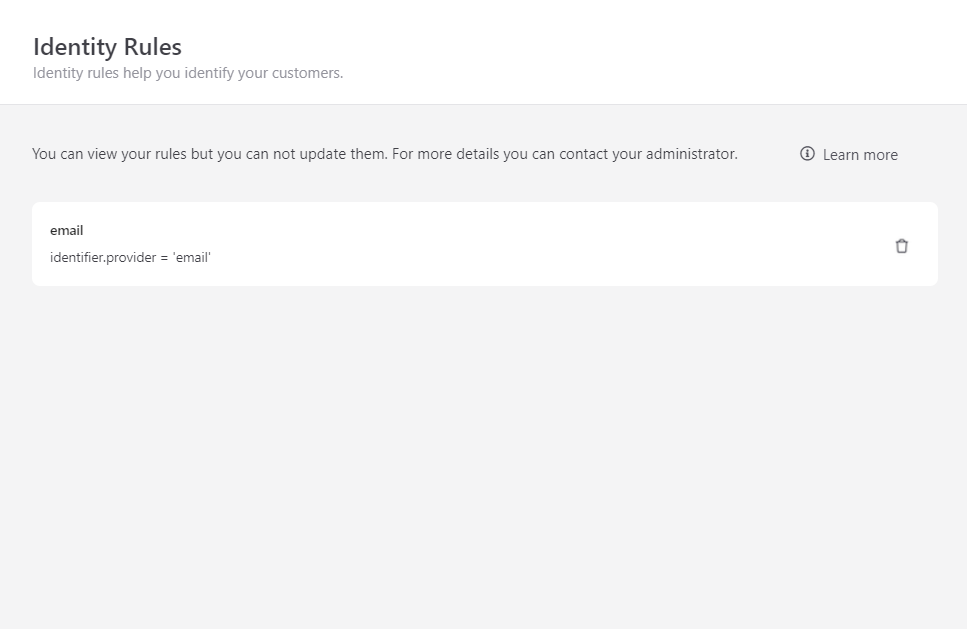
For example, your organization can use one identity rule, `email address`.
The identity rule for this configuration looks similar to the following image:
Using this same example, your organization can send an `IDENTITY` event that contains the `id` attribute with an email address as the string value.
If the string value for the `id` attribute is the same as an existing guest profile, Sitecore CDP migrates the guest's browsing data to the guest's existing guest profile, while retiring the other guest profile.
If the string value for the `id` attribute is not the same as an existing guest profile, Sitecore CDP creates a new guest profile with **visitor** as the guest type.
The following `IDENTITY` event meets the required identity rule because the `identifiers` array of JSON objects contains a value for the `"id"` attribute.
```csharp
{
"channel":"WEB",
"type":"IDENTITY",
"language":"EN",
"currency":"EUR",
"page":"home page",
"pos":"myretailsite.com",
"browser_id":"56860bff-94ba-4d84-aa37-2b5a83d5411b",
"identifiers":[
{
"provider":"email",
"id":"john.doe@gmail.com"
}
]
}
```
When Sitecore CDP receives the `IDENTITY` event, it evaluates the identity rule as follows:
1. Sitecore CDP locates the `identifiers` array of JSON objects and evaluates the value of the `id` attribute, `"john.doe@gmail.com"`. It searches the platform to find a guest profile with an identical string value of `"john.doe@gmail.com"` for the `id` attribute. If it finds the identical string value in the `identifiers` array of JSON objects, it migrates the guest data including current session data to the guest profile with the **customer** guest type. Sitecore CDP adds the `identifiers` object to the guest profile, to use for identity resolution in the future. It retires the guest profile with the **visitor** guest type.
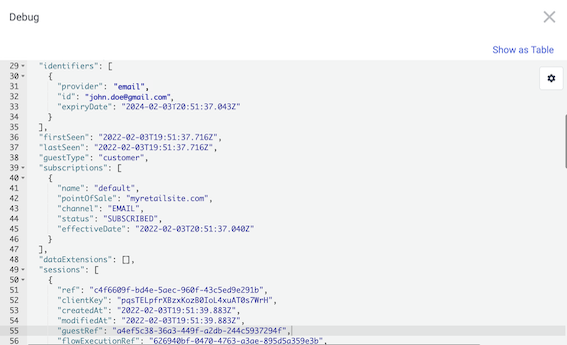
You can [use debug mode](https://doc.sitecore.com/cdp/en/users/sitecore-cdp/managing-guests-in-sitecore-cdp/use-debug-mode-in-sitecore-cdp.html "Use debug mode in Sitecore CDP") to [view the guest profile](https://doc.sitecore.com/cdp/en/users/sitecore-cdp/managing-guests-in-sitecore-cdp/view-a-guest-profile-in-sitecore-cdp.html "View a guest profile in Sitecore CDP") in JSON format.
The following image displays a guest profile with the populated `identifiers` object:
2. If Sitecore CDP does not find a guest with an identical string value, `"john.doe@gmail.com"`, for the `id` attribute, it creates a guest profile with a **visitor** guest type.
If a string value for the `id` attribute is not provided for the `SITECORE_ID` attribute, Sitecore CDP creates a new guest profile with the **visitor** guest type.
Multiple identity rules
Your organization can configure multiple identity rules to use a unique identifier to identify a guest as a **customer**.
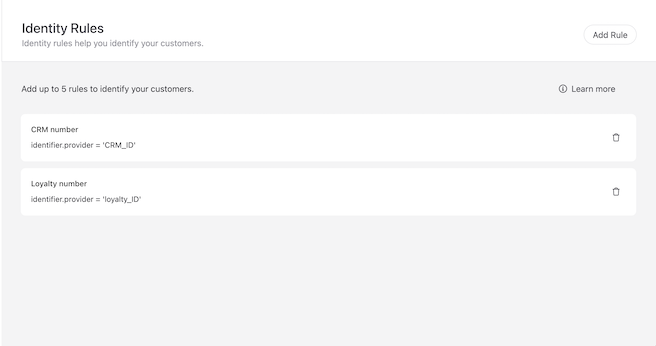
For example, your organization can use two identity rules: `CRM_ID` and `loyalty_ID`. You can configure Sitecore CDP to evaluate the identity rules using the equivalent of an `OR` operator, so that either identity rule can be used to identify a guest.
The identity rules for this configuration look similar to the following image:
Using this same example, your organization must send an `IDENTITY` event that contains a string value for the `id` attribute, for either the `CRM_ID` or `loyalty_ID` attributes, for Sitecore CDP to identify a guest. The following `IDENTITY` event meets the required identity rules because it contains at least one of the required `id` attributes:
```csharp
{
"channel":"WEB",
"type":"IDENTITY",
"language":"EN",
"currency":"EUR",
"page":"home page",
"pos":"myretailsite.com",
"browser_id":"56860bff-94ba-4d84-aa37-2b5a83d5411b",
"identifiers":[
{
"provider":"CRM_ID",
"id":"123456"
},
{
"provider":"loyalty_ID",
"id":"xni8934y77"
}
]
}
```
When Sitecore CDP receives the `IDENTITY` event, it evaluates the identity rules in the order they are listed on the **Identity Rules** screen, as follows:
1. Sitecore CDP locates the `identifiers` array of JSON objects and evaluates the `id` attribute for the first identity rule, **CRM number**. It searches the platform to find a guest profile with an identical string value, `"123456"` for the `id` attribute. If it finds the identical string value in the `identifiers` array of JSON objects, it migrates the guest data including current session data to the guest profile with the **customer** guest type. It retires the guest profile with the **visitor** guest type.
2. If Sitecore CDP does not find a guest with an identical string value for the `id` attribute for the first identity rule, **CRM number**, it evaluates the `id` attribute for the next identity rule, **Loyalty number**. The following occurs:
- If Sitecore CDP does not find a guest with an identical string value, `"xni8934y77`", for the `id` attribute for the second identity rule, **Loyalty number**, it creates a guest profile with a **visitor** guest type.
- If Sitecore CDP finds a guest with an identical string value, `"xni8934y77`", for the `id` attribute for the second identity rule, **Loyalty number,** it migrates the guest data including current session data to the existing guest profile with the **customer** guest type. It retires the guest profile with the **visitor** guest type.
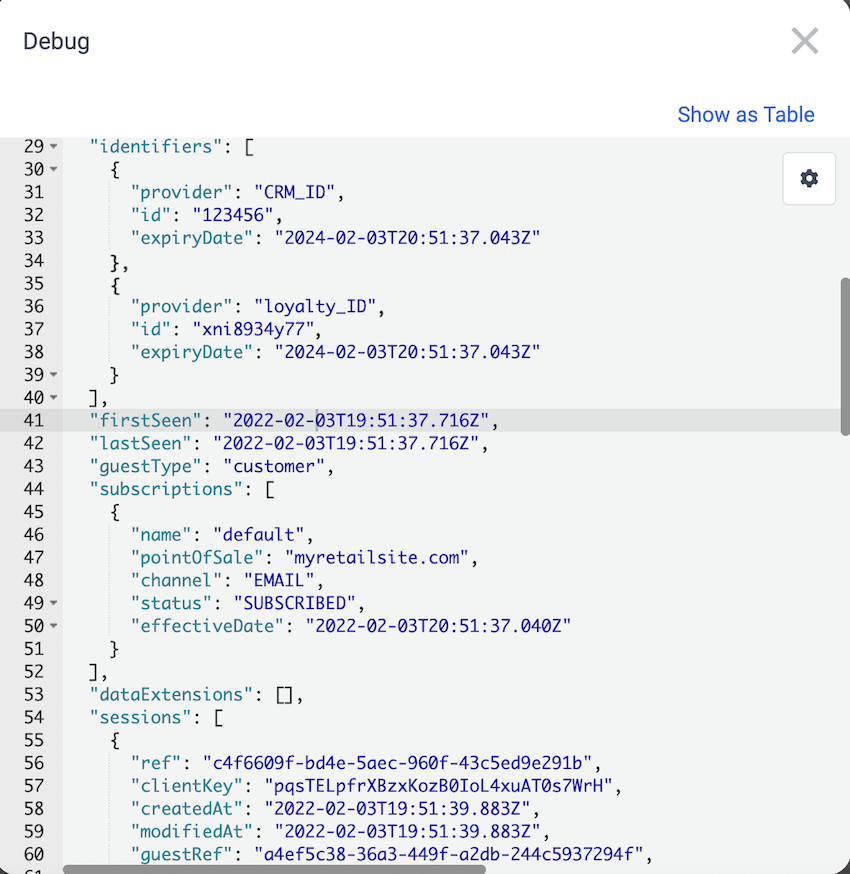
Sitecore CDP adds the `identifiers` object to the guest profile, to use for identity resolution in the future. You can [use debug mode](https://doc.sitecore.com/cdp/en/users/sitecore-cdp/managing-guests-in-sitecore-cdp/use-debug-mode-in-sitecore-cdp.html "Use debug mode in Sitecore CDP") to [view the guest profile](https://doc.sitecore.com/cdp/en/users/sitecore-cdp/managing-guests-in-sitecore-cdp/view-a-guest-profile-in-sitecore-cdp.html "View a guest profile in Sitecore CDP") in JSON format.
The following image displays a guest profile with the populated `identifiers` object:
If a string value for the `id` attribute is not provided for either the `CRM_ID` attribute or `loyalty_ID` attribute, Sitecore CDP creates a new guest profile with the **visitor** guest type.