---
title: "Update and display talk teasers"
slug: "update-and-display-talk-teasers"
abstract: "Modify the code to display talk teasers instead of recipe teasers."
---
# Update and display talk teasers
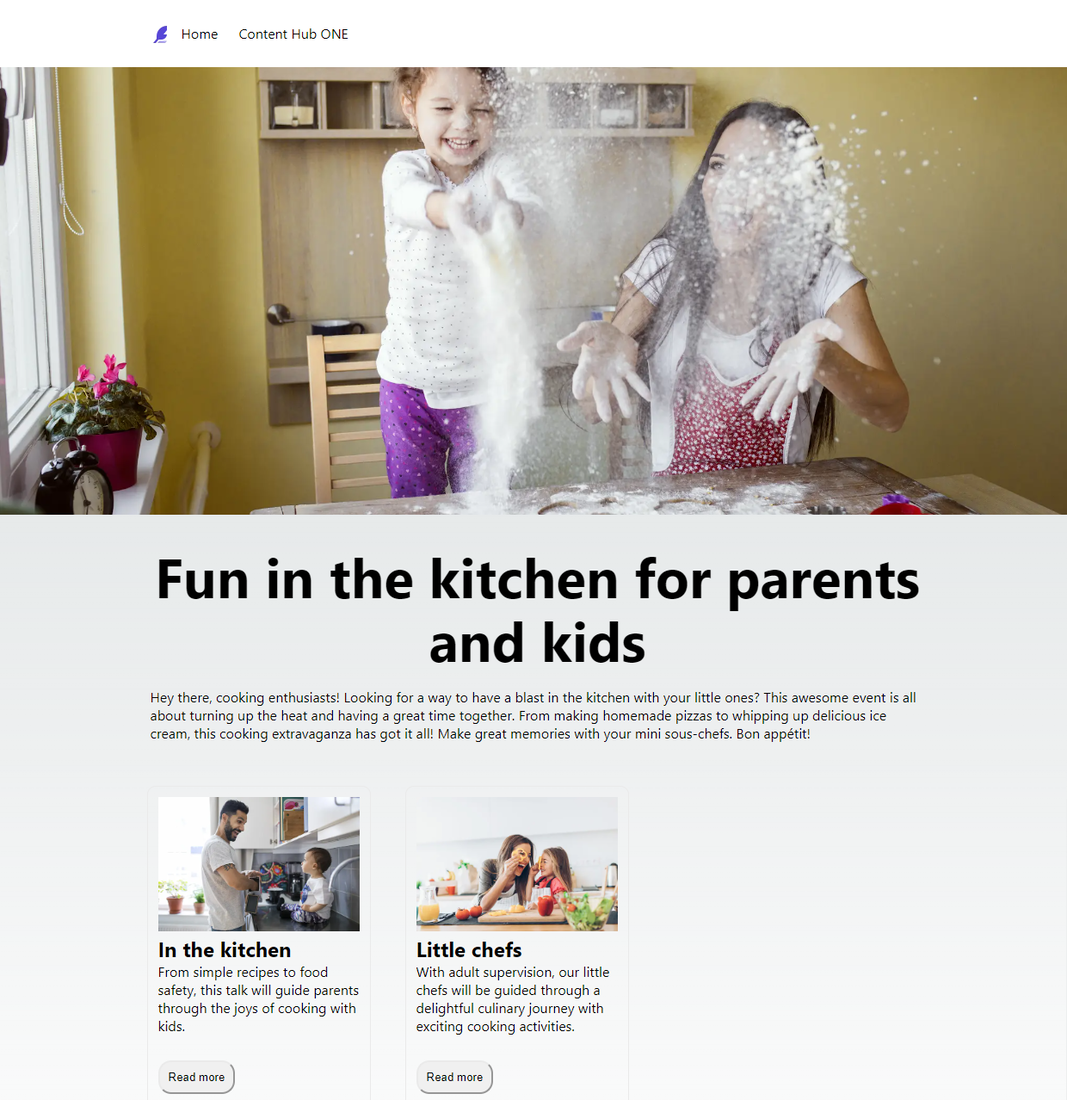
One last thing to make the event page complete. The teasers on the page need to show talk teasers and link to associated talks.
## Create the talk-lib file
Create the *talk-lib.ts* file so you have a dedicated function to query talk data.
To create the talk-lib file:
1. In Visual Studio Code, open the starter kit repository and go to the */lib/Events* folder.
2. Create a copy of the *event-lib.ts* file and name it *talk-lib.ts*.
3. Open this file and modify it as shown in the following table and code sample.
| Search for | Change from | Change to |
| --- | --- | --- |
| Functions that use `Event` in the title. | `Event` | `Talk` |
| `import Event statement` | `import Event, {EventResults} from "../../types/Events/event-type";` | `(import Talk, { TalkResults } from "../../types/Events/talk-type";)` |
| `import Event` statement | N/A | `import ALL_AGENDA_QUERY, {AGENDA_QUERY} from "../../graphQl/Events/agenda-query";)`. |
| `getAllTalk` function | `Promise Event[] ` | `Promise Talk[] `. |
| `getAllTalk` function | `ALL_EVENT_QUERY` | `ALL_AGENDA_QUERY` to pass into the function |
| `getTalkById` function | `Promise Event ` | `Promise Talk ` |
| `getTalkById` function | `const queryEvent` | `const queryTalk` |
| `getTalkById` function | `await fetchAPI(queryEvent)` | `await fetchAPI(queryTalk)` |
| `getAllEventsWithIds` function | `Promise Event ` | `Promise Talk `. |
| `getAllEventsWithIds` function | `data:allEvent` | `data:allTalk` |
| `getAllTalksWithIds` function | `EVENT_QUERY` | `AGENDA_QUERY` |
| `extractPosts` function | `data:Event` | `data:Talk` |
| `extractPosts` function | `data:EventResults` | `data:TalkResults` |
| `extractPost` function | `data:Event` | `data:Talk` |
4. Remove unused imports for events.
5. Save the file. The final code looks like this.
talk-lib.ts
```json
import {fetchAPI} from "../Common/api"
import Talk, {TalkResults} from "../../types/Events/talk-type";
import ALL_AGENDA_QUERY, {AGENDA_QUERY} from "../../graphQl/Events/agenda-query";
export async function getAllTalk(preview: boolean): Promise Talk[] {
const data = await fetchAPI(`${ALL_AGENDA_QUERY}`);
return extractPosts(data.data);
}
export async function getTalkById(id: string): Promise Talk {
console.log('getTalkById' + id);
const queryTalk = `{
data: talk(id: "${id}")
{
${AGENDA_QUERY}
}
}`;
const data = await fetchAPI(queryTalk);
return data.data.data;
}
export async function getAllTalksWithIds(): Promise Talk[] {
const query = `{
data: allTalk
{
__typename
total
results {
${AGENDA_QUERY }
}
}
}`;
const data = await fetchAPI(query);
return extractPosts(data.data);
}
function extractPosts({
data
}: {
data: TalkResults
}) {
return data.results.map((post: Talk) = {
return post;
});
}
function extractPost({data}: {data: Talk}) {
return data;
}
```
## Create the talkTeaser component file
To create the talkTeaser component file:
1. In Visual Studio Code, open the starter kit repository, make a copy of the */components/Recipe* folder and name it *Events*.
2. Open the *Events* folder and rename the *recipeTeaser-component.tsx* file *talkTeaser-component.tsx*.
3. Open the *talkTeaser-component.tsx* file and change all mentions of *recipe* to equivalent mentions of *talk*.
4. Save the file. The final code looks like this.
talkTeaser-component.tsx
```json
import stylesHp from '../../styles/Homepage/Homepage.module.css'
import Talk, {TalkResults} from "../../types/Events/talk-type";
import Link from 'next/link'
import Image from 'next/image'
type Props = {
allTalks: TalkResults;
}
const TalkTeaserComponent = ({allTalks}:Props) = {
const talks = allTalks.results;
return(
div
{talks.map((talk: Talk) = (
div key={talk.id} className={stylesHp.boxOuter}
div className={stylesHp.box}
Image
alt=''
src={talk.image.results[0].fileUrl}
width='500'
height= '500'
className={stylesHp.boxImage}
/
h2 {talk.talkTitle} /h2
p className={stylesHp.boxText}
{talk.talkDescription}
/p
p
button className={stylesHp.button}
Link href={/talk/${encodeURIComponent(talk.id)}} Read more /Link
/button
/p
/div
/div
))}
/div
)
}
export default TalkTeaserComponent
```
## Create the talk details page
Create the talk details pages so the talk IDs are passed through the URL and query for data.
To create the talk details page:
1. In Visual Studio Code, open the starter kit repository and go to the */pages* folder.
2. Create a copy of the *recipes* folder and name it *talk*.
3. Open the */pages/talk/\[slug\].tsx* file.
4. Modify it as follows to create the talk detail pages, changing all instances of *recipe* to equivalent instances of *talk*.
| Search for | Change from | Change to |
| --- | --- | --- |
| `import Recipe` | `import Recipe, {RecipeResults} from "../../types/Recipe/recipe-type";` | `import Talk, {TalkResults} from "../../types/Events/talk-type";` |
| `import {getRecipeById` | `import {getRecipeById,getAllRecipeWithIds} from "../../lib/Recipe/recipe-lib";` | `import {getTalkById,getAllTalksWithIds} from "../../lib/Events/talk-lib";` |
| `getStaticProps` function | `const recipe` | `const talk` |
| `getStaticProps` function | `get recidpeById` | `getTalkById` |
| `getStaticProps` function | `props: {recipe,homepage}` | `props: {talk,homepage}` |
| `getStaticPaths` function | `const allRecipePost` | `const allTalksPost` |
| `getStaticPaths` function | `getAllRecipesWithIds` | `getAllTalksWithIds` |
| `getStaticPaths` function | `allRecipePosts.map(({ id }) = `/recipes/${id}`)` | `allTalkPosts.map(({ id }) = `/talk/${id}`)` |
| `props` definition | `recipe: Recipe` | `talk: Talk` |
| `Post` property | `recipe` | `talk` |
| ` title ` tags | `recipe?.Title` | `talk?.talkTitle` |
| ` HeroBanner ` | `recipeImage (recipe?.image?.results[0].fileUrl)` | `talkImage (talk?.image?.results[0].fileUrl)` |
| ` h1 ` tag | ` h1 {recipe?.Title} /h1 ` | ` h1 {talk?.talkTitle} /h1 ` |
| ` strong Duration: /strong ` | `{recipe?.Duration}` | `{talk?.time}` |
| ` strong Ingredients: /strong ` | ` p strong Ingredients: /strong {recipe?.Ingredients}/p ` | Remove or comment out. |
5. Remove `Output Duration` and `Ingredients` as these are not needed.
6. Remove the `RichText Component` as this is not needed because `talkDescription` is not rich text.
7. Add `Talk Data`. The final code looks like this.
[slug].tsx
```json
import Talk, {TalkResults} from "../../types/Events/talk-type";
import {getTalkById,getAllTalksWithIds} from "../../lib/Events/talk-lib";
import stylesHp from '../../styles/Homepage/Homepage.module.css';
import Head from 'next/head'
import {getHomepageById} from "../../lib/Homepage/homepage-lib";
import { HOMEPAGE_ID } from "../../lib/Common/constants";
import Homepage from "../../types/Homepage/homepage-type";
import HeaderComponent from "../../components/Homepage/header-component";
import FooterComponent from "../../components/Homepage/footer-component";
import HeroBanner from "../../components/Homepage/hero-banner";
import RichText from "../../components/Common/richText-component";
const Renderer = require("prosemirror-to-html-js").Renderer;
type Params = {
params: {
slug: string;
};
};
export async function getStaticProps({ params }: Params) {
const talk = await getTalkById(params.slug);
const homepage = await getHomepageById(HOMEPAGE_ID);
return {
props: {talk,homepage},
// Next.js will attempt to re-generate the page:
// - When a request comes in
// - At most once every 10 seconds
revalidate: 10, //in seconds
};
}
export async function getStaticPaths() {
const allTalkPosts = await getAllTalksWithIds();
return {
paths: allTalkPosts.map(({ id }) = `/talk/${id}`) ?? [],
fallback: true,
};
}
type Props = {
talk: Talk;
homepage: Homepage;
};
const Post = ({talk,homepage}: Props) = {
return (
div className={stylesHp.container}
Head
title {talk?.talkTitle} /title
meta name="description" content="Generated by create next app" /
link rel="icon" href="/favicon.ico" /
/Head
main className={stylesHp.main}
HeaderComponent
allHeaders={homepage.header}
/
HeroBanner
heroImageUrl={talk.image.results[0].fileUrl}
altText=''
/
div className={stylesHp.boxedContainer}
h1 {talk?.talkTitle} /h1
p strong Duration: /strong {talk?.time} min. br/ /p {/*
p strong Ingredients: /strong {talk?.Ingredients} /p */}
{/* RichText richText={talk?.preparationDescriptionRt} / */}
/div
FooterComponent
allFooters={homepage.footer}
/
/main
/div
)
};
export default Post;
```
## Update the event.tsx file
To update the event.tsx file:
1. In Visual Studio Code, open the starter kit repository and go to the */pages* folder.
2. Open the *event.tsx* file.
3. Add the line `import TalkTeaserComponent from '../components/Talk/talkTeaser-component';` after the `import FooterComponent` statement.
4. Add the following lines before the FooterComponent.
```
TalkTeaserComponent
allTalks={event.agenda}
/
```
5. Save the file.
6. If the website is not still running locally, run `npm run dev`.
7. Navigate to `http://localhost:3000/event` to open the event page and see your changes.
The final code should look like this.
event.tsx
```csharp
import Head from 'next/head'
import HeaderComponent from '../components/Homepage/header-component'
import stylesHp from '../styles/Homepage/Homepage.module.css';
import {getAllHomepage, getHomepageById} from "../lib/Homepage/homepage-lib";
import Homepage from "../types/Homepage/homepage-type";
import FooterComponent from '../components/Homepage/footer-component';
import TalkTeaserComponent from '../components/Talk/talkTeaser-component';
import Image from 'next/image';
import HeroBanner from '../components/Homepage/hero-banner';
import { HOMEPAGE_ID } from '../lib/Common/constants';
import { getEventById } from '../lib/Events/events-lib';
import Event from '../types/Events/events-type';
import RichText from '../components/Common/richText-component';
export async function getStaticProps({ preview = false}){
const allHomepage = await getAllHomepage(preview);
const homepage = await getHomepageById(HOMEPAGE_ID);
const event = await getEventById(' YOUR_EVENT_ID ');
return{
props: {allHomepage, homepage, preview},
// Next.js will attempt to re-generate the page:
// - When a request comes in
// - At most once every 10 seconds
revalidate: 10, //in seconds
}
}
type Props = {
allHomepage: Homepage[];
homepage: Homepage;
event: Event;
}
const Homepage = ({allHomepage, homepage}: Props) = {
//const homepage = allHomepage[0];
return (
div className={stylesHp.container}
Head
title Event /title
meta name="description" content="Generated by create next app" /
link rel="icon" href="/favicon.ico" /
/Head
main className={stylesHp.main}
HeaderComponent
allHeaders={homepage.header}
/
HeroBanner
heroImageUrl={event.eventImage?.results[0]?.fileUrl}
altText=''
/
div className={stylesHp.boxedContainer}
h1 className={stylesHp.title}
{event.eventName}
/h1
RichText
richText={event.eventDescription}
/
TalkTeaserComponent allTalks={event.agenda}/
/div
FooterComponent
allFooters={homepage.footer}
/
/main
/div
)
}
export default Homepage;
```
Your first foray into Content Hub ONE development is complete! You're now ready to continue your developer journey to build and deliver great applications.