---
title: "Components and architecture"
slug: "components-and-architecture"
abstract: "Describes the Sitecore Discover component architecture."
---
# Components and architecture
Sitecore Discover has multiple components that interact with your platforms and third-party services to create personalized experiences for your customers.
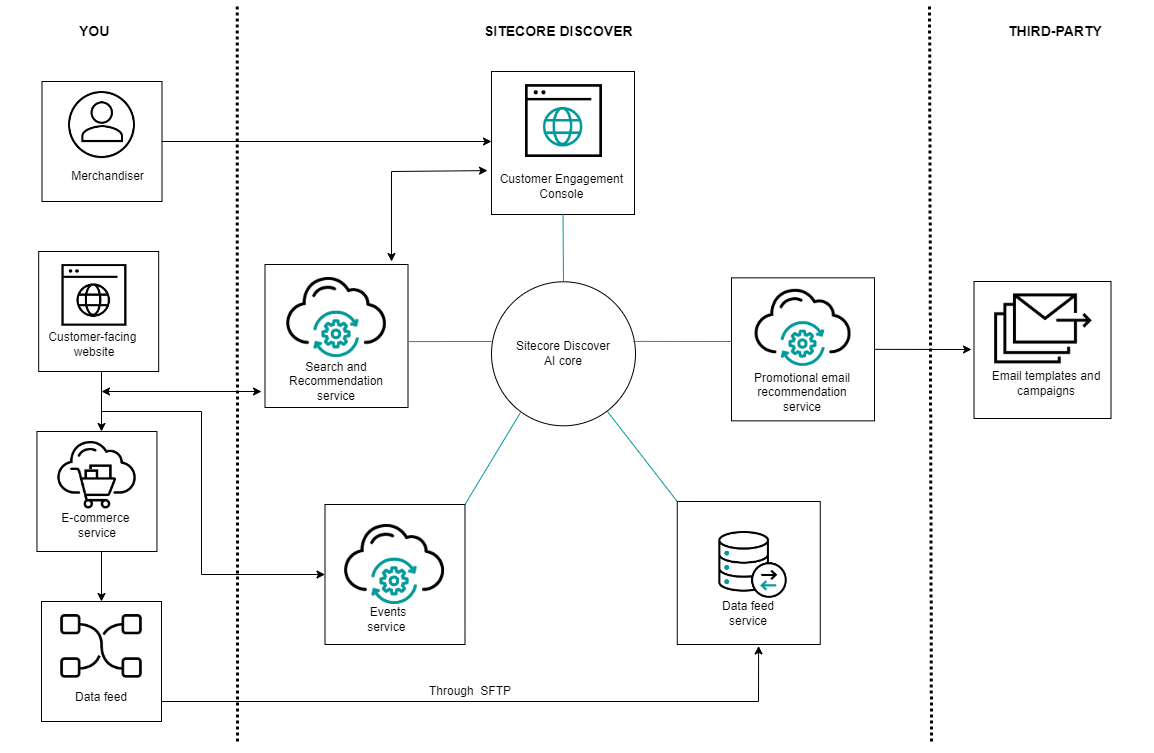
The following diagram shows the component architecture of Sitecore Discover:
Customer Engagement Console (CEC)
The CEC is a SaaS workbench for merchandising teams and developers.
Merchandisers, or business users, can create rules, new product discovery experiences, run A/B tests, perform analytics, and more. Developers can [use the CEC](https://doc.sitecore.com/discover/en/developers/discover-developer-guide/introduction-to-sitecore-discover/the-customer-engagement-console.md "The Customer Engagement Console") to learn about Sitecore Discover APIs and test integrations.
Search and recommendation service
The [Discover Search and Recommendation service](https://doc.sitecore.com/discover/en/developers/discover-developer-guide/introduction-to-sitecore-discover/integrate-using-the-search-and-recommendation-api.md "Integrate using the Search and Recommendation API") provides targeted, AI-based search and recommendations for your products. The service honors all rules that you set up on the CEC including synonyms, boost/suppress/include/exclude rules, and redirect rules. Use this service in preview search, search results, product listing, landing, special occasion, and recommendation pages, such as *similar items* and *you may also like* that use HTML content, banners, and more.
After you integrate your website with Discover, either your website or your e-commerce platform can talk to the Search and Recommendation service.
Events service
The [Discover Events service](https://doc.sitecore.com/discover/en/developers/discover-developer-guide/introduction-to-sitecore-discover/integrate-using-the-events-api.md "Integrate using the Events API") processes user data that Discover uses to optimize user experiences and create valuable analytics data.
Any time a user visits your page, they generate information. Some examples of information-generating user actions include searching for a product, clicking a recommended product, adding an item to a wishlist, or viewing more details about a product.
Data about these actions can be captured and sent to Discover in the form of event objects. In some circumstances, this data is sent automatically. However, in other circumstances, such as when you integrate using REST APIs, you must track and send event objects yourself.
Discover tracks events to improve your business KPIs. Events tell the Sitecore Discover algorithms about a user's affinities, which translates to more personalized product recommendations. Events are also integral to generating analytics such as click-through rates (CTR), click-assisted revenue, page views, keyword analytics, and so on.
Promotional email recommendation service
Use the Discover promotional email recommendation service to insert dynamic recommendations into email messages you send to users. Each user sees personalized recommendations when they open the email message.
After you set up a campaign and define other variables in the CEC, Discover gives you a code snippet that you can embed into the email messages you send using any third-party email service. You use just one code snippet, but Discover ensures that each user sees products that are personalized based on what you defined in the CEC.
Data feed service
You prepare data and then transfer catalog datasets to Discover through a secure file transfer protocol (SFTP) to the [Discover data feed service](https://doc.sitecore.com/discover/en/developers/discover-developer-guide/introduction-to-sitecore-discover/preparing,-uploading,-and-managing-your-data.md "Preparing, uploading, and managing your data"). You can also use the SFTP service to update product data.