---
title: "Calling the Incremental Feed API"
slug: "calling-the-incremental-feed-api"
abstract: "Provides basic information you need to make calls to the Sitecore Discover Incremental Feed API."
---
# Calling the Incremental Feed API
You can use either the HTTP or the HTTPS protocol to make calls to the Incremental Feed API.
You use the POST method to call the Incremental Feed API.
> [!important]
> For data security and privacy reason, we recommend that you use the HTTPS protocol to make calls to the Discover APIs.
Sitecore Discover APIs accept requests payload in the form of JSON objects or a URL encoded JSON string.
Incremental Feed API end-point
You can obtain the API URL in the Customer Engagement Console (CEC), in **Developer Resources**, on the **API Access** tab, as shown in the following example:
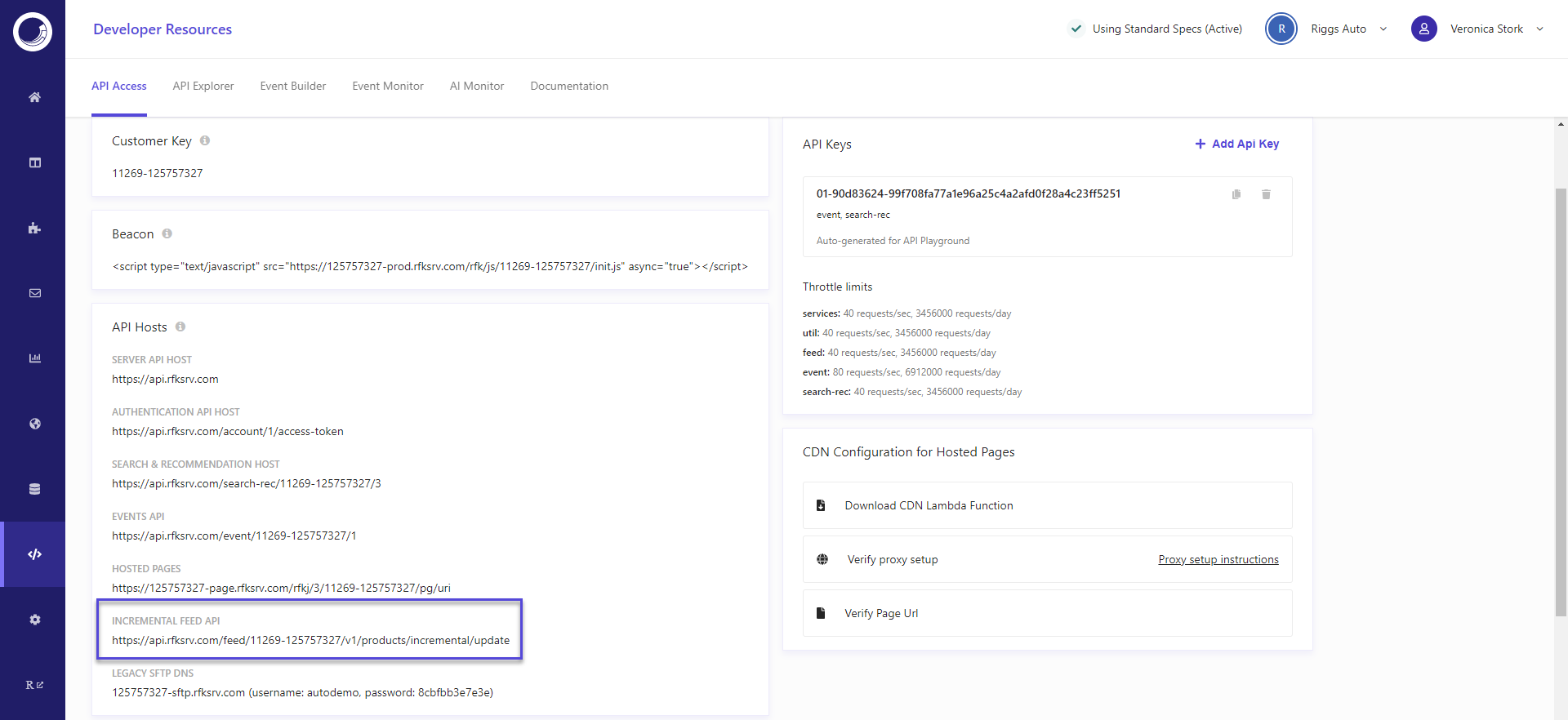
Recommendations for optimal API calls performance
Each call to the Incremental Feed API results in multiple operations in Discover. Requests with large payloads also take longer to travel through the network. For an optimal performance, Sitecore recommends to include a maximum of 10 stock keeping units (SKUs) per call to the API endpoint.
During onboarding, a Sitecore integration specialist works with you to determine and configure the adequate throttle limit for your implementation. You can see throttle limits configured for each Discover service in the CEC, in **Developer Resources**, on the **API Access** tab.
Authentication
If you use a subdomain in your Discover implementation, you are not required to authenticate requests to the Discover API. You can call the API endpoint directly.
Otherwise, if do not use a subdomain, Sitecore recommends that you [authenticate your request](https://doc.sitecore.com/discover/en/developers/discover-developer-guide/keep-product-data-up-to-date-using-the-incremental-feed-api/api-authentication-and-authorization.md "API authentication and authorization").
The following shows an example of an API request header including an API key.
Host: ``
Header: `Authorization: `
Header: `Content-Type: application/json`
> [!warning]
> Do not call the Incremental Feed API from within the browser. Calling the API from within a browser exposes how you are modifying data in real time and constitute a security risk.
Keys in an Incremental Feed API request
The following table lists the keys in the payload of an Incremental Feed API request:
| Key | Data type | Description |
| --- | --- | --- |
| `api-key` | string | Required.
An API key provided by Sitecore during Discover onboarding. You use this key to make API calls from the server. |
| `data` | string | Required.
A JSON string that represents the [data object](https://doc.sitecore.com/discover/en/developers/discover-developer-guide/keep-product-data-up-to-date-using-the-incremental-feed-api/the-structure-of-the-data-object-in-incremental-feed-api-requests.html "The structure of the data object in Incremental Feed API requests") included in the request. |
Example of a POST request to the Incremental Feed API
The following shows an example of a POST request to the Incremental Feed API:
```csharp
POST /feed/products/incremental/update
{
"data": "{}"
}
Header:
Content-Type: application/json
Authorization: ""
OR
Authorization: "Bearer "
```
Example request to the Incremental Feed API using Curl
You can use the Curl programming language to make calls to the Incremental Feed API. The following shows an example of what every Curl calls to the API must include:
```xml
curl -X POST \
/feed/products/incremental/update \
-H 'Accept: */*' \
-H 'Accept-Encoding: gzip, deflate' \
-H 'Authorization: 01-16d038d8-1f12d3e2b2...9b05467c7011af308' \
-H 'Content-Type: application/json' \
-d ''
```