---
title: "Split test overview"
slug: "split-test-overview"
abstract: "The Split test overview report describes the key conditions of and links to the widget variations in the split test run in Sitecore Discover Customer Engagement Console (CEC)."
---
# Split test overview
The *Split test overview* report describes the key test conditions and links to the widget and widget variations of the split test.
> [!note]
> The first variation in the list of variations for a test is always the control variation. All other variations are tested against it.

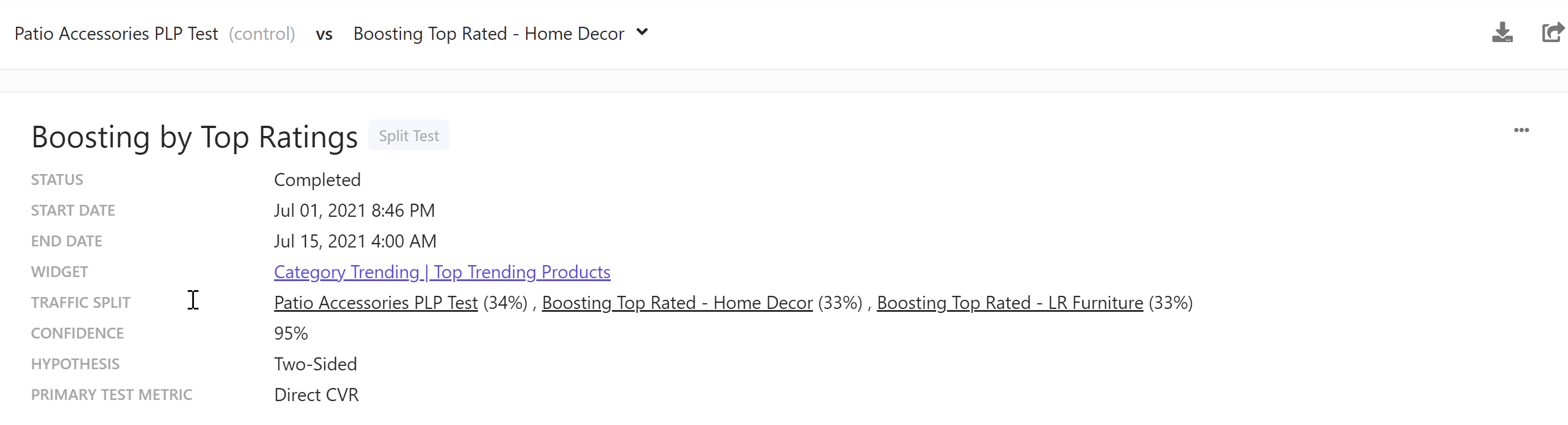
The following table describes the properties of the *Split test overview* report.
| Property | Description |
| --- | --- |
| Name | Name of the split test. |
| Status | Status of the split test. Options are *Running*, *Completed*, and *Scheduled*. |
| Start date | Date and time when the test started or starts. |
| End Date | Date and time when the test ended or ends. |
| Widget | Name of and link to the Discover widget whose variations are in the test. |
| Traffic Split | Split percentages of the widget variations in the test.
Hover your mouse over a widget variation name to display all the widget variation rules active during the test. |
| Confidence | Probability that the hypothesis is true. Default value is *95%*. |
| Hypothesis | Predicted difference between two widget variations in a Discover split test. Default value is *Two-Sided*. |
| Primary test metric | Metric that is used to decide the winner. |
> [!note]
> When you test more than two variations, all variations are run against the first variation because tests are always run between two variations.
>
> In [a *Split test* report](https://doc.sitecore.com/discover/en/users/discover-user-guide/monitor-performance/split-tests-reports/split-test-results.html "Split test results"), use the drop-down menu above the *Split test overview* report to select a variation for its test results.
>
> 
>
> This drop-down menu is only available for tests with more than two variations.