---
title: "Examples of identity rules using unique identifiers"
slug: "examples-of-identity-rules-using-unique-identifiers"
abstract: "Provides examples of identity rules and IDENTITY events that use unique identifiers to perform identity resolution in Sitecore Personalize."
---
# Examples of identity rules using unique identifiers
This topic includes examples of *identity rules* and `IDENTITY` events that use unique identifiers to perform identity resolution.
The examples in this topic are relevant to both the [Sitecore Personalize 2.0 data model and the 2.1 data model](https://doc.sitecore.com/personalize/en/developers/api/developing-with-sitecore-personalize.html#data-models).. If you are unsure of the data model your organization uses, ask your Sitecore representative.
You can [verify a tenant's identity rules](https://doc.sitecore.com/personalize/en/users/sitecore-personalize/identifying-guests-in-sitecore-personalize/understanding-identity-resolution-in-sitecore-personalize/view-your-organization-s-identity-rules.html "View your organization's identity rules") in system settings.
Organizations can use the `identifiers` array of JSON objects to identify guests in Sitecore Personalize. An identifier is a unique string used to identify the guest, such as a unique ID from a Customer Relationship Management (CRM) system or loyalty program. Identifiers are not created by Sitecore Personalize, they are created by your organization and sent to Sitecore Personalize.
We recommend that you [familiarize yourself with identity resolution](https://doc.sitecore.com/personalize/en/users/sitecore-personalize/identifying-guests-in-sitecore-personalize/understanding-identity-resolution-in-sitecore-personalize.html "Understanding identity resolution in Sitecore Personalize") before you review the examples.
Single identity rule
Your organization can configure a single identity rule that uses a unique identifier to identify a guest as a **customer**.
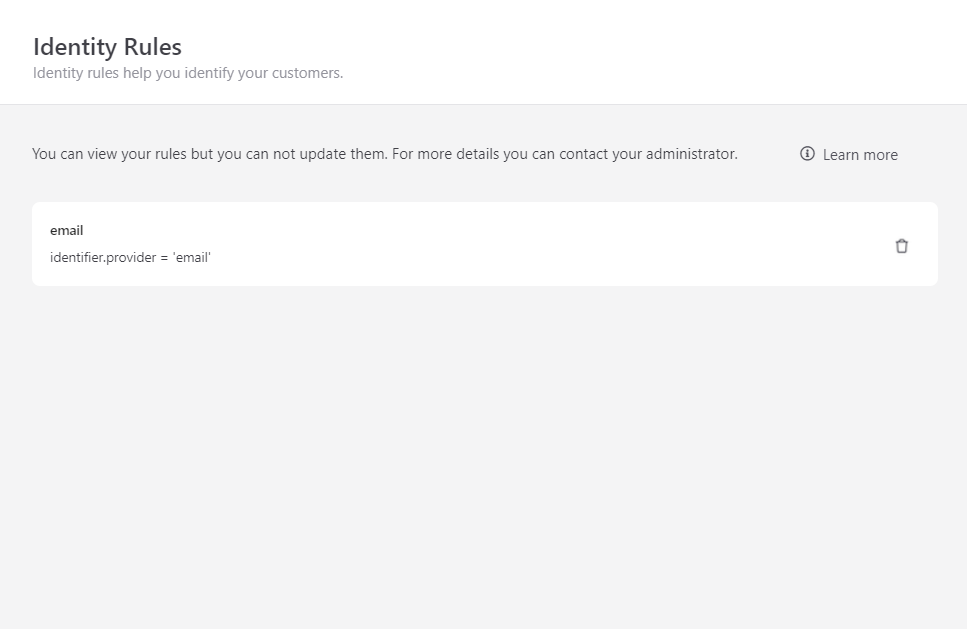
For example, your organization can use one identity rule, `email address`.
The identity rule for this configuration looks similar to the following image:
Using this same example, your organization can send an `IDENTITY` event that contains the `id` attribute with an email address as the string value.
If the string value for the `id` attribute is the same as an existing guest, Sitecore Personalize migrates the guest's browsing data to the existing guest, while retiring the other guest.
If the string value for the `id` attribute is not the same as an existing guest, Sitecore Personalize. creates a new guest with **visitor** as the guest type.
The following `IDENTITY` event meets the required identity rule because the `identifiers` array of JSON objects contains a value for the `"id"` attribute.
```csharp
{
"channel":"WEB",
"type":"IDENTITY",
"language":"EN",
"currency":"EUR",
"page":"home page",
"pos":"myretailsite.com",
"browser_id":"56860bff-94ba-4d84-aa37-2b5a83d5411b",
"identifiers":[
{
"provider":"email",
"id":"john.doe@gmail.com"
}
]
}
```
When Sitecore Personalize receives the `IDENTITY` event, it evaluates the identity rule as follows:
1. Sitecore Personalize locates the `identifiers` array of JSON objects and evaluates the value of the `id` attribute, `"john.doe@gmail.com"`. It searches the platform to find a guest with an identical string value of `"john.doe@gmail.com"` for the `id` attribute. If it finds the identical string value in the `identifiers` array of JSON objects, it migrates the guest data including current session data to the guest with the **customer** guest type. Sitecore Personalize adds the `identifiers` object to the guest, to use for identity resolution in the future. It retires the guest with the **visitor** guest type.
2. If Sitecore Personalize does not find a guest with an identical string value, `"john.doe@gmail.com"`, for the `id` attribute, it creates a guest with a **visitor** guest type.
If a string value for the `id` attribute is not provided for the `SITECORE_ID` attribute, Sitecore Personalize creates a new guest with the **visitor** guest type.
Multiple identity rules
Your organization can configure multiple identity rules to use a unique identifier to identify a guest as a **customer**.
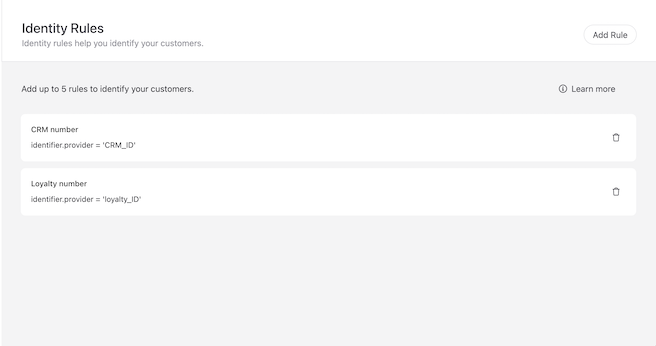
For example, your organization can use two identity rules: `CRM_ID` and `loyalty_ID`. You can configure Sitecore Personalize to evaluate the identity rules using the equivalent of an `OR` operator, so that either identity rule can be used to identify a guest.
The identity rules for this configuration look similar to the following image:
Using this same example, your organization must send an `IDENTITY` event that contains a string value for the `id` attribute, for either the `CRM_ID` or `loyalty_ID` attributes, for Sitecore Personalize to identify a guest. The following `IDENTITY` event meets the required identity rules because it contains at least one of the required `id` attributes:
```csharp
{
"channel":"WEB",
"type":"IDENTITY",
"language":"EN",
"currency":"EUR",
"page":"home page",
"pos":"myretailsite.com",
"browser_id":"56860bff-94ba-4d84-aa37-2b5a83d5411b",
"identifiers":[
{
"provider":"CRM_ID",
"id":"123456"
},
{
"provider":"loyalty_ID",
"id":"xni8934y77"
}
]
}
```
When Sitecore Personalize receives the `IDENTITY` event, it evaluates the identity rules in the order they are listed on the **Identity Rules** screen, as follows:
1. Sitecore Personalize locates the `identifiers` array of JSON objects and evaluates the `id` attribute for the first identity rule, **CRM number**. It searches the platform to find a guest with an identical string value, `"123456"` for the `id` attribute. If it finds the identical string value in the `identifiers` array of JSON objects, it migrates the guest data including current session data to the guest with the **customer** guest type. It retires the guest with the **visitor** guest type.
2. If Sitecore Personalize does not find a guest with an identical string value for the `id` attribute for the first identity rule, **CRM number**, it evaluates the `id` attribute for the next identity rule, **Loyalty number**. The following occurs:
- If Sitecore Personalize does not find a guest with an identical string value, `"xni8934y77`", for the `id` attribute for the second identity rule, **Loyalty number**, it creates a guest with a **visitor** guest type.
- If Sitecore Personalize finds a guest with an identical string value, `"xni8934y77`", for the `id` attribute for the second identity rule, **Loyalty number,** it migrates the guest data including current session data to the existing guest with the **customer** guest type. It retires the guest with the **visitor** guest type.
Sitecore Personalize adds the `identifiers` object to the guest, to use for identity resolution in the future.
If a string value for the `id` attribute is not provided for either the `CRM_ID` attribute or `loyalty_ID` attribute, Sitecore Personalize creates a new guest with the **visitor** guest type.