---
title: "Using traffic allocation and variant traffic assignment in a web experiment"
slug: "using-traffic-allocation-and-variant-traffic-assignment-in-a-web-experiment"
abstract: "Allocate traffic to a Sitecore Personalize web experiment and assign it to variants to manage the proportion and distribution of guests that enter the experiment and all variants, based on the Unique or Universal assignment method selected."
---
# Using traffic allocation and variant traffic assignment in a web experiment
When testing new website designs or features, it is important to consider how to manage guest traffic entering a [classic](https://doc.sitecore.com/personalize/en/users/sitecore-personalize/introduction-to-experiments-in-sitecore-personalize.html "Introduction to experiments in Sitecore Personalize") A/B experiment and distribute it across different variants. In Sitecore Personalize, this involves:
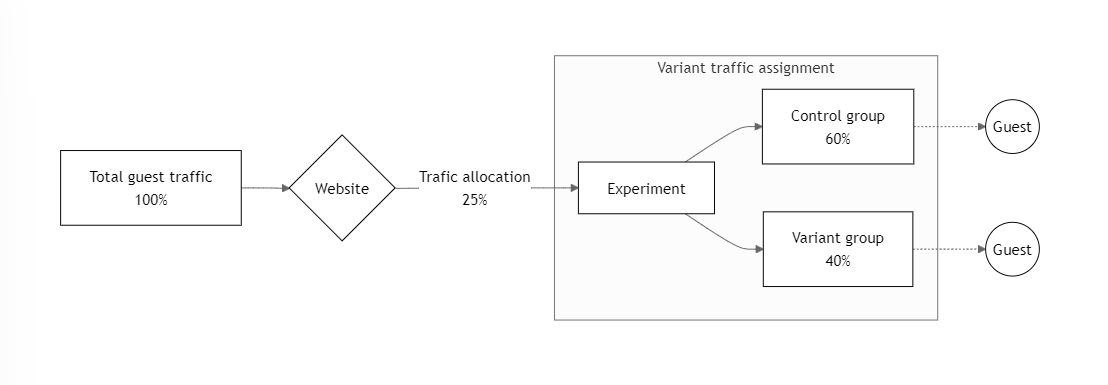
- **Traffic allocation** - refers to the proportion of guests entering the experiment. By default, Sitecore Personalize allocates 100% of traffic to an experiment, but you can adjust this. For instance, you might start with only a fraction of guest traffic, like 25%, to test a new feature. You can gradually increase this percentage as you move to full deployment.
- **Variant traffic assignment** - determines how the allocated traffic is assigned to the experiment variants. This ensures that of those who enter the experiment, a certain portion of guests will be randomly assigned to the control, and the remainder will be assigned to the other variants. You can manually divide traffic or let Sitecore Personalize equally split traffic among all variants. In the following diagram, 25% of website traffic is allocated to the experiment, of which 60% is assigned to the control and 40% to the other variant.
Choosing between the [Unique](https://doc.sitecore.com/personalize/en/users/sitecore-personalize/introduction-to-experiments-in-sitecore-personalize/introduction-to-web-experiments-in-sitecore-personalize/using-unique-assignment-method-in-a-web-experiment.html "Using Unique assignment method in a web experiment") or [Universal](https://doc.sitecore.com/personalize/en/users/sitecore-personalize/introduction-to-experiments-in-sitecore-personalize/introduction-to-web-experiments-in-sitecore-personalize/using-universal-assignment-method-in-a-web-experiment.html "Using Universal assignment method in a web experiment") assignment methods affects how you allocate traffic to a classic A/B experiment and assign that traffic to variants. Unique assignment is useful for running multiple tests simultaneously, prioritizing speed and quantity over precision. In contrast, universal assignment is suited for experiments requiring precision and more control over guest assignment.
> [!note]
> An experiment that runs with [optimized testing](https://doc.sitecore.com/personalize/en/users/sitecore-personalize/introduction-to-experiments-in-sitecore-personalize/introduction-to-web-experiments-in-sitecore-personalize/running-an-experiment-with-optimized-testing.html "Running an experiment with optimized testing") prevents you from selecting the Unique and Universal assignment methods or adjusting how you allocate traffic. This option will automatically allocate 100% of the traffic to your experiment, and dynamically assign guests to the highest performing variants.
The following table compares traffic allocations and variant traffic assignments using the two assignment methods:
| Allocation type | Unique assignment method | Universal assignment method |
| --- | --- | --- |
| Traffic allocation | [Set a percentage](https://doc.sitecore.com/personalize/en/users/sitecore-personalize/introduction-to-experiments-in-sitecore-personalize/introduction-to-web-experiments-in-sitecore-personalize/allocate-traffic-and-assign-to-variants-of-a-web-experiment-with-unique-assignment.html) between 1 and 100.
For example, 20% means 1 in 5 guests are participating in the experiment. | [Choose a bucket range](https://doc.sitecore.com/personalize/en/users/sitecore-personalize/introduction-to-experiments-in-sitecore-personalize/introduction-to-web-experiments-in-sitecore-personalize/allocate-traffic-and-assign-to-variants-of-a-web-experiment-with-universal-assignment.html) between 1 and 120. Each guest is assigned a bucket number between 1 and 120, and those whose number falls within the chosen range will participate.
For example, choose buckets 1 to 60 for 50% guest traffic participation. |
| Variant traffic assignment | Assign the allocated traffic to variants [using percentages](https://doc.sitecore.com/personalize/en/users/sitecore-personalize/introduction-to-experiments-in-sitecore-personalize/introduction-to-web-experiments-in-sitecore-personalize/allocate-traffic-and-assign-to-variants-of-a-web-experiment-with-unique-assignment.html).
For example, split the 20% allocated traffic into:
- Control - 34%
- Variant 1 - 33%
- Variant 2 - 33%
| Assign the allocated traffic to variants [using percentages](https://doc.sitecore.com/personalize/en/users/sitecore-personalize/introduction-to-experiments-in-sitecore-personalize/introduction-to-web-experiments-in-sitecore-personalize/allocate-traffic-and-assign-to-variants-of-a-web-experiment-with-universal-assignment.html). The system will automatically calculate and display the corresponding bucket ranges.
For example, split the 50% allocated traffic (buckets 1 to 60) into:
- Control - Buckets 1 to 30 (50%)
- Variant 1 - Buckets 31 to 60 (50%)
|
> [!note]
> When you add a condition to filter an experiment's audience, the system allocates traffic after the filter is applied. For example, if you set a region filter to *Europe* and allocate 100% of the traffic to the experiment, it ensures all European guest traffic participates in the experiment. With a 50% allocation, only half of the European guest traffic is included.