---
title: "Configure triggers"
slug: "configure-triggers"
abstract: "Description of the trigger settings for a Search crawler."
---
# Configure triggers
A trigger is the starting point that a Sitecore Search crawler uses to look for content to index. Depending on the type, a trigger can contain the complete list of URLs to crawl (when you use a sitemap or sitemap index trigger) or can be a starting point for further action (when you use a request or JavaScript trigger).
Except for the [web crawler](https://doc.sitecore.com/search/en/users/search-user-guide/index-items/configure-indexing/configure-a-web-crawler.html "Configure a web crawler") source, you can configure more than one trigger. If you have more than one, Search runs all triggers in parallel.
> [!note]
> For a web crawler source, configure triggers in the **Web Crawler Settings** section of the **Source Settings** page. For the [advanced web crawler](https://doc.sitecore.com/search/en/users/search-user-guide/index-items/additional-configurations-and-settings/configure-an-advanced-web-crawler.html#UUID-1f2f85d4-5ab3-30eb-a344-202bb53dfff7_section-idm4581825694513633495976618142 "Configure a trigger") and [API crawler](https://doc.sitecore.com/search/en/users/search-user-guide/index-items/additional-configurations-and-settings/configure-an-api-crawler.html#UUID-35c9f696-feb4-3e49-7b01-dd161da88f58_section-idm1823366252897656 "Configure a trigger") sources, configure triggers in the **Triggers** section on the **Source Settings** page.
Sometimes, a trigger might not be enough to get all the content you want to index. In this case, you'll also need to define [request extractors](https://doc.sitecore.com/search/en/users/search-user-guide/index-items/additional-configurations-and-settings/request-extractors.html "Request extractors").
## Sitemap and sitemap index triggers
Use a sitemap or sitemap index trigger when you have a sitemap or sitemap index that includes all the URLs you want to index. This is usually the easiest way to configure a trigger because most public websites have a sitemap or sitemap index.
When you define a sitemap or sitemap index trigger, Search crawls all URLs listen in the sitemaps. For this trigger type, the default *max_depth* in the [**Web Crawler Settings**](https://doc.sitecore.com/search/en/users/search-user-guide/index-items/additional-configurations-and-settings/configure-crawler-settings.html#UUID-0dfb2dde-ba55-97dc-6938-5157e86384fc_tr-idm1823366294761402) is *0*, which means that Search does not follow any hyperlinks.
> [!note]
> You can use a sitemap or sitemap index trigger with the [web crawler](https://doc.sitecore.com/search/en/users/search-user-guide/index-items/additional-configurations-and-settings/configure-a-web-crawler.html#UUID-d2842294-0288-d59c-43b0-a157eeeec32c_section-idm1823364884636836 "Configure crawler settings") and [advanced web crawler](https://doc.sitecore.com/search/en/users/search-user-guide/index-items/additional-configurations-and-settings/configure-triggers/create-a-sitemap-trigger.html "Create a sitemap trigger") sources.
Configure the following settings to [use a sitemap or sitemap index as the trigger](https://doc.sitecore.com/search/en/users/search-user-guide/index-items/additional-configurations-and-settings/configure-triggers/create-a-sitemap-trigger.html "Create a sitemap trigger"):
| Setting | Description |
| --- | --- |
| **Timeout** | Time, in milliseconds, that the crawler waits to get data from the Sitemap URL.
Default: 1000 |
| **Urls** | Sitemap or sitemap index URLs. You can enter more than one URL.
For example, enter *https://www.sitecore.com/sitemap.xml* |
## Request trigger
Use a request trigger when you want the crawler to start from one URL and then follow hyperlinks, or your content can only be accessed through a REST API endpoint.
> [!note]
> You can use a request trigger with the [web crawler](https://doc.sitecore.com/search/en/users/search-user-guide/index-items/additional-configurations-and-settings/configure-a-web-crawler.html#UUID-d2842294-0288-d59c-43b0-a157eeeec32c_section-idm1823364884636836 "Configure crawler settings"), [advanced web crawler](https://doc.sitecore.com/search/en/users/search-user-guide/index-items/additional-configurations-and-settings/configure-triggers/create-a-request-trigger.html "Create a request trigger"), and [API crawler](https://doc.sitecore.com/search/en/users/search-user-guide/index-items/additional-configurations-and-settings/configure-an-api-crawler.html#UUID-35c9f696-feb4-3e49-7b01-dd161da88f58_section-idm1823366252897656 "Configure a trigger") sources.
When you create a request Trigger, Search starts from that URL and then follows hyperlinks, if any.
> [!note]
> Use the **MAX DEPTH** [crawler setting](https://doc.sitecore.com/search/en/users/search-user-guide/index-items/additional-configurations-and-settings/configure-crawler-settings.html#UUID-0dfb2dde-ba55-97dc-6938-5157e86384fc_tr-idm1823366294761402) to define how many hyperlinks the crawler needs to open and index from a single URL.
Configure the following settings to use a request as the trigger:
| Setting | Description |
| --- | --- |
| **URL** | The URL to start from or the API endpoint you want to call. |
| **Body** | Body of the request.
This setting is not available with the web crawler source. |
| **Header** | Headers in the request.
This setting is not available with the web crawler source. |
| **Method** | Method of the API request. Use the default method, `GET`, when you only require the request URL and no body parameters. Use `POST`, `PUT` or `PATCH` if you want to add body parameters.
This setting is not available with the web crawler source. The default method is `GET`. |
## JavaScript trigger
Configure a JavaScript trigger when you want to create a JavaScript function that returns URLs. Sitecore Search treats each URL as a request trigger.
> [!note]
> You can use a JavaScript trigger with the [advanced web crawler](https://doc.sitecore.com/search/en/users/search-user-guide/index-items/additional-configurations-and-settings/configure-an-advanced-web-crawler.html "Configure an advanced web crawler") and [API crawler](https://doc.sitecore.com/search/en/users/search-user-guide/index-items/additional-configurations-and-settings/configure-an-api-crawler.html "Configure an API crawler") sources.
One scenario where you can use a JavaScript trigger is when you have to crawl many URLs, some of which need a simple `GET` request and some of which need a `POST` request with header and body information. Instead of creating individual request triggers for each URL, you can create a JavaScript URL that returns a list of URLs, like in the following code sample:
```javascript
function extract() {
return [
{
"url": "http://www.domainA.com/page1.html"
},
{
"url": "http://www.domainB.com/page1.html",
"method": "POST",
"headers": {
"user-agent": ["sitecorebot"],
"Content-Type": ["application/json"]
},
"body": JSON.stringify({
"sampleKeyA": "sampleValueA"
})
},
{
"url": "http://www.domainC.com/page1.html",
"method": "POST",
"headers": {
"user-agent": ["sitecorebot"],
"Content-Type": ["application/json"]
"auth-token":["tokenvalue"]
},
"body": JSON.stringify({
"sampleKeyB": "sampleValueB"
"sampleKeyC": "sampleValueC"
})
}
];
}
```
Another scenario where you can [use a JavaScript trigger](https://doc.sitecore.com/search/en/users/search-user-guide/index-items/additional-configurations-and-settings/configure-triggers/create-a-javascript-trigger-to-get-a-set-of-urls.html "Create a JavaScript trigger to get a set of URLs") is when your content is accessible through an endpoint that only returns URLs in batches. For example, if an endpoint has 1000 objects but returns only 100 objects per call, create a JavaScript trigger with a `for` loop that iterates 10 times. Each iteration results in a URL that provides 100 objects.
Configure these settings to use a JavaScript function as a trigger:
| Setting | Description |
| --- | --- |
| **Trigger Source** | JavaScript function that returns a list of URLs. |
| **Timeout** | Time, in milliseconds, that the crawler waits to get data from each URL returned by the JavaScript function.
Default: 1000. |
## RSS trigger
Configure an RSS trigger when you want to index content that is made available by an RSS feed.
> [!note]
> You can use an RSS trigger with the [advanced web crawler](https://doc.sitecore.com/search/en/users/search-user-guide/index-items/additional-configurations-and-settings/configure-an-advanced-web-crawler.html "Configure an advanced web crawler") source.
When Search parses the RSS feed, it looks for `` elements within the main `` section of the RSS feed and treats each item as a request trigger.
For example, the following image of an RSS feed has three links:
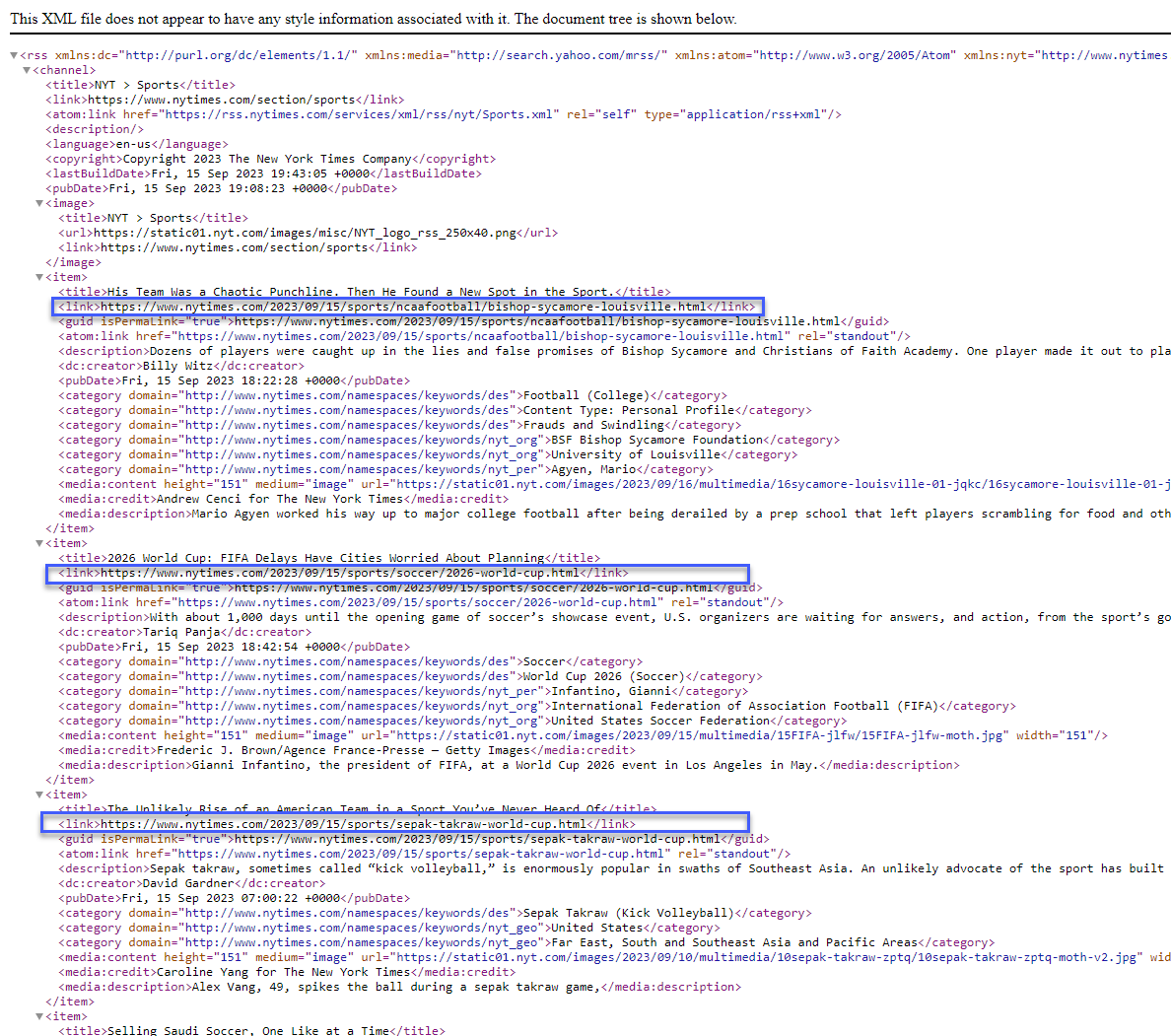
The process of configuring an RSS trigger is very similar to how you [configure a sitemap or sitemap index trigger](https://doc.sitecore.com/search/en/users/search-user-guide/index-items/additional-configurations-and-settings/configure-triggers/create-a-request-trigger.html "Create a request trigger"). You just change the request URL to the RSS feed URL.
Configure the following settings to use an RSS feed as the trigger:
| Setting | Description |
| --- | --- |
| **Timeout** | Time, in milliseconds, that the crawler waits to get data from a URL in an RSS feed.
Default: 1000. |
| **Urls** | The RSS feed URLs. You can enter more than one URL. |