---
title: "Content Management (CM)"
slug: "content-management--cm-"
abstract: "Overview of Sitecore Content Management supported infrastructure, references, scaling, and privacy and security."
---
# Content Management (CM)
The Content Management (CM) role enables authors to create, manage, and publish content.
> [!note]
> In Sitecore 10.1 and later, the xDB Reporting role has been combined with the Content Management role.
Supported infrastructure
You can host the CM role on:
- IIS
- [Azure App Service](https://azure.microsoft.com/en-us/services/app-service/)
Refer to the [Sitecore compatibility table](https://kb.sitecore.net/articles/087164) for compatible versions.
Reference structure
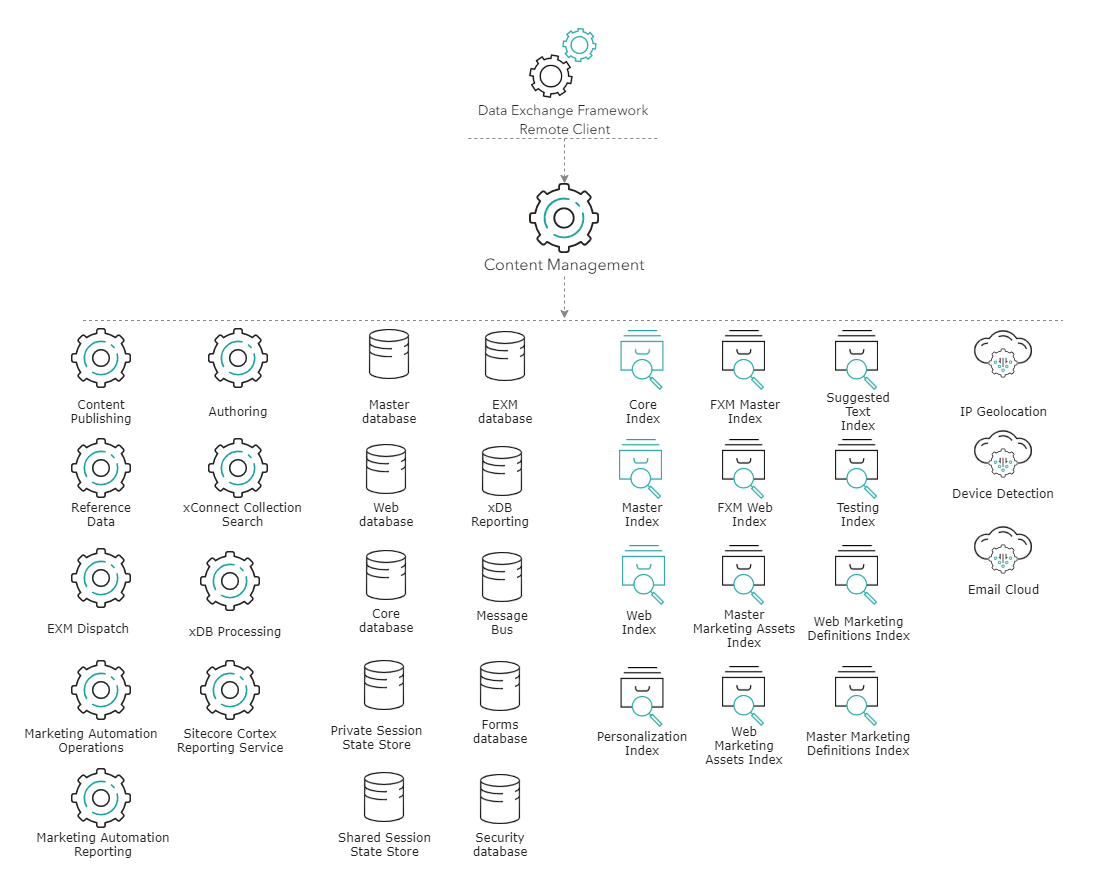
The CM role has its place in the Sitecore reference structure. It can be referenced by other roles, and it can also reference other roles.
### Referenced by
The CM role is referenced by the following roles:
- [Data Exchange Framework Remote Client](https://doc.sitecore.com/xp/en/developers/101/platform-administration-and-architecture/data-exchange-framework-remote-client.html "Data Exchange Framework Remote Client")
### References
The CM role references the following roles:
#### Storage roles
| Role name | Connection string name | Port | Type | Notes |
| --- | --- | --- | --- | --- |
| [Master database](https://doc.sitecore.com/xp/en/developers/101/platform-administration-and-architecture/master-database.html) | master | 1433 | SQL | |
| [Core database](https://doc.sitecore.com/xp/en/developers/101/platform-administration-and-architecture/core-database.html) | core | 1433 | SQL | |
| [Security database](https://doc.sitecore.com/xp/en/developers/101/platform-administration-and-architecture/security-database.html) | security | 1433 | SQL | |
| [Web database](https://doc.sitecore.com/xp/en/developers/101/platform-administration-and-architecture/web-database.html) | web | 1433 | SQL | |
| [xDB Reporting database](https://doc.sitecore.com/xp/en/developers/101/platform-administration-and-architecture/xdb-reporting-database.html) | reporting | 1433 | SQL | |
| [Message Bus](https://doc.sitecore.com/xp/en/developers/101/platform-administration-and-architecture/message-bus.html) | messaging | 1433 | SQL | If you install using SIF, SQL is the default provider. Not applicable to Experience Manager. |
| | | 443 | Azure Service Bus | If you install Sitecore on Azure, Azure Service Bus is the default provider. Azure Service Bus is available in 9.2 and later. |
| [Forms database](https://doc.sitecore.com/xp/en/developers/101/platform-administration-and-architecture/forms-database.html) | experienceforms | 1433 | SQL | The connection strings for the Forms database and for file storage are the same by default. You can create your own file storage provider with a custom connection string. See [Manage file storage for forms](https://doc.sitecore.com/xp/en/developers/101/sitecore-experience-manager/en/manage-file-storage-for-forms.html) and [The security roles in Sitecore Form](https://doc.sitecore.com/xp/en/developers/101/sitecore-experience-manager/en/the-security-roles-in-sitecore-forms.html) for details. |
| [EXM database](https://doc.sitecore.com/xp/en/developers/101/platform-administration-and-architecture/exm-database.html) | exm.master | 1433 | SQL | Not applicable to Experience Manager |
| [Private Session State Store](https://doc.sitecore.com/xp/en/developers/101/platform-administration-and-architecture/private-session-state-store.html) | session | 1433 | SQL | Optional, for SQL session state provider |
| | | 6379 | HTTP | Optional, for Redis session state provider |
| [Shared Session State Store](https://doc.sitecore.com/xp/en/developers/101/platform-administration-and-architecture/shared-session-state-store.html) | sharedsession | 1433 | SQL | Optional, for SQL session state provider |
| | | 6379 | HTTP | Optional, for Redis session state provider |
#### On-premise application roles
| Role name | Connection string name | Port | Type |
| --- | --- | --- | --- |
| [xConnect Collection service](https://doc.sitecore.com/xp/en/developers/101/platform-administration-and-architecture/xconnect-collection-service.html) | xconnect.collection | 443 | HTTPS |
| [xConnect Collection Search service](https://doc.sitecore.com/xp/en/developers/101/platform-administration-and-architecture/xconnect-collection-search-service.html) | xconnect.search | 443 | HTTPS |
The following client certificates and keys are required in a secure production environment:
| Role | Connection string name | Type |
| --- | --- | --- |
| [xConnect Collection service](https://doc.sitecore.com/xp/en/developers/101/platform-administration-and-architecture/xconnect-collection-service.html) | xconnect.collection.certificate | Certificate |
| [xConnect Collection Search service](https://doc.sitecore.com/xp/en/developers/101/platform-administration-and-architecture/xconnect-collection-search-service.html) | xconnect.search.certificate | Certificate |
#### Azure application roles
On XP1 topologies deployed on Azure, the xConnect Collection Search service has a dedicated connection string. This is to separate the collection requests from the search and indexing requests. The xConnect Collection Search service is hosted under a basic hosting plan which might not have enough resources for collection, search, and indexing requests.
| Role name | Connection string name | Port | Type | Notes |
| --- | --- | --- | --- | --- |
| [xConnect Collection service](https://doc.sitecore.com/xp/en/developers/101/platform-administration-and-architecture/xconnect-collection-service.html) | xconnect.collection | 443 | HTTPS | Hosted on a resource intensive plan. |
| [xConnect Collection Search service](https://doc.sitecore.com/xp/en/developers/101/platform-administration-and-architecture/xconnect-collection-search-service.html) | xconnect.search | 443 | HTTPS | Hosted on a basic plan. |
The following client certificates and keys are required in a secure production environment:
| Role | Connection string name | Type | Notes |
| --- | --- | --- | --- |
| [xConnect Collection service](https://doc.sitecore.com/xp/en/developers/101/platform-administration-and-architecture/xconnect-collection-service.html) | xconnect.collection.certificate | Certificate | |
| [xConnect Collection Search service](https://doc.sitecore.com/xp/en/developers/101/platform-administration-and-architecture/xconnect-collection-search-service.html) | xconnect.search.certificate | Certificate | |
#### Application roles for both on-premise and Azure
| Role name | Connection string name | Port | Type | Notes |
| --- | --- | --- | --- | --- |
| [Reference Data service](https://doc.sitecore.com/xp/en/developers/101/platform-administration-and-architecture/reference-data-service.html) | xdb.referencedata.client | 443 | HTTPS | |
| [Marketing Automation Operations service](https://doc.sitecore.com/xp/en/developers/101/platform-administration-and-architecture/marketing-automation-operations-service.html) | xdb.marketingautomation.operations.client | 443 | HTTPS | |
| [Marketing Automation Reporting service](https://doc.sitecore.com/xp/en/developers/101/platform-administration-and-architecture/marketing-automation-reporting-service.html) | xdb.marketingautomation.reporting.client | 443 | HTTPS | |
| [xDB Processing](https://doc.sitecore.com/xp/en/developers/101/platform-administration-and-architecture/xdb-processing.html) | N/A - see notes | 443 | HTTPS | The [xDB Processing](https://doc.sitecore.com/xp/en/developers/101/platform-administration-and-architecture/xdb-processing.html) service URL is configured in
\App_Config\Sitecore\Marketing.xDB\Sitecore.Xdb.Remote.Client.config |
| [EXM Dispatch](https://doc.sitecore.com/xp/en/developers/101/platform-administration-and-architecture/exm-dispatch.html) | N/A - see notes | 443 | HTTPS | |
| [Content Publishing](https://doc.sitecore.com/xp/en/developers/101/platform-administration-and-architecture/content-publishing--publishing-.html) | N/A - see notes | 80/443 | HTTP/HTTPS | Service url is configured in the
\App_Config\Modules\PublishingService\Sitecore.Publishing.Service.Config |
| [Authoring](https://doc.sitecore.com/xp/en/developers/101/platform-administration-and-architecture/authoring.html) | N/A - see notes | 5000 | HTTPS | Service url is configured in the
\App_ConfigIncludeY.Commerce.Engine\Sitecore.Commerce.Engine.Connect.config |
| [Sitecore Cortex™ Reporting service](https://doc.sitecore.com/xp/en/developers/101/platform-administration-and-architecture/sitecore-cortex-reporting-service.html) | sitecore.reporting.client | 443 | HTTPS | |
If you have a dedicated [xDB Processing](https://doc.sitecore.com/xp/en/developers/101/platform-administration-and-architecture/xdb-processing.html "xDB Processing") role, you must include the following API key in the CM connection strings configuration file:
| Role | Connection string name | Type | Notes |
| --- | --- | --- | --- |
| [xDB Processing](https://doc.sitecore.com/xp/en/developers/101/platform-administration-and-architecture/xdb-processing.html) | reporting.apikey | Unique string | Required if you use a dedicated xDB Processing role. |
The following client certificates and keys are required in a secure production environment:
| Role | Connection string name | Type | Notes |
| --- | --- | --- | --- |
| [Reference Data service](https://doc.sitecore.com/xp/en/developers/101/platform-administration-and-architecture/reference-data-service.html) | xdb.referencedata.client.certificate | Certificate | |
| [Marketing Automation Operations service](https://doc.sitecore.com/xp/en/developers/101/platform-administration-and-architecture/marketing-automation-operations-service.html) | xdb.marketingautomation.operations.client.certificate | Certificate | |
| [Marketing Automation Reporting service](https://doc.sitecore.com/xp/en/developers/101/platform-administration-and-architecture/marketing-automation-reporting-service.html) | xdb.marketingautomation.reporting.client.certificate | Certificate | |
| [Sitecore Cortex™ Reporting service](https://doc.sitecore.com/xp/en/developers/101/platform-administration-and-architecture/sitecore-cortex-reporting-service.html) | sitecore.reporting.client.certificate | Certificate | |
| EXM Dispatch | EXM.CryptographicKey | Key | |
| EXM Dispatch | EXM.AuthenticationKey | Key | |
| Sitecore Identity | sitecoreidentity.secret | Key | |
#### Search indexes
> [!note]
> The Content Search provider determines how the CD role connects to the indexes. Sitecore supports Azure Search and Solr.
| Index | Port, Solr | Port, Azure Search | Type | Notes |
| --- | --- | --- | --- | --- |
| [Master index](https://doc.sitecore.com/xp/en/developers/101/platform-administration-and-architecture/master-index.html) | 8983 | 443 | HTTPS | |
| [Core index](https://doc.sitecore.com/xp/en/developers/101/platform-administration-and-architecture/core-index.html) | 8983 | 443 | HTTPS | |
| [Web index](https://doc.sitecore.com/xp/en/developers/101/platform-administration-and-architecture/web-index.html) | 8983 | 443 | HTTPS | |
| [FXM Web index](https://doc.sitecore.com/xp/en/developers/101/platform-administration-and-architecture/fxm-web-index.html) | 8983 | 443 | HTTPS | Only for XP installations |
| [Web Marketing Definitions index](https://doc.sitecore.com/xp/en/developers/101/platform-administration-and-architecture/web-marketing-definitions-index.html) | 8983 | 443 | HTTPS | Only for XP installations |
| [Web Marketing Assets index](https://doc.sitecore.com/xp/en/developers/101/platform-administration-and-architecture/web-marketing-assets-index.html) | 8983 | 443 | HTTPS | Only for XP installations |
| [FXM Master index](https://doc.sitecore.com/xp/en/developers/101/platform-administration-and-architecture/fxm-master-index.html) | 8983 | 443 | HTTPS | Only for XP installations |
| [Master Marketing Definitions index](https://doc.sitecore.com/xp/en/developers/101/platform-administration-and-architecture/master-marketing-definitions-index.html) | 8983 | 443 | HTTPS | Only for XP installations |
| [Master Marketing Assets index](https://doc.sitecore.com/xp/en/developers/101/platform-administration-and-architecture/master-marketing-assets-index.html) | 8983 | 443 | HTTPS | Only for XP installations |
| [Testing index](https://doc.sitecore.com/xp/en/developers/101/platform-administration-and-architecture/testing-index.html) | 8983 | 443 | HTTPS | Only for XP installations |
| [Suggested Test index](https://doc.sitecore.com/xp/en/developers/101/platform-administration-and-architecture/suggested-test-index.html) | 8983 | 443 | HTTPS | Only for XP installations |
| [Personalization index](https://doc.sitecore.com/xp/en/developers/101/platform-administration-and-architecture/personalization-index.html) | 8983 | 443 | HTTPS | Only for XP installations |
For more information, see:
- [Choosing the right search provider](https://doc.sitecore.com/xp/en/developers/101/platform-administration-and-architecture/configure-a-search-and-indexing-provider.html "Configure a search and indexing provider")
- [Configure Azure Search provider](https://doc.sitecore.com/xp/en/developers/101/platform-administration-and-architecture/walkthrough--configure-azure-cognitive-search.html "Walkthrough: Configure Azure Cognitive Search")
- [Configure Solr provider](https://doc.sitecore.com/xp/en/developers/101/platform-administration-and-architecture/walkthrough--setting-up-solr.html "Walkthrough: Setting up Solr")
#### Cloud Services
| Role Name | Port | Type | Endpoint URL |
| --- | --- | --- | --- |
| [IP Geolocation](https://doc.sitecore.com/xp/en/developers/101/platform-administration-and-architecture/ip-geolocation.html) | 443 | HTTPS | geoip-ces.cloud.sitecore.net |
| [Device Detection](https://doc.sitecore.com/xp/en/developers/101/platform-administration-and-architecture/device-detection.html) | 443 | HTTPS | devicedetection-ces.cloud.sitecore.net |
| [E-mail Cloud](https://doc.sitecore.com/xp/en/developers/101/platform-administration-and-architecture/email-cloud.html) | 443 | HTTPS | Multiple endpoints |
For more information, see:
- [Setting up Geolocation](https://doc.sitecore.com/xp/en/developers/101/sitecore-experience-manager/en/set-up-sitecore-ip-geolocation.html)
- [Configure Device Detection](https://doc.sitecore.com/xp/en/developers/101/sitecore-experience-manager/en/configure-sitecore-device-detection.html)
- [Setting up EXM Delivery Cloud](https://doc.sitecore.com/xp/en/developers/exm/101/email-experience-manager/en/use-the-exm-delivery-cloud-service.html)
#### Other
The CM role includes a reference to the Package Management Service via the `PackageManagementServiceUrl` connection string.
Privacy and security
The CM role handles personal data in the following ways:
- Handles authentication and authorization of content editors and other business users.
- Allows the management of website user accounts and authorization.
- Hosts the business tools for accessing and managing Experience Database contacts and interactions.
- Hosts the Experience Profile which shows Commerce customer and order information.
Refer to the [Security Guide](https://doc.sitecore.com/xp/en/developers/101/platform-administration-and-architecture/securing-experience-manager.html "Securing Experience Manager") for steps to secure the CM role.