---
title: "Solr managed schemas"
slug: "solr-managed-schemas"
abstract: "Solr has a RESTful API that you use to manage schemas programmatically."
---
# Solr managed schemas
Solr has a RESTful API that you use to manage schemas programmatically. The cores and collections reload automatically after you update the schema.
Solr sample configuration sets use managed schemas instead of the legacy manual schema (`schema.xml` file).
Sitecore supports managed schemas, and has a tool that you use to populate the schema using the Schema API directly to Solr.
To prepare the config sets and the managed schema:
1. Copy the Solr provided configuration example from the `configsets` folder into `[SOLR_DIR]/server/solr` and rename it to the appropriate index name.
2. Create a text file called `core.properties` in the folder you created (`[SOLR_DIR]/server/solr/[CORE_NAME]` ), and specify the following values:
```
name=[CORE_NAME]
config=solrconfig.xml
update.autoCreateFields=false
dataDir=data
```
3. Open the managed schema file in the `conf` subfolder of the folder created in step 1.
:::lettered
1. Set the value in `id` to `_uniqueid`.
2. In the fields section, add the following field configuration for `_uniqueid`: ``
3. Save your changes.
:::
4. Repeat step 1 and step 2 for all content search indexes.
> [!note]
> Do not do this for the xdb indexes. Use [this description](https://doc.sitecore.com/xp/en/developers/101/platform-administration-and-architecture/configure-the-solr-search-provider.html "Configure the Solr search provider") instead.
To populate the schema from the **Control Panel**:
1. Start Solr.
2. Start Sitecore, and go to the **Control Panel**.
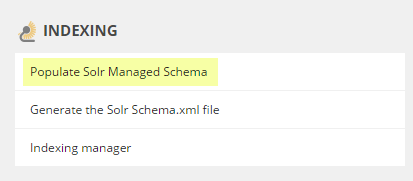
3. In the **Indexing** tab, click **Populate Solr Managed Schema**:
4. In the **Schema Populate** window, select the indexes you want to populate:
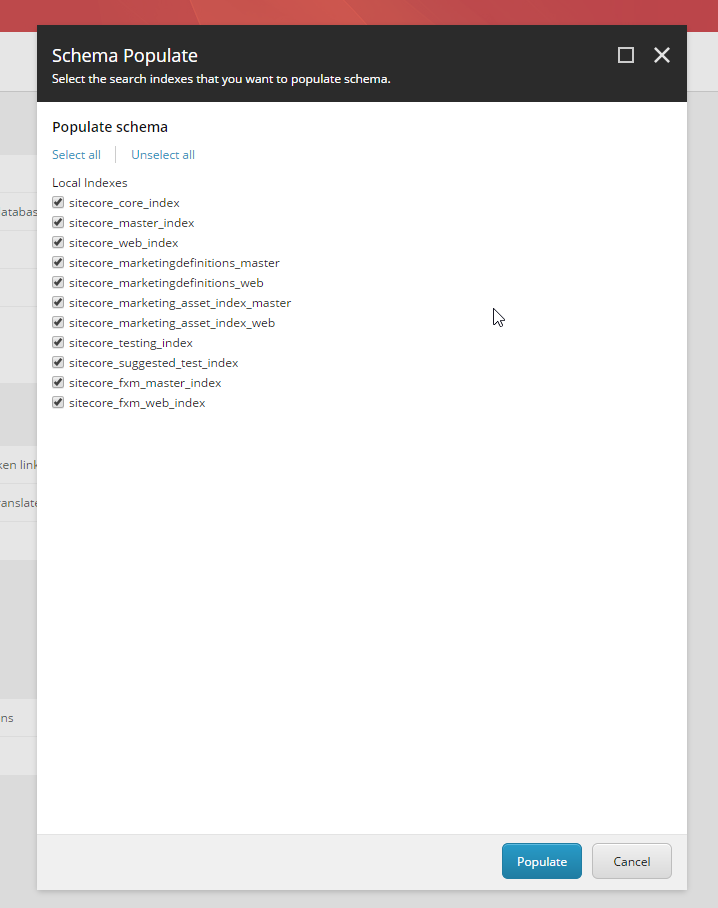
5. Click **Populate**.
Populate schema from admin page
You can populate schemas from the admin page. This is especially useful if you populate schemas from PowerShell scripts.
To do so:
1. Call `http://YOUR_INSTANCE/sitecore/admin/ PopulateManagedSchema.aspx?indexes=sitecore_master_index|sitecore_core_index|sitecore_web_index`. You use the `indexes` query parameter to pass the names of the indexes that you want to populate as a pipe (‘|’) separated list.
2. Inspect the HTTP status code to verify the result (200 means success).
Populate schema using the Sitecore CLI
You can use the [indexing plugin](https://doc.sitecore.com/xp/en/developers/101/developer-tools/indexing-plugin.html) that is available for the [Sitecore CLI](https://doc.sitecore.com/xp/en/developers/101/developer-tools/sitecore-command-line-interface.html) to populate schemas.
To populate schemas using the Sitecore CLI:
- Run the `sitecore index schema-populate` command in a terminal.
> [!note]
> For more information, see [The CLI index command](https://doc.sitecore.com/xp/en/developers/101/developer-tools/the-cli-index-command.html). This command is available from CLI 4.0 or later.
Disable the ability to change the schema programmatically
You can disable the ability to change the schema programmatically by setting the `` class to `ClassicIndexSchemaFactory` in the `solrconfig.xml` file. For more information, see the Schema Factory Definition documentation for the Solr version that is [compatible](https://support.sitecore.com/kb?id=kb_article_view&sysparm_article=KB0227897) with your version of Sitecore XP.
> [!note]
> If you disable the ability to change the schema programmatically, then the schema file must be edited manually. The methods to automatically populate the schema, including those described in this topic, will not work.