---
title: "Using Solr auto-suggest"
slug: "using-solr-auto-suggest"
abstract: "Use the Solr suggester feature to provide automatic suggestions for query terms"
---
# Using Solr auto-suggest
> [!note]
> This topic is valid for Sitecore 9.0 and later.
Solr has a "suggester" component called SuggestComponent. You use this component to give users automatic suggestions for query terms. For example, you create a text box that has an autocomplete feature and suggested terms appear as a user types a query term in the text box.
You can use also the Solr spell check feature to implement autosuggest. The dedicated SuggesterComponent uses Lucene's suggester implementation and it supports all of the lookup implementations available in Lucene. You can also configure other aspects of the result when you use the spell check feature.
There is more information here:
[https://wiki.apache.org/solr/Suggester](https://wiki.apache.org/solr/Suggester)
[https://cwiki.apache.org/confluence/display/solr/Suggester](https://cwiki.apache.org/confluence/display/solr/Suggester)
Lookup implementation
You use the `lookupImpl` parameter in the `solrConfig.xml` file to specify which lookup algorithm to use to look up terms in the suggest index. You can choose between several implementations. They are all subclasses of the `Lookup` class and some require that you configure additional parameters:
- `JaspellLookup`: a tree-based representation based on Jaspell.
- `TSTLookup`: a ternary tree-based representation that is capable of immediate data structure updates.
- `FSTLookup`: an automaton-based representation; slower to build, but consumes far less memory at runtime .
- `WFSTLookup`: a weighted automaton representation; an alternative to `FSTLookup` for more fine-grained ranking.
Dictionary implementation
You use the `dictionaryImpl` parameter in the `solrConfig.xml` file to specify which dictionary implementation to use to store the terms in the suggest index. You can choose between several implementations. They are all subclasses of the `DictionaryFactory` class:
- `DocumentDictionaryFactory`: a dictionary with terms, weights, and an optional payload taken from the index.
- `DocumentExpressionDictionaryFactory`: the same dictionary implementation as the `DocumentDictionaryFactory`, but users can specify an arbitrary expression in the `weightExpression` tag.
- `HighFrequencyDictionaryFactory`: this dictionary implementation allows adding a threshold to prune out less frequent terms in cases where very common terms may overwhelm other terms.
- `FileDictionaryFactory`: this dictionary implementation allows using an external file that contains suggested entries. You can also use weights and payloads.
> [!note]
> You can have multiple dictionaries in a single SuggesterComponent. At request time, you need to specify which dictionary(s) to use.
Configuring the auto-suggest in Solr
You must add and configure the SuggesterComponent, as well as a request handler, in order to use auto-suggest.
### Add and configure the SuggesterComponent
The `SuggesterComponent` search component accepts a number of configuration parameters. The lookup implementation choice (`lookupImpl`) and dictionary implementation choice (`dictionaryImpl`) dictate some of the parameters that are required.
The sample below shows the common parameters that you can use regardless of the lookup or dictionary implementation you specify:
```xml
mySuggesterFSTLookupFactoryDocumentDictionaryFactorymyFieldNamestringfalse
```
#### SuggesterComponent parameters
| Parameter | Description |
| --- | --- |
| searchComponent name | An arbitrary name for the search component. |
| name | A symbolic name for this suggester. |
| lookupImpl | Lookup implementation. If not specified, the default lookup implementation is `JaspellLookupFactory`. |
| dictionaryImpl | The dictionary implementation to use. If not specified, the default dictionary implementation is `HighFrequencyDictionaryFactory` unless a `sourceLocation` is used. In this case, the dictionary implementation will be `FileDictionaryFactory`. |
| field | A field from the index to use as the basis for suggestion terms. If `sourceLocation` is empty, then terms from this index field will be used.
The field must be stored to be used as the basis for a suggestion. You can [use copyField rules](https://cwiki.apache.org/confluence/display/solr/Copying+Fields) to create a special "suggest" field that consists of terms from other fields in documents.
The field should have only a minimal amount of analysis, so you can also create a field type in your schema that only uses basic tokenizers or filters. |
| sourceLocation | The path to the dictionary file if using the `FileDictionaryFactory`. If this value is empty, then the main index is used as the source of terms and weights. |
| storeDir | The folder where the dictionary file is stored. |
| buildOnCommit or buildOnOptimize | If `true`, then the lookup data structure is rebuilt after a soft commit. If `false` (the default), then the lookup data structure is only built when requested by the URL parameter `suggest.build=true`.
Use `buildOnCommit` to rebuild the dictionary with every soft-commit, or `buildOnOptimize` to build the dictionary only when the index is optimized.
Some lookup implementations may take a long time to build, especially with large indexes. In these situations, using `buildOnCommit` or `buildOnOptimize`, particularly with a high frequency of `softCommits`, is not recommended. Instead, we recommend that you build the suggester at a lower frequency by manually issuing requests with `suggest.build=true`. |
| buildOnStartup | If `true`, then the lookup data structure is built when Solr starts or when the core is reloaded.
If you do not specify this parameter, the `SuggesterComponent` checks if the lookup data structure is present on disk and builds it if not found.
Setting this to `true` could lead to the core talking longer to load (or reload), as the suggester data structure needs to be built. This may take a long time. It’s usually preferred to have this setting set to `false` and build suggesters manually issuing requests with `suggest.build=true`.
When this setting is `true`, it may take longer to load and reload the core. This is because the suggester data structure is rebuilt at startup time. Therefore, we recommend that you set it to `false`, and build the suggester manually with `suggest.build=true`. |
### Request handler
You must edit the `solrconfig.xml` file and add a request handler. This request handler works the same way as any other request handler. You use it to configure default parameters for serving suggestion requests. The request handler definition must incorporate the SuggesterComponent:
```xml
true10suggest
```
#### Request Handler Parameters
You can specify these parameters to set defaults for the request handler.
| Parameter | Description |
| --- | --- |
| suggest | This parameter must always be `true`. This is because you always want to run the `SuggesterComponent` for queries submitted to this handler. |
| suggest.dictionary | Specifies the name of the dictionary component configured in the search component. This parameter is mandatory. You can it set in the request handler, or send it as a parameter at query time. |
| suggest.q | Specifies the query to use for suggestion lookups. |
| suggest.count | Specifies the number of suggestions that Solr returns. |
| suggest.cfq | Specifies a context filter query that Solr uses to filter suggestions based on the context field (if supported by the suggester). |
| suggest.build | If `true`, Solr builds the suggester index. This is probably only useful for initial requests. You do not want to build the dictionary on every request, especially in a production environment.
Use the `buildOnCommit` or the `buildOnOptimize` parameters for the search component to keep the index updated. |
| suggest.reload | If `true`, Solr reloads the suggester index. |
| suggest.buildAll | If `true`, Solr builds all suggester indexes. |
| suggest.reloadAll | If `true`, Solr reloads all suggester indexes. |
Use with Sitecore
Sitecore has an API that you use to access the suggester feature of Solr. The API is designed as an extension to the existing ContentSearch API.
Follow these steps to use the API in your project:
1. Reference the following DLL files into your project. You can get them from the `bin` folder of your Sitecore website:
- SolrNet.dll
- Sitecore.ContentSearch.dll
- Sitecore.ContentSearch.SolrProvider.dll
- Sitecore.ContentSearch.SolrNetExtension.dll
2. Import the following namespaces:
- Sitecore.ContentSearch.SolrNetExtension (an extension of SolrNet that contains the implementation of the SuggesterComponent)
- Sitecore.ContentSearch.SolrProvider.SolrNetIntegration (contains methods that extends ISearchIndex)
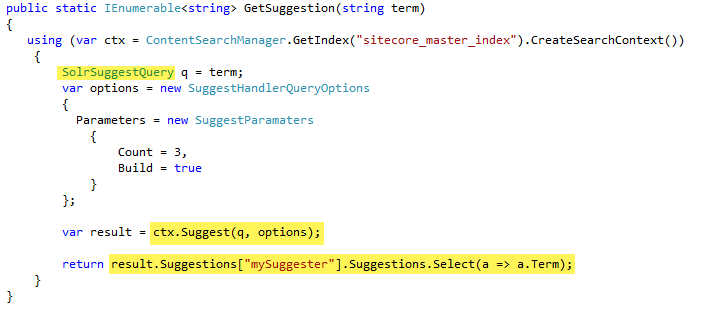
Now you can use the Suggest API as part of ISearchIndex:
1. Create a query object of type `SolrSuggestQuery`
2. Call the `IProviderSearchContext.Suggest()`method and inspect the returned result of type `SolrSuggestHandlerQueryResults.`
The returned result is a `Dictionary` where `Key` is the dictionary name that is used for suggestion and `Value` is an `SuggestResult` object that represents the count of terms found along with the list of suggestions (`IEnumerable`).
Each `Suggestion` object contains the suggested term, the weight, and the payload.
For example:
API Documentation
Suggest(SolrSuggestQuery, SuggestHandlerQueryOptions)
Suggests terms that matches the provided query.
### Syntax
```csharp
public static SolrSuggestHandlerQueryResults Suggest(
this IProviderSearchContext context,
SolrSuggestQuery q,
SuggestHandlerQueryOptions options
)
```
### Parameters
- Context
Type: `Sitecore.ContentSearch.IProviderSearchContext`
The search provider context
- q
Type: `Sitecore.ContentSearch.SolrNetExtension.SolrSuggestQuery`
The query object
- Options
Type: `Sitecore.ContentSearch.SolrNetExtension.SuggestHandlerQueryOptions`
Query options
### Remarks
This method executes the query (the first argument) against Solr with the defined set of options (second parameter), and retrieves the result as a dictionary of values.
Example
The following example illustrates the basic usage:
```csharp
<%@ Page Language="C#" AutoEventWireup="true" %>
<%@ Import Namespace="System.Web.Services" %>
<%@ Import Namespace="Sitecore.ContentSearch.SolrProvider.SolrNetIntegration" %>
<%@ Import Namespace="Sitecore.ContentSearch" %>
<%@ Import Namespace="Sitecore.ContentSearch.SolrNetExtension" %>
Suggester demo
```