---
title: "Work with the Form Client API"
slug: "work-with-the-form-client-api"
abstract: "Use the Form Client API for customization."
---
# Work with the Form Client API
The Form Client API is a SPEAK item that assists developers with developing customized components within the Sitecore Designer Page. The Form Client API lets you retrieve form fields from the form.
You can add the Form Client API to the layout of the Form Designer Page and to dialog boxes of the Form Designer Page ( for example, the **Edit conditions** dialog box).
Add the Form Client API to the layout
To add the Form Client API to the layout of the Form Designer Page:
1. Go to the Design Layout window, and click **AddRendering**.
2. In the **Selected Renderings** dialog box, search for *FormClientAPI* (or navigate to `sitecore/client/Applications/FormsBuilder/Components/Layouts/Renderings/Composites`), click it, and click **Add**.
Add API parameters
To configure the settings of the Form Client API:
1. Go to the `PageSettings` of your page, right-click it and click **Add**, and click **New Item**.
2. In the **Add New Item** dialog box, search for and click *FormClientApi-Parameters*, and then click **Add**.
3. To edit the parameters, double-click the *FormClientApi-Parameters* item.
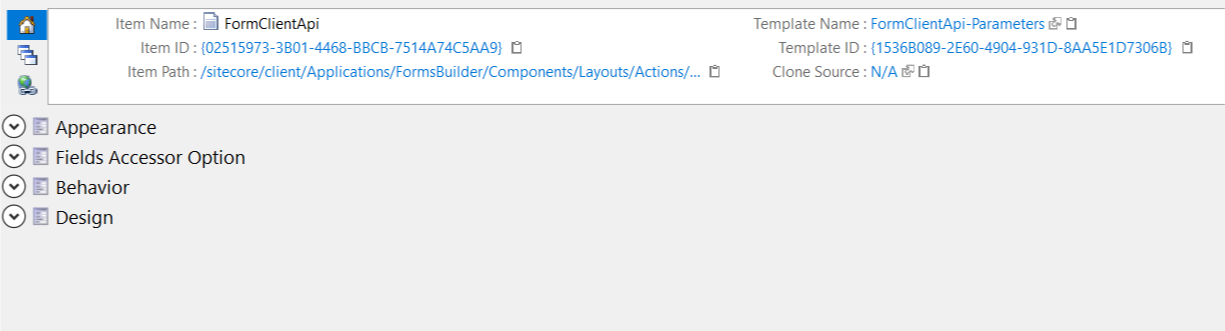
4. To configure how to retrieve form fields in the *Fields Accessor Option* item, configure the following available settings:
- `IncludedFieldTypeIds` - defines which field types will be retrieved. If you do not include a field type, fields of that field type are not returned. For example, if you do not want to retrieve any fields of type single-line text, do not select it from the tree list.

- `Format` - defines the transformation of the retrieved field object. It will extract the `model` property of a field object and transform it to a new object according to the format defined.
For example, properties of a field object can be: `idx, itemId, model, parentId, rendering settings`.
The properties that are available in the `model` property are: `conditionSettings`, `cssClass`, `itemId`, `name`, and `templateId`.
On the left, specify the properties that are available in the `model`. On the right, specify the name for the property after transformation.
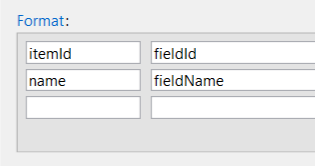
For example, the returned field object based on the format:
```csharp
{
fieldId:
fieldName:
}
```
> [!note]
> If you want to retrieve field objects with all properties, do not specify any format.
Retrieve form fields from PageCode
To retrieve the available form fields of a form:
1. Go to the `PageCode` JavaScript file of your page, and access the Form Client API by its ID.

2. Use the following JavaScript code to get the form fields:
`var fields = this.FormClientApi.getFields();`