---
title: "Customizing the Commerce Search Results rendering"
slug: "customizing-the-commerce-search-results-rendering"
abstract: "Overview of the Commerce Search Results rendering Scriban template."
---
# Customizing the Commerce Search Results rendering

The Commerce Search Results rendering variant includes a renderer in the form of a [Scriban](https://doc.sitecore.com/xp/en/developers/103/sitecore-experience-commerce/working-with-scriban-templates.html "Working with Scriban templates") template.

The Scriban template is responsible for rendering the markup for the individual product cards. It is executed within a loop that iterates over the product items. To change the markup generated for the product cards, you can modify the Scriban template. It is best to create a new custom rendering variant in this case so that the customization does not get overridden during software upgrades. You can also [modify the labels](https://doc.sitecore.com/xp/en/developers/103/sitecore-experience-commerce/modify-a-label-for-a-rendering-that-uses-a-scriban-template.html "Modify a label for a rendering that uses a Scriban template") for the rendering.

![Location of the Scriban template in the content tree](https://doc.sitecore.com/api/markdown-image/xp/en/developers/103/sitecore-experience-commerce/images/CommerceSearchRenderingVariant.png)

The following table details key properties of the Commerce Search Results rendering Scriban template.

| Property or Variable | Description |
| --- | --- |
| [`i_item`](https://doc.sitecore.com/xp/en/developers/sxa/103/sitecore-experience-accelerator/item-and-field-extensions.html) | The `i_item` property is the current item in the context of the rendering variant. Often, an equivalent to the `i_datasource` item but, in this case, it is exposing catalog data for the individual items.<br><br>In the default implementation, it is assumed that items are all of type `products`, but items can also be bundles, categories, or variants. The `i_item` item is used to store various types of data in this template. For example, the `i_item.name` property stores the Product ID and is assigned to a data attribute named `id`, and the `i_item.url` property stores the link to the product detail page and is assigned to the href attribute. |
| [`o_model`](https://doc.sitecore.com/xp/en/developers/sxa/104/sitecore-experience-accelerator/the-embedded-items-and-objects-in-the-scriban-context.html#UUID-14718e71-5607-902d-579c-4f6da3b3849d_para-idm273166667358066) | The `o_model` property is passed to the MVC Controller rendering. This means the name of the catalog and the product bundle ID are passed to the MVC Controller. The `o_model` property is also used to pass along price and promotion information. |
| `displayName` | The displayName variable is used in various contexts. For example, it is initialized to `i_item.display_name`, which stores the Display Name of the product. The variable is passed into the built-in function `html.escape` so that the returned string is a text block.<br><br>It is also assigned to the `title` attribute in the anchor tag. The `i_item.url` property, which stores the link to the product page, is assigned to the `href` attribute. The `displayName` variable is also assigned as text for the `anchor` tag. |
| [`sc_imagelink`](https://doc.sitecore.com/xp/en/developers/103/sitecore-experience-commerce/the-embedded-commerce-functions-for-scriban-templates.html) | The image link is retrieved using the `sc_imagelink` function on a `CatalogProductImage` object. Configure the source for catalog images and the result either comes from the Media Library or Digital Asset Management system depending on the [settings](https://doc.sitecore.com/xp/en/developers/103/sitecore-experience-commerce/configure-the-source-for-catalog-images.html) you define. The function expects a parameter object of type `CatalogProductImage` that represents the product image and the `o_model.master_product_image` property that contains the `CatalogProductImage` object for the main/hero product image. |
| [`sc_translate`](https://doc.sitecore.com/xp/en/developers/sxa/103/sitecore-experience-accelerator/the-embedded-functions-for-the-scriban-template.html) | This function is used to display items defined in the Dictionary Domain of the site (*sitecore/Content/<tenant>/<site>/Storefront Dictionary*). |
| `i_item.brand` | This property stores the brand name of the product and is displayed in the `<div>` element. |

The following code shows the Commerce Search Results rendering Scriban template defined within the default rendering variant.

```coffee
{{ # The <div> element renders a product item with values from the search item (i_item) and the ProductSummaryViewModel (o_model) }}
<div class="product-summary" data-id="{{ i_item.name }}">
    {{
        # If the o_model is not available, set it to an empty object to be accessed by the rest of the template without null reference error
        if !o_model
            o_model = {}
        end

        # Escape any HTML characters in the display name
        displayName = i_item.display_name | html.escape
    }}
    {{ # The <div> element contains the product photo }}
    <div class="product-photo">
        {{ # The <a> element wraps the product photo with a link to navigate to the product page }}
        <a title="{{ displayName }}" href="{{ i_item.url }}">
            <img src="{{ o_model.master_product_image | sc_imagelink 220 220 }}" alt="{{ o_model.master_product_image.alternate_text }}" />
            {{ ## The <div> element contains the savings percentage and savings label.
                  The CSS class "promotion" is added on server side (if "o_model.is_on_sale" is true) or on client side after the data binding (if "promotion" has a true value). ## }}
            <div data-bind="css: { 'promotion': promotion }"
                class="hidden {{ if o_model.is_on_sale  }} promotion {{ end }}">
                {{ # The promotion text is rendered on server side and will be overwritten on the client side if data binding occurs }}
                <span data-bind="text: promotion" class="savings-percentage">{{ o_model.savings_percentage }}%</span>
                <span class="savings-label">{{ sc_translate 'SAVINGS_LABEL' }}</span>
            </div>
        </a>
    </div>
    {{ # The <div> element contains all the product information such as the display name and price }}
    <div class="product-info">
        {{ # The <a> element wraps the product display name with a link to navigate to the product page }}
        <a class="product-title" title="{{ displayName }}" href="{{ i_item.url }}">
            {{ displayName }}
        </a>
        <div class="product-brand">
            {{ i_item.brand }}
        </div>
        {{ # The <div> element contains the stock status of the product and a "Starting From" label }}
        <div class="product-indicator">
            {{ ## The <label> element contains the "Starting From" label.
                  The CSS class "price-difference" is added on server side (if "o_model.display_starting_from" is true) or on client side after the data binding (if "hasDifferentPrice" is true). ## }}
            <label class="hidden  {{ if o_model.display_starting_from  }} price-difference {{ end }}"
                data-bind="css: { 'price-difference': hasDifferentPrice }">
                {{ sc_translate 'STARTING_FROM' }}
            </label>
            <label class="stock-status" data-bind="text: stockLabel">{{ o_model.stock_status_name }}</label>
        </div>
        {{ ## The <div> element contains the product price and product details link.
              The CSS class "on-sale" is added on server side (if "o_model.is_on_sale" is true) or on client side after the data binding (if "promotion" has a truthy value). ## }}
        <div class="product-detail {{ if o_model.is_on_sale  }} on-sale {{ end }}"
            data-bind="css: { 'on-sale': promotion }">
            {{ # The product price text is rendered on server side and will be overwritten on the client side if data binding occurs }}
            <span data-bind="text: price" class="product-price">{{ o_model.adjusted_price_with_currency }}</span>
            <a class="product-link" title="{{ displayName }}" href="{{ i_item.url }}">
                {{ sc_translate 'DETAILS' }}
            </a>
        </div>
    </div>
</div>

```

The [Commerce Search Results rendering](https://doc.sitecore.com/xp/en/users/103/sitecore-experience-commerce/use-the-commerce-search-results-rendering.html) is a clone of the SXA Search Results rendering specific to Commerce. It has its own default [rendering variant root and default rendering variant](https://doc.sitecore.com/xp/en/users/93/sitecore-experience-commerce/en/using-rendering-variants-to-display-product-information.html) (*/sitecore/Content/<tenant>/<site>/Presentation/Rendering Variants/Commerce Search Results*), which uses a Scriban template for generating the markup, JavaScript for retrieving the stock and price information (as an [AJAX request](https://doc.sitecore.com/xp/en/developers/103/sitecore-experience-commerce/understanding-asynchronous-calls-and-caching.html "Understanding asynchronous calls and caching")), and the SXA Dictionary for label translation.

> [!note]
> You can [change the labels](https://doc.sitecore.com/xp/en/developers/103/sitecore-experience-commerce/modify-the-commerce-search-results-scriban-template.html "Modify the Commerce Search Results Scriban template") used with the Commerce Search Results rendering.

<details>
<summary><h2>Product Summary View model</h2></summary>

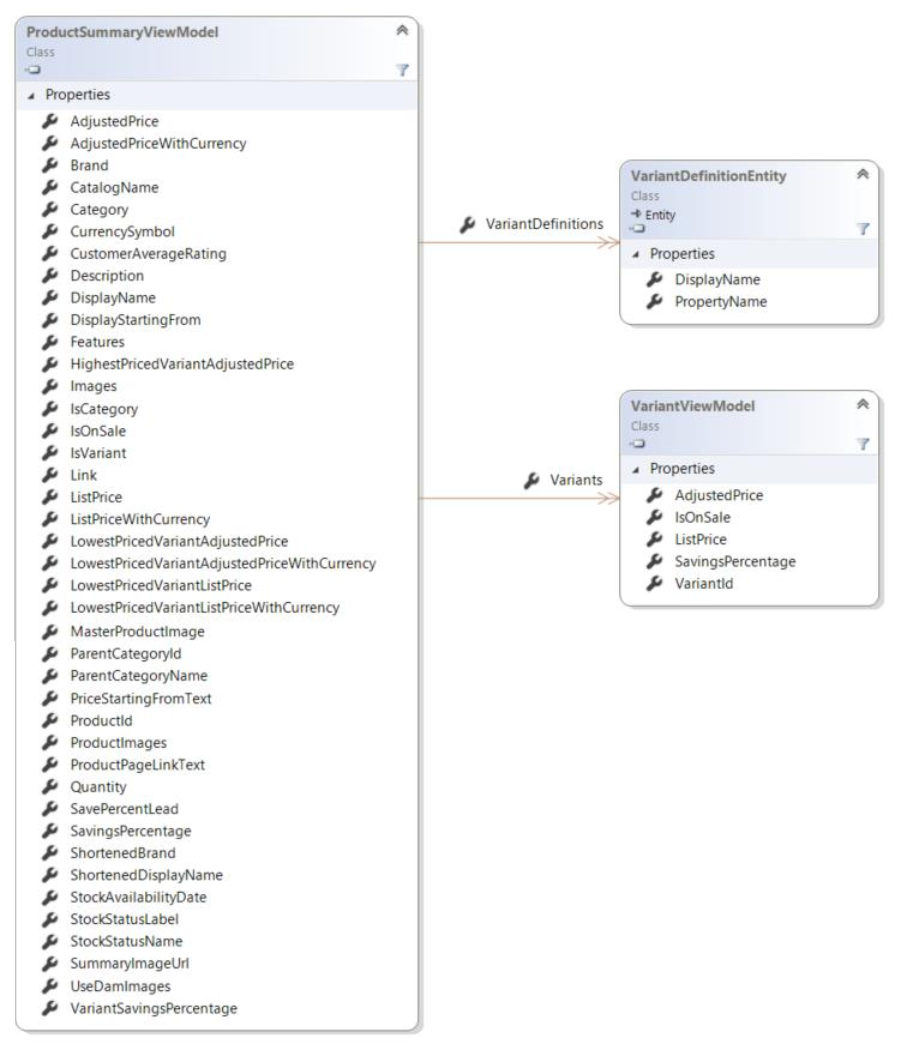
When search results are processed, the price and stock information is retrieved from the Commerce Engine and converted to the `ProductSummaryViewModel` model to be rendered inside Scriban template (accessed through the `o_model` variable).
![Class diagram for the ProductSummaryView Model](https://doc.sitecore.com/api/markdown-image/xp/en/developers/103/sitecore-experience-commerce/images/ProductSummaryViewModelDiagram10.png)

</details>