---
title: "Walkthrough: Creating a custom submit action"
slug: "walkthrough--creating-a-custom-submit-action"
abstract: "Create a submit action that adds an entry to the log files about the form's submit status."
---
# Walkthrough: Creating a custom submit action
You use the submit button for navigation (previous and next buttons), to submit the form, and/or to trigger submit actions. You can add different types of actions to all submit buttons. For example, the submit action **Save data** added to the next button makes sure the data is saved to the [Forms database](https://doc.sitecore.com/xp/en/developers/103/platform-administration-and-architecture/forms-database.html) when a contact clicks **Next** to move on to the next page of the form. By default, you can add the Trigger Goal, Trigger Campaign Activity, Trigger Outcome, Redirect to Page, and Save Data submit items.
This walkthrough takes you through how to create a custom submit action that adds an entry to the log files about the form's submit status. It describes how to:
- Create a submit action class
- Create a submit action item
Create a submit action class
When you create a custom submit action, you must create a class that inherits from the `SubmitActionBase` class.
To create the submit action class:
1. Create the LogSubmit class and inherit from `SubmitActionBase`
2. Specify the `TParametersData` type.
3. Override the `TryParse `method to enable parsing empty string parameter and return true.
4. Override the `Execute` method and log a message that contains the form submit status and the form id. For example:
```csharp
using System.Linq;
using Sitecore.Diagnostics;
using Sitecore.ExperienceForms.Models;
using Sitecore.ExperienceForms.Processing;
using Sitecore.ExperienceForms.Processing.Actions;
using static System.FormattableString;
namespace Sitecore.ExperienceForms.Samples.SubmitActions
{
///
/// Executes a submit action for logging the form submit status.
///
///
public class LogSubmit : SubmitActionBase
{
///
/// Initializes a new instance of the class.
///
/// The submit action data.
public LogSubmit(ISubmitActionData submitActionData) : base(submitActionData)
{
}
///
/// Tries to convert the specified to an instance of the specified target type.
///
/// The value.
/// The target object.
///
/// true if was converted successfully; otherwise, false.
///
protected override bool TryParse(string value, out string target)
{
target = string.Empty;
return true;
}
///
/// Executes the action with the specified .
///
/// The data.
/// The form submit context.
///
/// true if the action is executed correctly; otherwise false
///
protected override bool Execute(string data, FormSubmitContext formSubmitContext)
{
Assert.ArgumentNotNull(formSubmitContext, nameof(formSubmitContext));
if (!formSubmitContext.HasErrors)
{
Logger.Info(Invariant($"Form {formSubmitContext.FormId} submitted successfully."), this);
}
else
{
Logger.Warn(Invariant($"Form {formSubmitContext.FormId} submitted with errors: {string.Join(", ", formSubmitContext.Errors.Select(t => t.ErrorMessage))}."), this);
}
return true;
}
}
}
```
5. Build and deploy
Create a submit action item
To create the submit action item:
1. Go to `/sitecore/System/Settings/Forms`.
2. Right-click **Submit Actions**, click **Insert**, and click **Insert from template**.
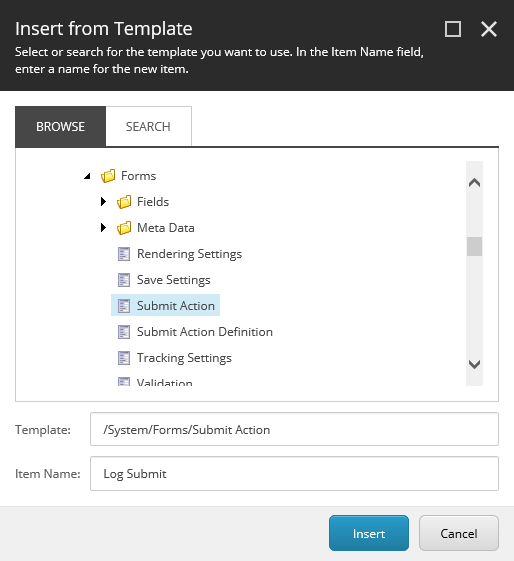
3. Select the */System/Forms/Submit Action* template, in the **Item Name** field, enter the name *Log Submit* and click **Insert**.
4. Go to the item you just created and in the **Settings** section, in the **Model Type** field, set the value to the class type name.
5. In the **Error Message** field, enter an error message, for example, *Log Submit Failed!*
6. In the **Appearance** section, select the icon that you want to display in the Forms elements pane.
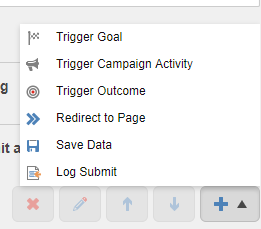
In the Form elements pane, when you click add a submit action, you can now select the Log Submit action: