---
title: "Create a user"
slug: "create-a-user"
abstract: "How to add a new user to your Sitecore implementation."
---
# Create a user
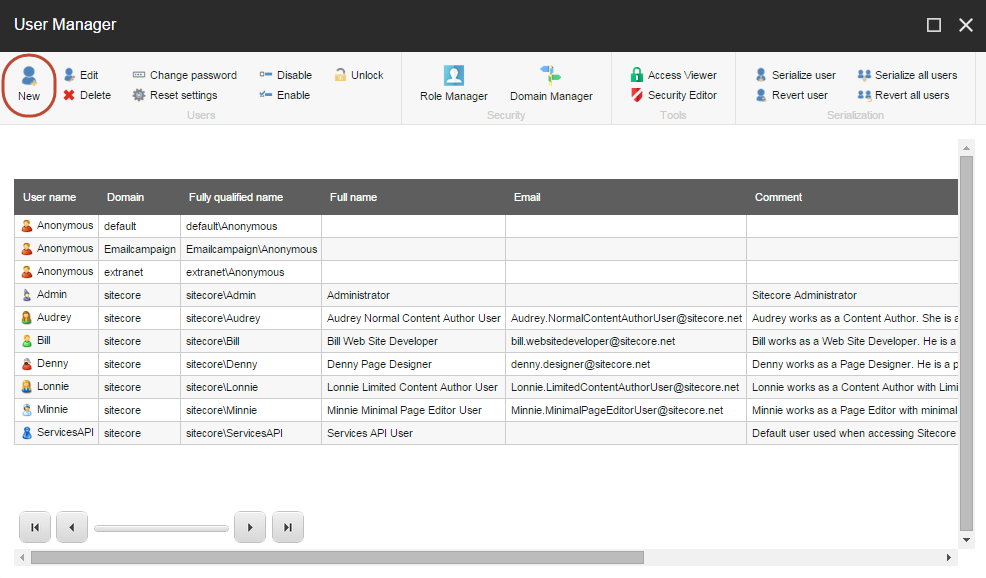
In Sitecore, you use the User Manager to create users and manage the roles that they are members of.
To create a user in the User Manager:
1. Log in to Sitecore and, on the [Sitecore Launchpad](https://doc.sitecore.com/xp/en/users/104/sitecore-experience-platform/overview-of-the-sitecore-launchpad.html), click **User Manager**.
2. In the **User Manager** dialog box, in the **Users** group, click **New**.
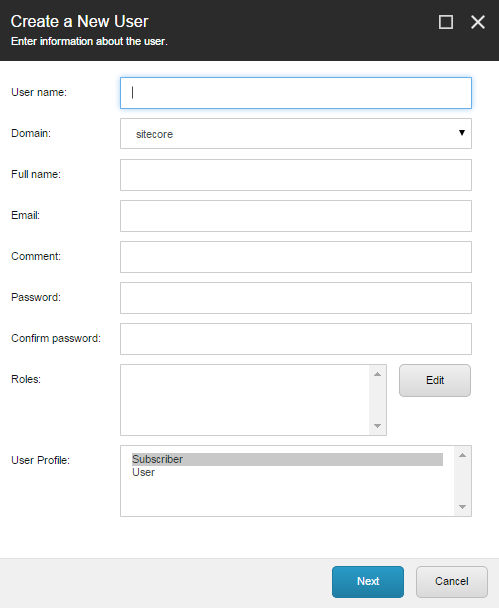
3. In the **Create a New User** dialog box, enter the relevant information about the new user. For example, enter the user name and password that the user must use for authentication when they log in to Sitecore.
> [!important]
> Passwords are case-sensitive in Sitecore but user names are not.
The **Create a New User** dialog box contains the following fields:
| **Field** | **Value** |
| --- | --- |
| User name | Enter the name of the user in Sitecore. (mandatory) |
| Domain | Enter the domain that the user has access to. |
| Full name | Enter the full name of the user. |
| Email | Enter the user’s email address. (mandatory) |
| Comment | Enter any relevant comments. |
| Password | Enter the password of the new user. (mandatory)
Users can change it after they log in to Sitecore. |
| Confirm password | Confirm the password (mandatory). |
| Roles | Enter the roles that you want to make the user a member of. Click **Edit** to add the user to one or more roles. |
| User profile | Enter the type of user you are creating. |
4. Click **Next** to validate the information that you have entered and then click **Finish**.
When you have created the user, you must [add the user to one or more roles](https://doc.sitecore.com/xp/en/developers/104/platform-administration-and-architecture/add-a-user-to-a-role.html "Add a user to a role"). These roles determine the user's access rights and thereby which items that the user can access in Sitecore and the actions that the user can perform on these items.