---
title: "Marketing automation"
slug: "marketing-automation"
abstract: "Overview of Sitecore Marketing Automation and the associated high-level data flows and processes."
---
# Marketing automation
Experience Platform (XP) includes an integrated Marketing Automation (MA) system. This system, combined with content management and contextual intelligence, lets you orchestrate real-time interactions and automate responses and content based on how customers interact with your brand in the moment.
MA relies heavily on the [tracking](https://doc.sitecore.com/xp/en/developers/104/platform-administration-and-architecture/collecting-experience-data.html "Collecting experience data") and [segmentation](https://doc.sitecore.com/xp/en/developers/104/platform-administration-and-architecture/indexing-and-segmentation.html "Indexing and segmentation") capabilities of Experience Database (xDB). It integrates with [Email Experience Manager (EXM)](https://doc.sitecore.com/xp/en/developers/104/platform-administration-and-architecture/email-marketing.html "Email marketing") - to continuously push campaign email messages to contacts, based on their behavior or journey.
You can also provide contacts with [personalized content](https://doc.sitecore.com/xp/en/developers/104/platform-administration-and-architecture/tracking-and-personalization.html "Tracking and personalization") based on their location in a marketing automation plan.
Managing plans
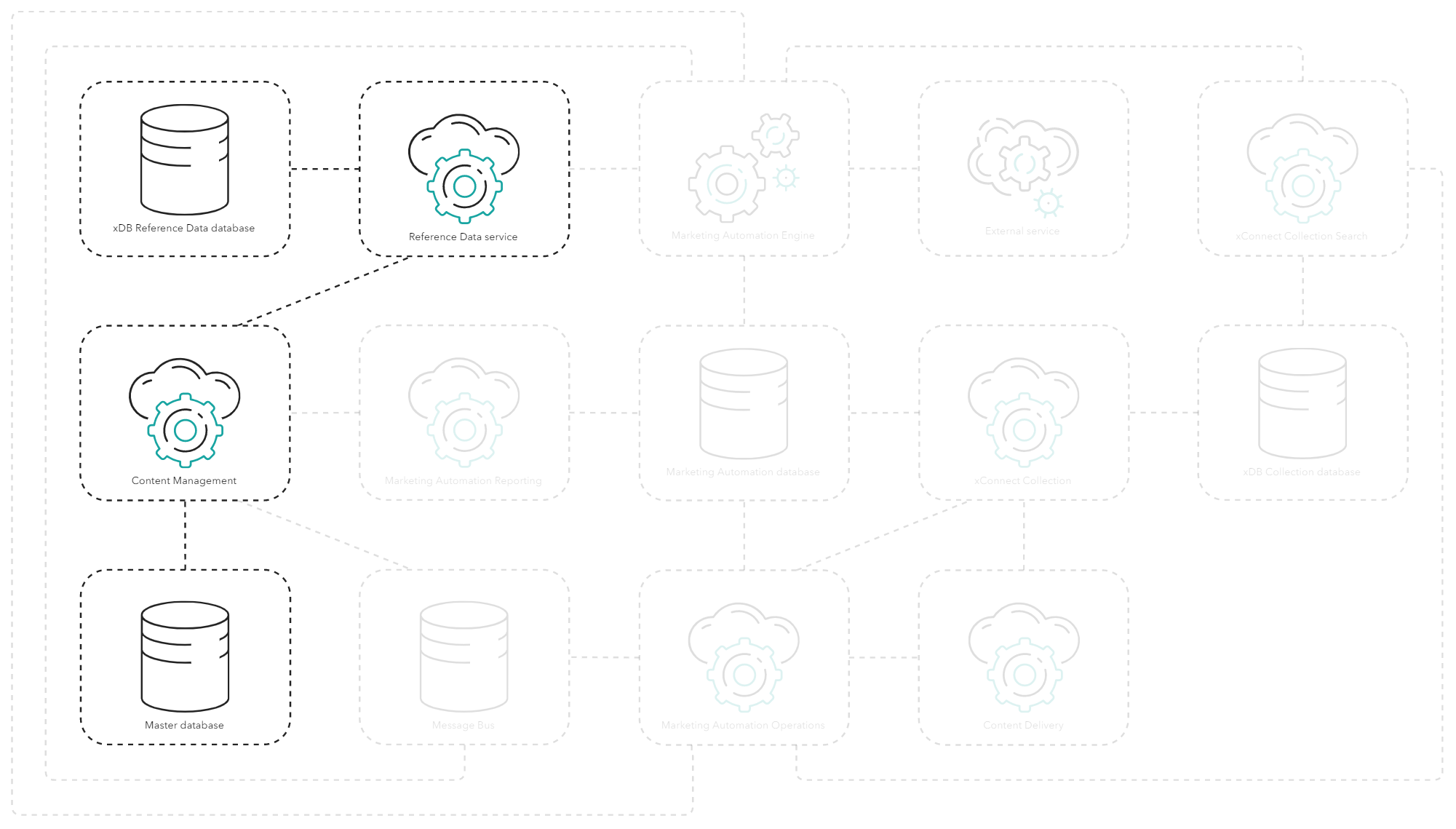
You create a plan in the MA application served through the Content Management (CM) role and store it in the Master database. The plan includes the criteria for when a contact is enrolled and the activities that an enrolled contact can go through as they pass through the plan.
You also activate the plan through the MA application. This triggers the CM role to switch the plan on through the Marketing Automation API, which pushes it to the Reference Data service role for storing in the xDB Reference Data database.
Enrolling and processing contacts
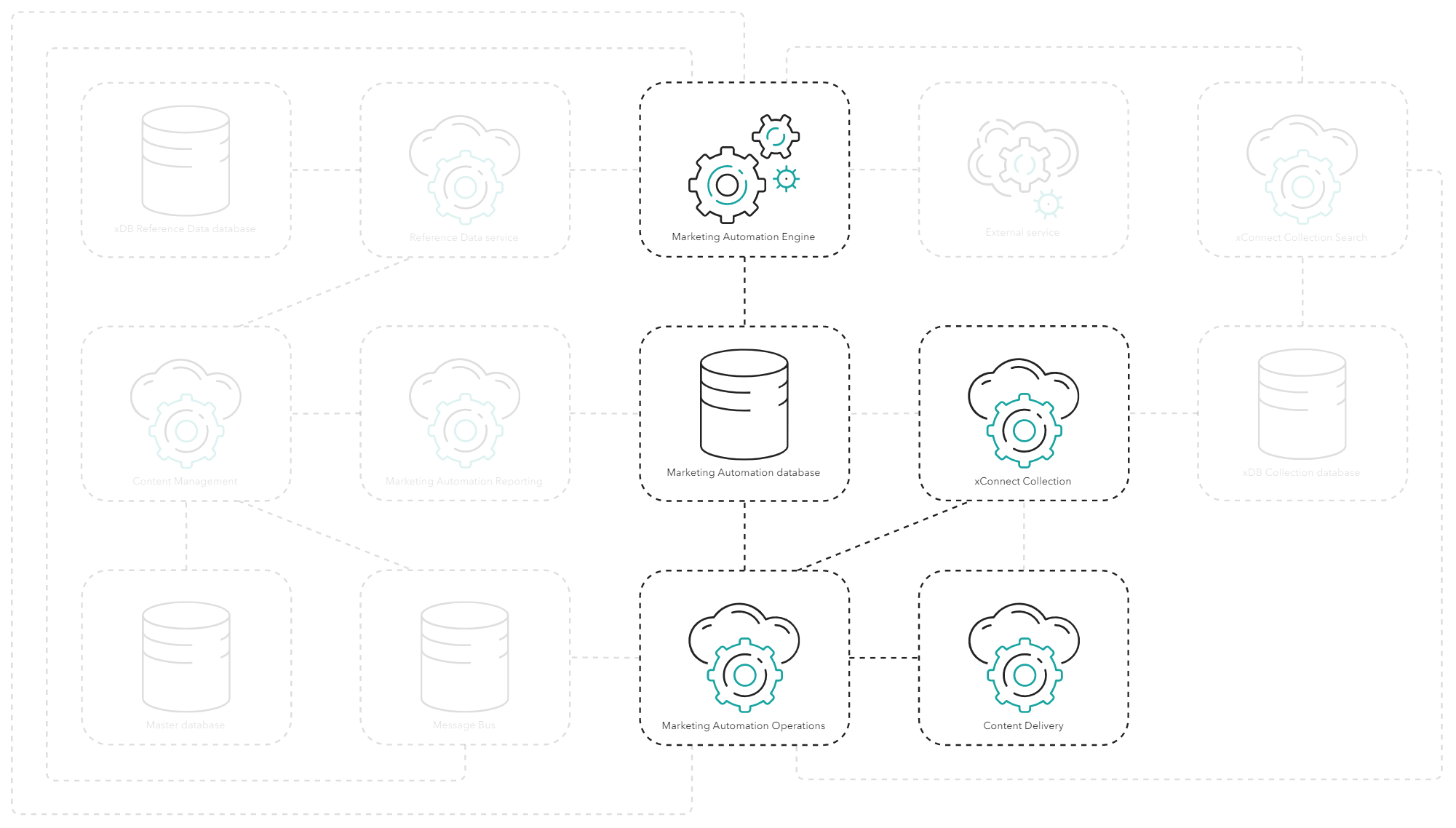
When a plan is active, the MA Engine accepts work for it and starts enrolling and [processing contacts](https://doc.sitecore.com/xp/en/developers/104/sitecore-experience-platform/marketing-automation-plan-processing.html).
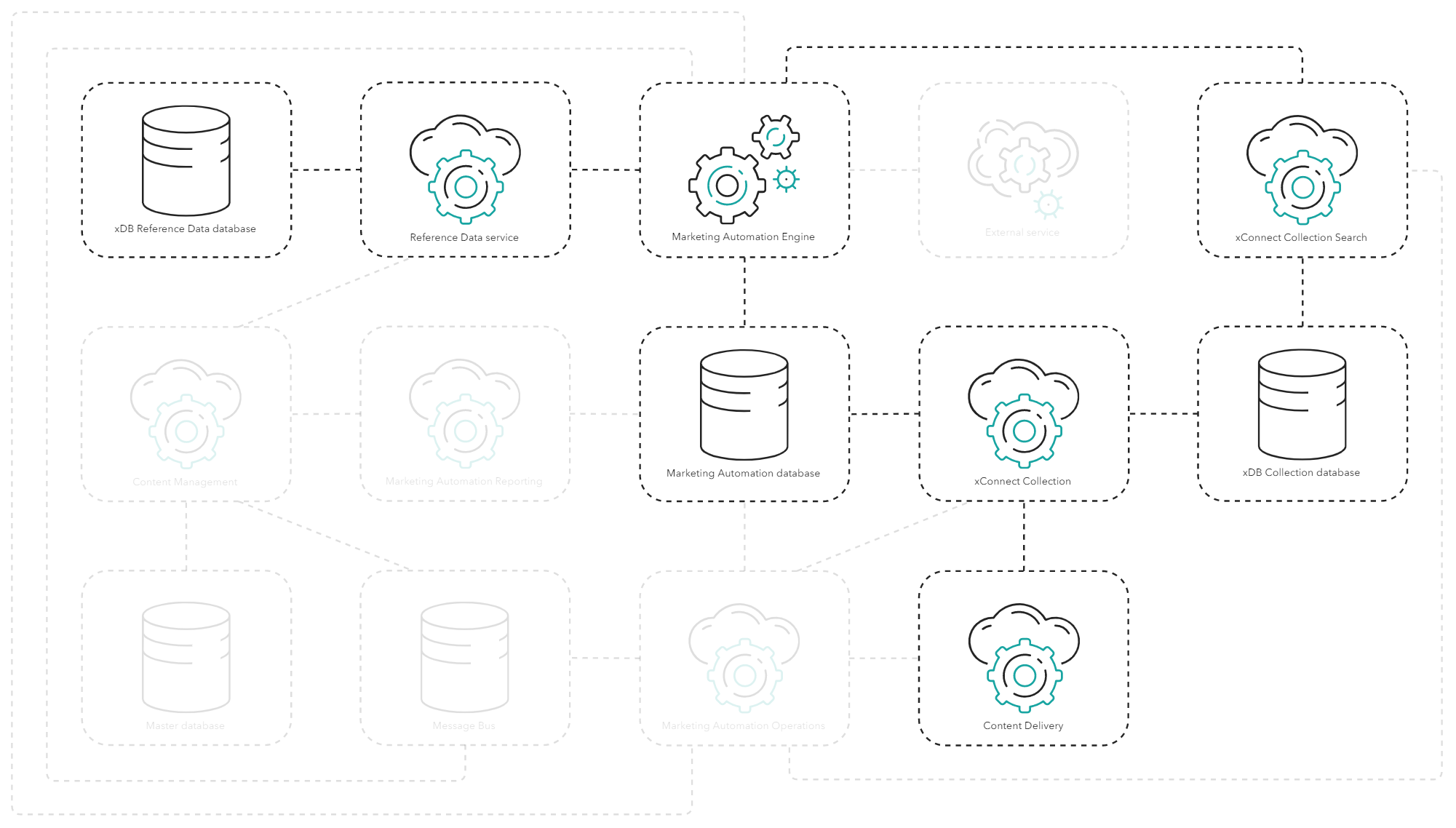
When, for example, a Content Delivery (CD) role creates an interaction or contact, or updates a facet in the xDB Collection database through the xConnect Collection role, a MA plugin stores a corresponding work item in the MA database.
MA Engine continuously polls the MA database for work items. When it finds one, it loads the contact from the xDB Collection database through the xConnect Collection Search role and reads all active plans from the xDB Reference Data database using the xDB Reference Data service. It then processes each plan individually for the contact.
> [!note]
> For scenarios where you have several MA plans or where MA activities require heavy processing, you can scale MA Engine by increasing the number of workers (or threads) running simultaneously on MA Engine or by increasing the number of MA Engine instances.
If the contact meets the entry criteria of a plan, MA Engine creates an enrollment in the MA database. Enrollments stored in the MA database can contain custom data that is defined by the custom activities in the plan or obtained through a call to the enroll operation on the MA Operations role.
If the contact is enrolled, MA Engine runs the business logic defined in the activities for the contact. This includes updating the contact data or facets as well as creating new MA interactions for the contact in the xDB Collection database using the xConnect Collection Search role .
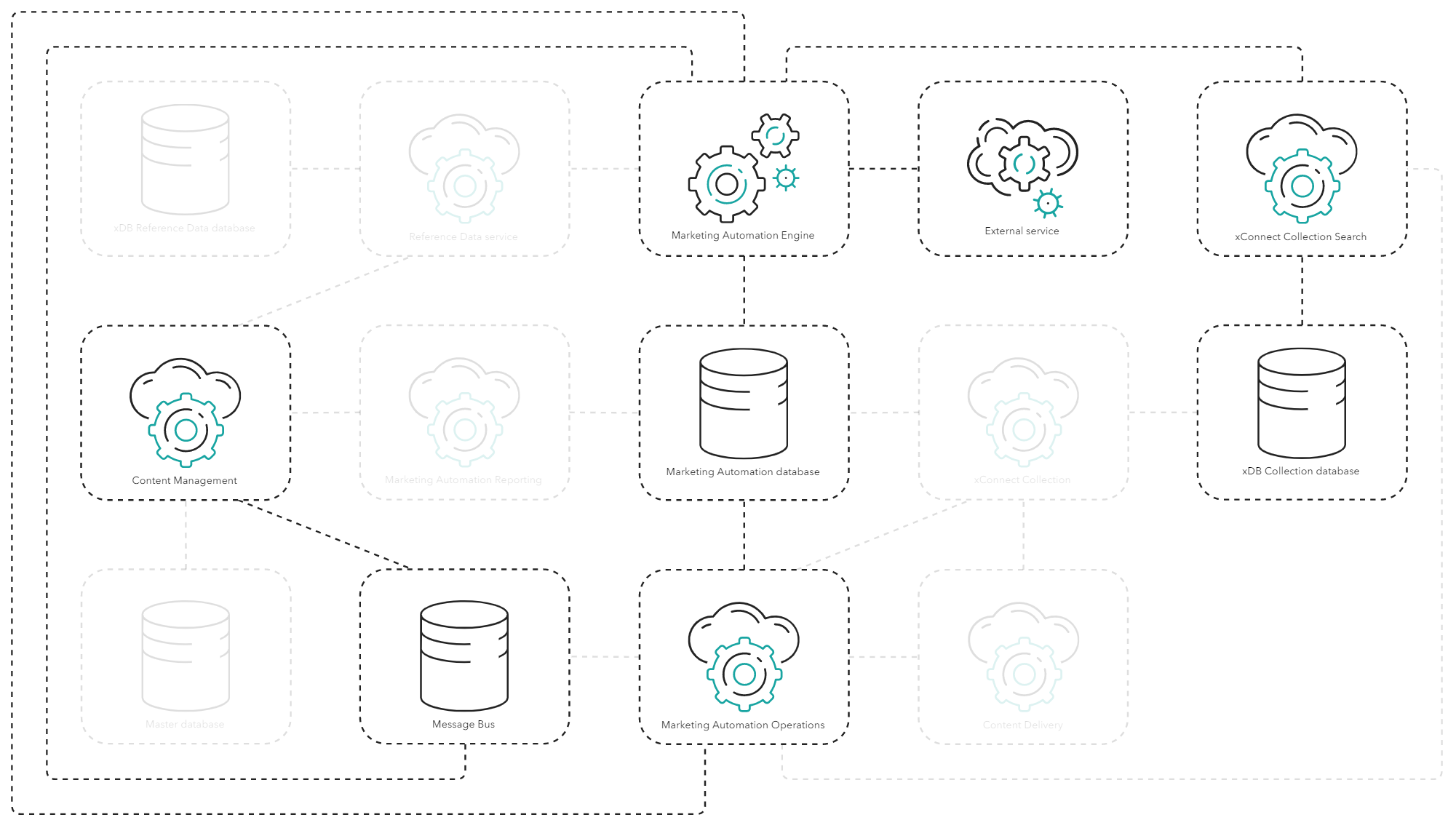
MA activities include sending personalized mails through EXM. MA Engine adds messages to the Message Bus role, and the CM role or an EXM Dedicated Dispatch role picks up the messages and dispatches them as email messages to the contact.
You can also extend MA Engine with [custom activities](https://doc.sitecore.com/xp/en/developers/104/sitecore-experience-platform/create-an-activity-type.html) that can run any business logic and notify or pull data from external services.
When MA Engine has processed a plan for the contact, it stores the enrollment and any custom data as a facet on the contact in the xDB Collection database using the xConnect Collection Search role. You can use this data for personalization and reporting.
When MA Engine finishes processing the entire work item and all relevant plans for the contact, the xConnect Collection Search role updates the contact and its facets.
Gaining insights
MA Engine continuously aggregates and stores data in the MA database to gain insights as contacts are enrolled and transition through the plans. The MA application hosted on the CM role provides [insights](https://doc.sitecore.com/xp/en/developers/104/sitecore-experience-platform/marketing-automation-reporting-api.html) into the plans by querying the MA Reporting role for data stored in the MA database. The insights include but are not limited to the number of contacts enrolled in the plans and the relevant activities included.
Triggering operations directly
In some scenarios, you might want to manipulate enrollments directly, for example, in order to secure privacy by purging contacts from the plans or to enroll contacts immediately based on explicit actions they took on the website or on other channels.
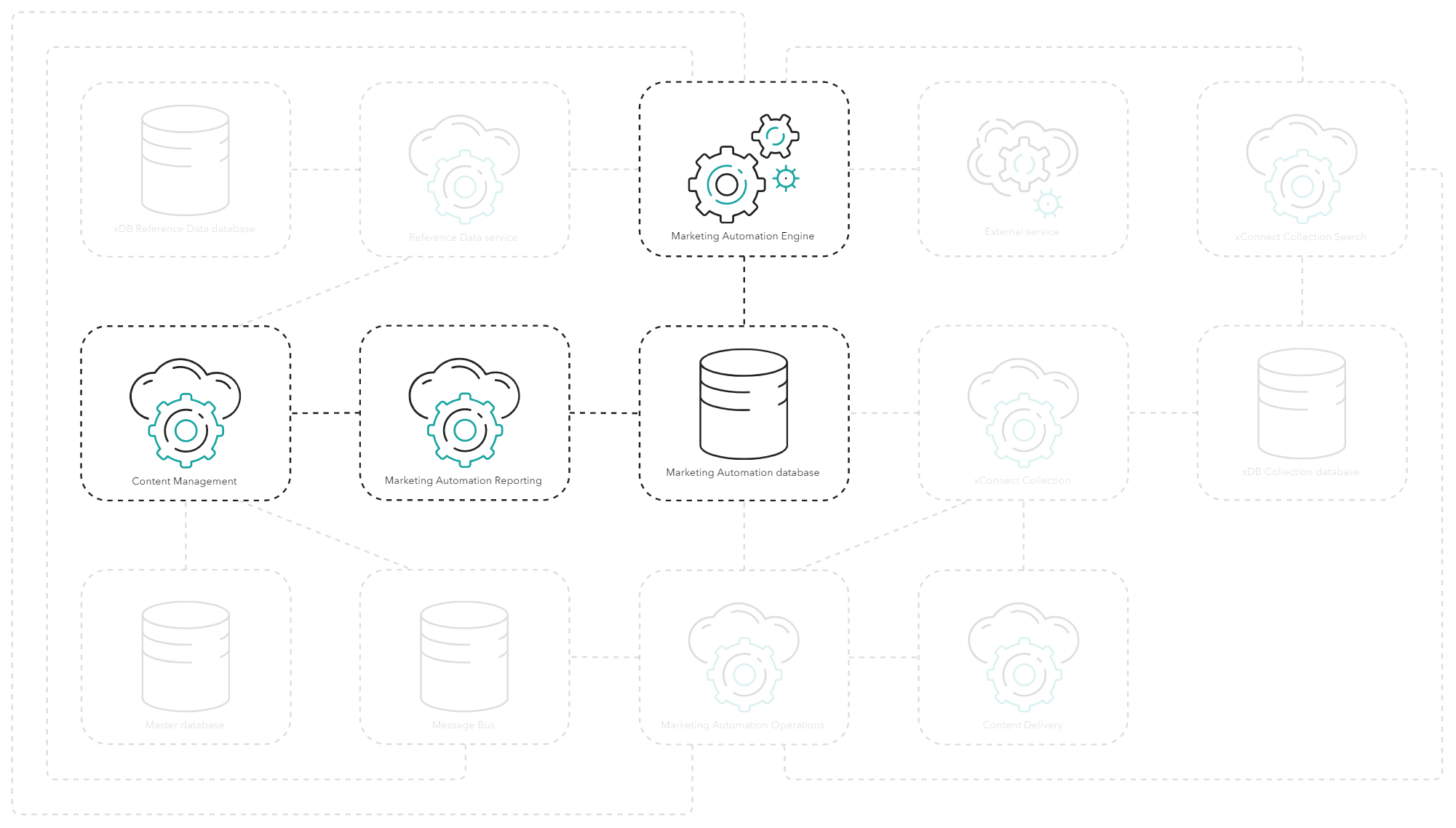
You can call the MA Operations role to [trigger specific operations on MA plans](https://doc.sitecore.com/xp/en/developers/104/sitecore-experience-platform/marketing-automation-reporting-api.html). For example, to directly enroll a contact in a plan, a CD role or another role can call the [Enroll operation](https://doc.sitecore.com/xp/en/developers/104/sitecore-experience-platform/marketing-automation-operations-api.html) on the MA Operations role. This creates an enrollment work item in the MA database, which MA Engine picks up for processing. You can also use this procedure to remove contacts from plans.
The [right to be forgotten](https://doc.sitecore.com/xp/en/developers/104/sitecore-experience-platform/execute-right-to-be-forgotten.html) is an integral part of the xConnect API. When the right to be forgotten operation is triggered on the xConnect Collection role, a plugin calls the MA Operations role to purge the contact from all plans and update the MA database.
Handling live events
The MA Operations role can process plans immediately. This enables Sitecore to provide live [personalization](https://doc.sitecore.com/xp/en/developers/104/platform-administration-and-architecture/tracking-and-personalization.html "Tracking and personalization") or other relevant processing, such as sending [emails through EXM](https://doc.sitecore.com/xp/en/developers/104/platform-administration-and-architecture/email-marketing.html "Email marketing") before the session ends.
> [!note]
> MA Engine runs asynchronously, which means that any live interactions that lead to contact processing or enrollment in a plan can have a delay.
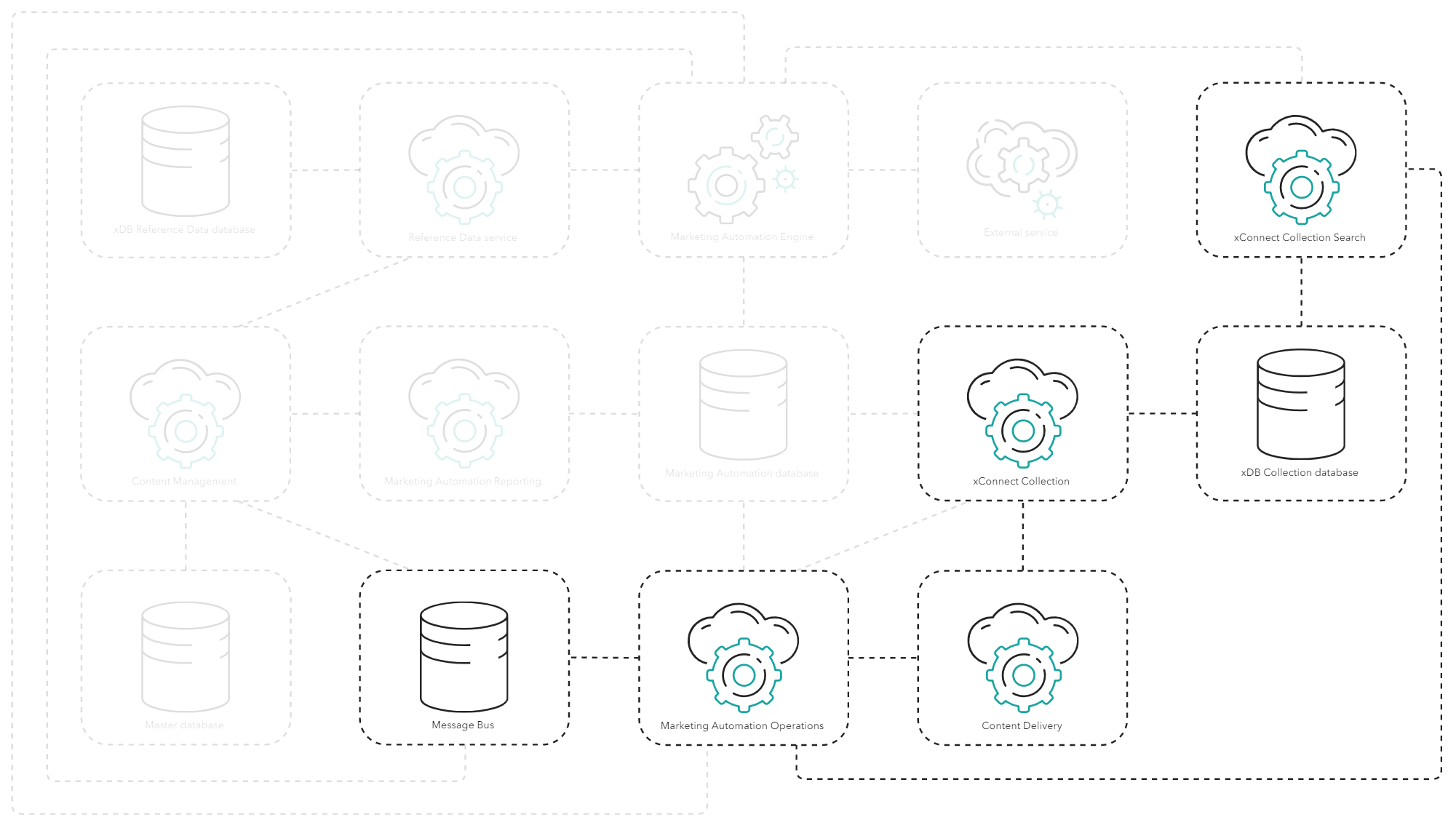
To facilitate processing MA for live personalization, the MA Operations role can process live events. Live events are marketing events such as goals and outcomes that you select for live processing in the Marketing Control panel.
When a CD role handles a live marketing event, the CD role first uses the xConnect Connection role to check if the xDB Collections database contains the contact. If the contact is new, the CD role immediately stores the contact in the xDB Collection database.
The CD role then sends the contact and interaction data to the MA Operations role, which processes the contact in the same way that the MA Engine does for work items.
This means that both custom and default activities run on the MA Operations service and that they can all communicate to the Message Bus, the xConnect Collection Search role, or third-party services.
When the processing is completed, the result is sent back to the role that triggered the live event. When the CD role gets the result of the live event processing, it updates the contact facets to reflect the result of the processing. This ensures that any personalization based on the newly executed plan is triggered correctly.
Privacy and security
Refer to the [Architecture and roles](https://doc.sitecore.com/xp/en/developers/104/platform-administration-and-architecture/architecture-overview.html "Architecture overview") documentation for privacy and security considerations for each role on the processing and aggregation data flow.