---
title: "Walkthrough: Replicating the Web database using Azure active geo-replication"
slug: "walkthrough--replicating-the-web-database-using-azure-active-geo-replication"
abstract: "How to accelerate Sitecore publishing speed by using Azure active geo-replication."
---
# Walkthrough: Replicating the Web database using Azure active geo-replication
You can speed up the publishing of content to multiple Web databases by using Azure active geo-replication. Instead of publishing separately to each Web database, you publish to only one and let Azure replicate that database. However, before you can take advantage of geo-replication, you must move the EventQueue, Properties and Tasks tables out of the local Web database and into a separate and shared Web database because they cannot be replicated.
> [!note]
> You cannot use Sitecore Publishing Service (SPS) if you set up geo-replication because SPS does not support EventQueue separation.
This walkthrough describes how to:
- Deploy the application and storage roles
- Configure the Azure active geo-replication
## The traditional publishing configuration
Consider a configuration that consists of the following: A main USA region that handles the content management, a European affiliate region, and an Asian affiliate region. In a traditional publishing configuration, the USA region Content Management (CM) role publishes the content to the Web databases in all three regions, and each regional Web database has its own EventQueue, Properties, and Tasks tables.
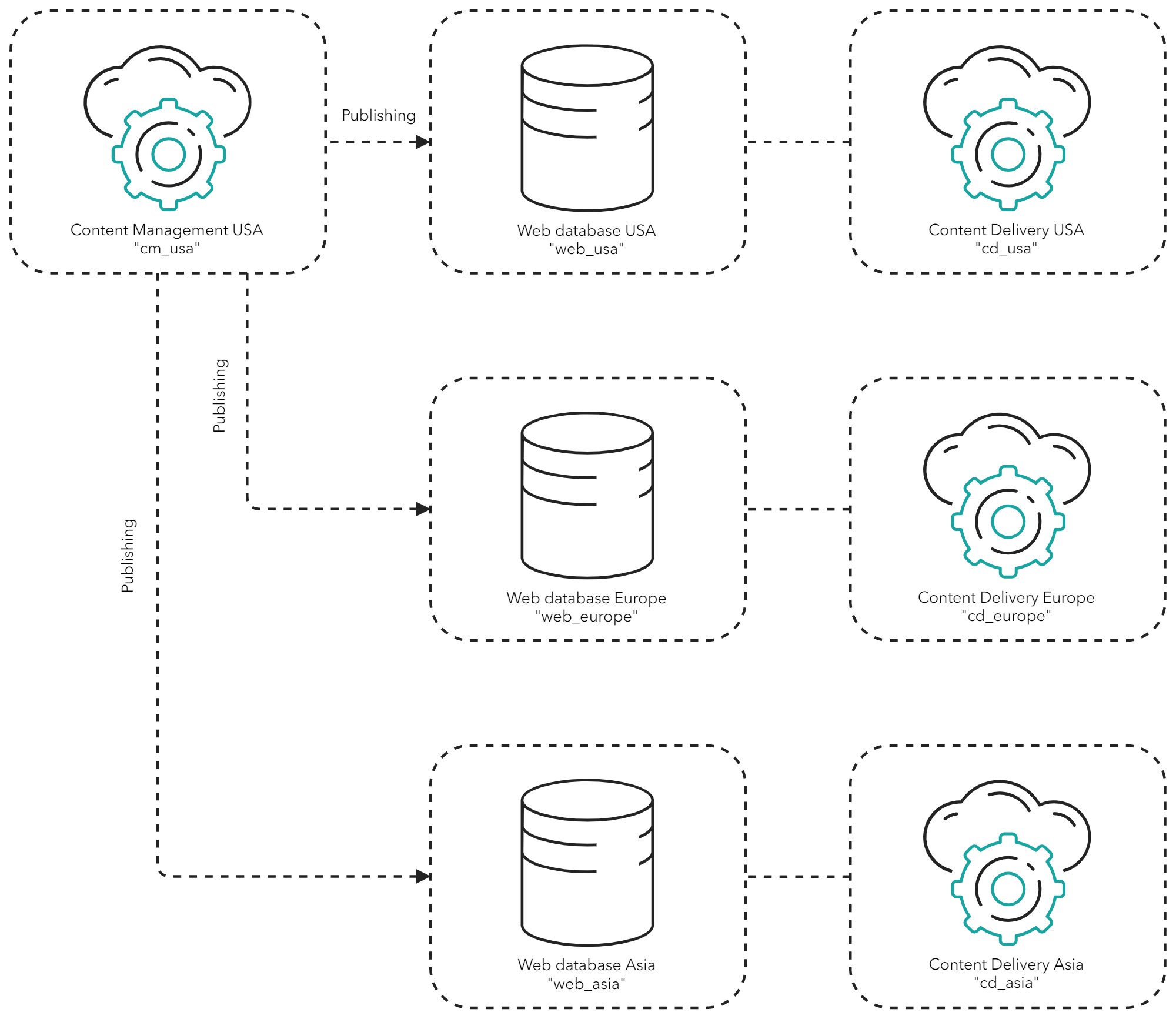
| Region | Content Management role | Web database including EventQueue, Properties, and Tasks tables | Content Delivery role |
| --- | --- | --- | --- |
| USA | `cm_usa` | `web_usa` (publishing target) | `cd_usa` |
| Europe | None | `web_europe` (publishing target) | `cd_europe` |
| Asia | None | `web_asia` (publishing target) | `cd_asia` |
## The accelerated replication configuration
By reconfiguring the same scenario to use Azure active geo-replication, the USA region CM role only publishes to the USA region Web database. On completion, Azure active geo-replication replicates the USA region Web database to the European and Asian Web databases. The three regions share a separate Web database containing the EventQueue, Properties, and Tasks tables that cannot be replicated.
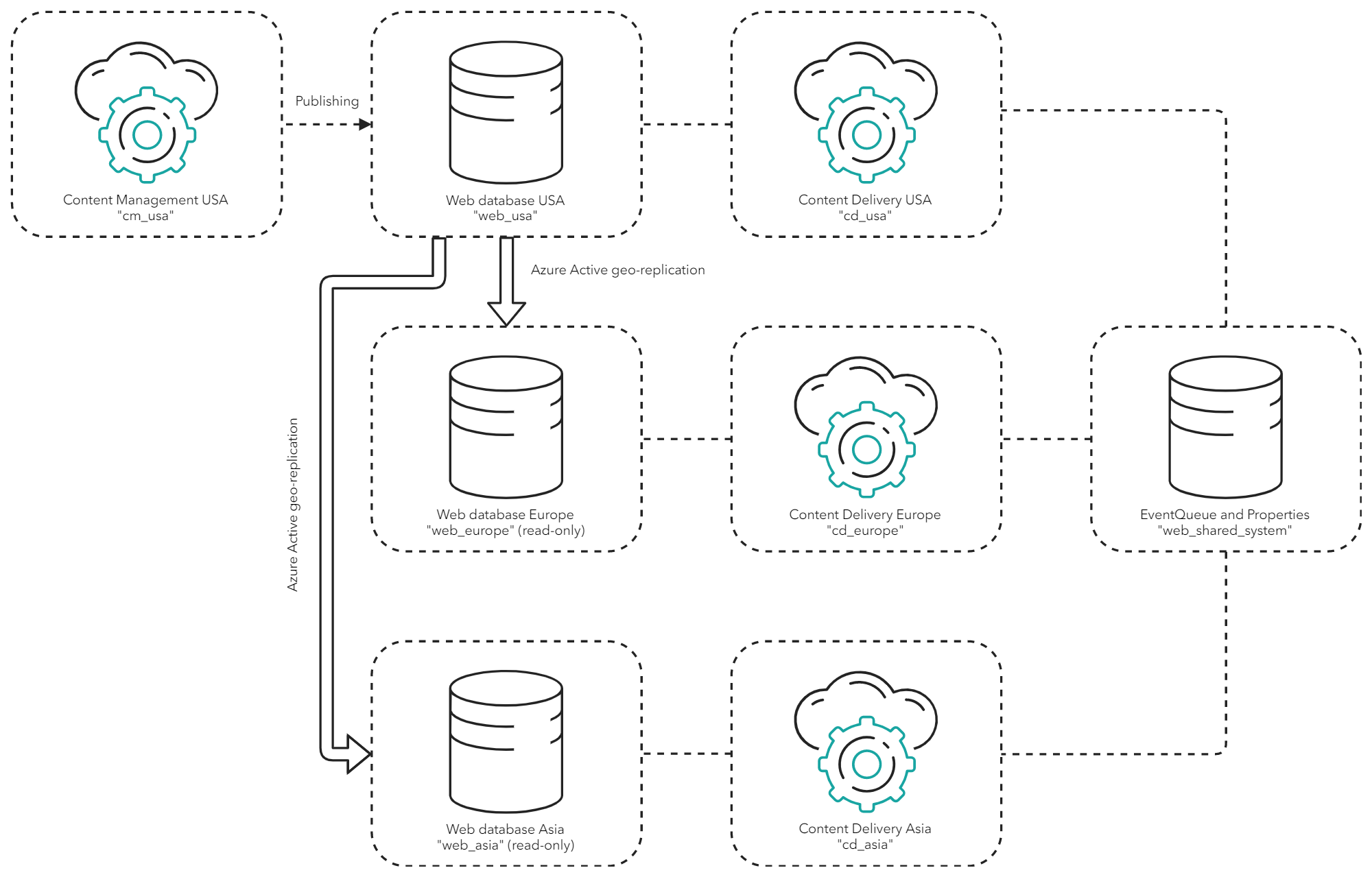
| Region | Content Management role | Web database | Content Delivery role | Shared Web database with EventQueue, Properties, and Tasks tables |
| --- | --- | --- | --- | --- |
| USA | `cm_usa` | `web_usa` (publishing target) | `cd_usa` | `web_shared_system` |
| Europe | None | `web_europe` (replication target) | `cd_europe` | |
| Asia | None | `web_asia` (replication target) | `cd_asia` | |
To prevent errors from occurring when you replicate the Web database, disable the `CompactClientDataAgent` and `CleanupPublishQueue` agents on the CD servers.
To disable the agents, in the `Sitecore.config` file, set the interval to `"00:00:00"`:
```xml
30
```
## Deploy the application and storage roles
You must deploy the main USA region as a standard Sitecore installation and remove the Core databases from the Europe and Asia regions.
To deploy the application and storage roles:
1. In the USA region, deploy the CM and CD roles.
2. In the Europe and Asia regions, deploy the CD role only.
> [!note]
> You must configure Azure active geo-replication target databases as read-only.
3. In the Europe and Asia regions, remove the Core database from both regions. You can [disable the Security database on a Content Delivery instance](https://doc.sitecore.com/xp/en/developers/104/platform-administration-and-architecture/walkthrough--disable-the-security-database-on-a-content-delivery-instance.html "Walkthrough: Disable the Security database on a Content Delivery instance") if you are *not* using the Federated Experience Manager (FXM) because the CD role can run without it.
4. Deploy an empty Web database for sharing the separate EventQueue, Properties, and Tasks tables.
> [!important]
> You might experience decreased performance when the EventQueue, Properties, and Tasks tables are shared by all regions.
5. [Configure your Sitecore roles to share the separate EventQueue, Properties, and Tasks database](https://doc.sitecore.com/xp/en/developers/104/platform-administration-and-architecture/configure-sitecore-roles-for-separate-eventqueue,-properties,-and-tasks-tables.md "Configure Sitecore roles for separate EventQueue, Properties, and Tasks tables").
## Configure the Azure active geo-replication
All that is left to do is to [configure Azure active geo-replication](https://docs.microsoft.com/en-us/azure/sql-database/sql-database-active-geo-replication-portal) to replicate data from the USA region Web database (`web_usa`) to the Europe and Asia region Web databases (`web_europe` and `web_asia`).
> [!warning]
> On CD roles using replicated Web databases, visitor requests can potentially repopulate the newly cleared cache with old content, until the replication is completed. Sitecore is working on a solution to this.