---
title: "FXM JavaScript API"
slug: "fxm-javascript-api"
abstract: "Use this API to manage Sitecore analytics functionality on a web page on external website."
---
# FXM JavaScript API
Sitecore Federate Experience Manager (FXM) offers a JavaScript API that enables you to manage some of the Sitecore analytics functionality on webpages on external websites. To use this API, you must set up the [FXM JavaScript beacon](https://doc.sitecore.com/xp/en/developers/91/sitecore-experience-platform/add-an-external-website-in-fxm.html "Add an external website in FXM") on the external website.
trackEvent
Use the `trackEvent` function to trigger a Sitecore page event from a webpage on the external website:
- To trigger the *Page visited* page event:
`SCBeacon.trackEvent(“Page visited”)`
- To trigger the page event with additional parameters, such as `data` and `dataKey`:
`SCBeacon.trackEvent(“Page visited”, { data: “custom data”, dataKey: “custom data key” })`
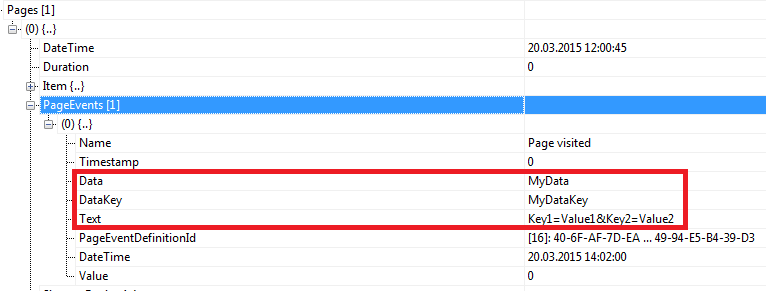
- To trigger the page event with custom parameters, make sure the parameter starts with the prefix, `x`. The custom parameter is added to the *Text* property. For example:
`SCBeacon.trackEvent(“Page visited”, { data: “MyData”, dataKey: “MyDataKey”, xKey1: “Value1”, xKey2: “Value2” })`
trackGoal
Use the `trackGoal` function to trigger a Sitecore goal from a webpage on an external website:
- To trigger the *Register* goal:
`SCBeacon.trackGoal(“Register”)`
- To trigger a goal with additional parameters, such as `data` and `dataKey`:
`SCBeacon.trackGoal(“Register”, { data: “custom data”, dataKey: “custom data key” })`
- To trigger the `SCBeacon.trackGoal` goal with custom data parameters, make sure the parameter starts with the prefix, `x`. The custom parameter is added to the *Text* property. For example:
`SCBeacon.trackGoal(“Register”, { data: “MyData”, dataKey: “MyDataKey”, xKey1: “Value1”, xKey2: “Value2” })`
trackOutcome
To use the `trackOutcome` function, you must use the item ID or name of a predefined outcome definition item, for example, `Product Purchase`:
- `SCBeacon.trackOutcome(“{9016E456-95CB-42E9-AD58-997D6D77AE83}”)`
- `SCBeacon.trackOutcome(“Product Purchase”)`
Use the `trackOutcome` function to trigger a Sitecore outcome from a webpage on an external website:
- To associate the outcome with a monetary value, add the parameter `monetaryValue` to the `trackOutcome` function:
`SCBeacon.trackOutcome(“{9016E456-95CB-42E9-AD58-997D6D77AE83}”, { monetaryValue: “25,5” })`
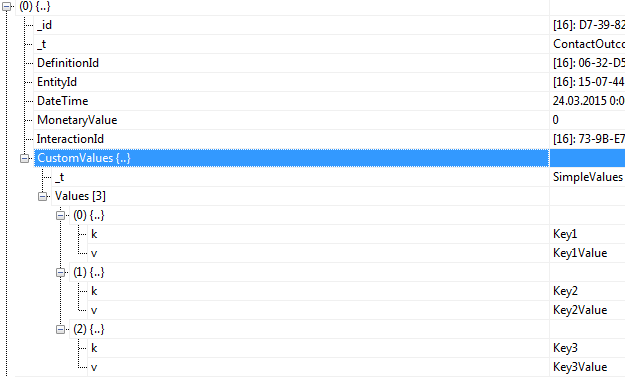
- To trigger an outcome with custom data parameters, add the parameters to the `trackOutcome` function. Make sure the parameters start with the prefix,` x`. For example:
`SCBeacon.trackOutcome(“{9016E456-95CB-42E9-AD58-997D6D77AE83}”, { xKey1: 'Key1Value', xKey2:'Key2Value', xKey3:'Key3Value' });`