---
title: "Create a custom event model"
slug: "create-a-custom-event-model"
abstract: "How to create definition items and custom event models as well as how to define the custom facet in the model and how to use the custom event model."
---
# Create a custom event model
This topic describes how to create a custom event model named `EnterStore`. This event model could be used in stores that allow shoppers to sign out a handset and scan their own items, and assumes the following requirements:
- The `EnterStore` model can be used with more than one definition item, and will therefore not have a fixed definition item.
- The `EnterStore` model is not a goal or outcome, and will therefore inherit the base `Sitecore.XConnect.Event` class.
Create definition items
The following example demonstrates how to create several event definition items to represent a contact entering a variety of stores.
1. Open the Sitecore Content Editor.
2. Go to */sitecore/system/Marketing Control Panel/Events*.
> [!note]
> If you are creating a web-specific page event, create the definition items under */sitecore/system/Settings/Analytics/Page Events* for consistency.
3. Right-click on the Events item and Insert > Event and enter an item name when prompted. Create one event named Enter Express Store and one named Enter Super Store.
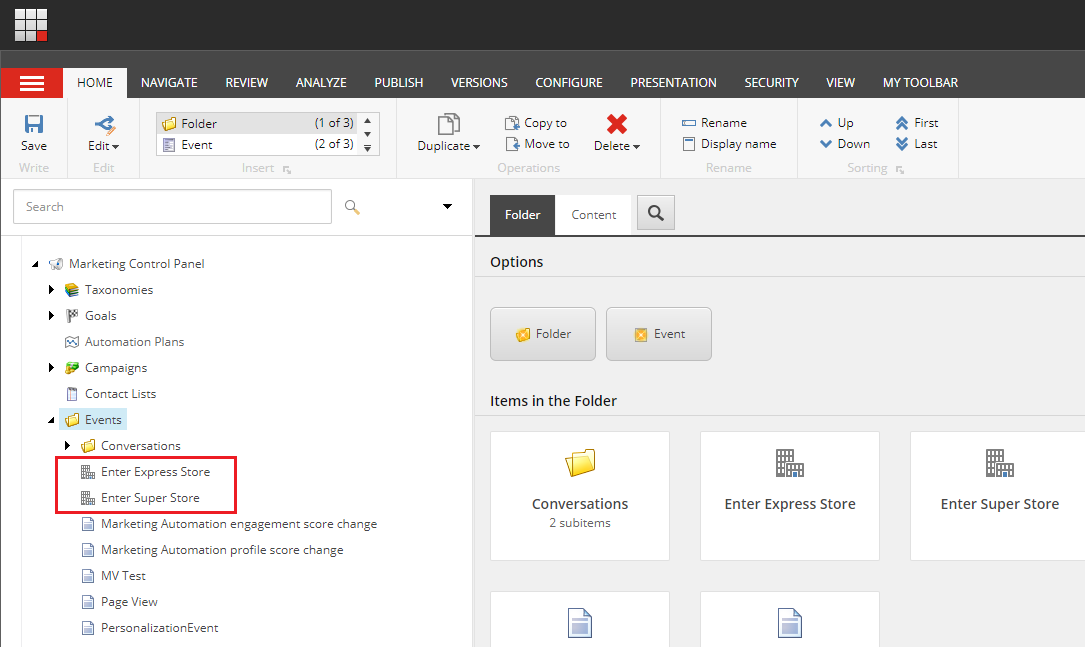
4. Select the newly created definition, then click the Review tab > Deploy. This publishes the definition to the web database and deploys it to the Reference Data Service database.
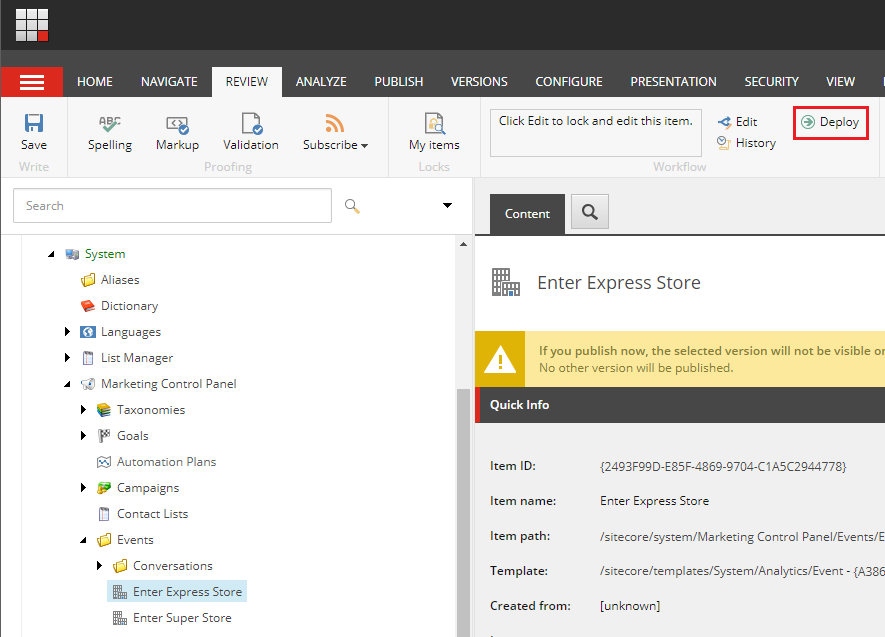
Create a custom event model
Create a new class named `EnterStore`. The class has a single property named `TookBasket`, which indicates whether the contact picked up a basket as they entered the store.
```csharp
using Sitecore.Events;
using System;
namespace Documentation
{
public class EnterStore : Sitecore.XConnect.Event
{
public EnterStore(Guid definitionID, DateTime dateTime) : base(definitionID, dateTime) { }
public bool TookBasket { get; set; }
}
}
```
Define a custom facet in the model
Define the new event in your collection model using the `.DefineEventType` method. In the following example, the event model has been added to a model named `SampleModel`. If you are using the model in a Sitecore context, the model class must be [registered in the client configuration file](https://doc.sitecore.com/xp/en/developers/93/sitecore-experience-platform/create-a-custom-model.html "Create a custom model").
```csharp
using Sitecore.XConnect;
using Sitecore.XConnect.Schema;
namespace Documentation
{
public class SampleModel
{
public static XdbModel Model { get; } = SampleModel.BuildModel();
private static XdbModel BuildModel()
{
XdbModelBuilder modelBuilder = new XdbModelBuilder("SampleModel", new XdbModelVersion(0, 1));
modelBuilder.ReferenceModel(Sitecore.XConnect.Collection.Model.CollectionModel.Model);
modelBuilder.DefineEventType(false);
return modelBuilder.BuildModel();
}
}
}
```
> [!warning]
> If you do not register your event model, you cannot use it. You will get errors such as ‘The type of this instance does not correspond to any type in the schema’.
Use a custom event model
Use the xConnect Client API to [add your event to an interaction](https://doc.sitecore.com/xp/en/developers/93/sitecore-experience-platform/add-interaction-events.html "Add interaction events"). The following example demonstrates how to instantiate the event model with two different definition item IDs:
```csharp
// Event definition ID
Guid enterExpressStore = Guid.Parse("{2493F99D-E85F-4869-9704-C1A5C2944778}");
var enterExpressStoreEvent = new EnterStore(enterExpressStore, DateTime.UtcNow)
{
TookBasket = true
};
// Event definition ID
Guid enterSuperStore = Guid.Parse("{CD7155D5-2DA5-46AB-8BE9-33A4597735A1}");
var enterSuperStoreEvent = new EnterStore(enterSuperStore, DateTime.UtcNow)
{
TookBasket = false
};
```
Use a custom event model with the tracker
To use a custom event model within the tracker, you must create an event conversion pipeline processor. For more information, see [Triggering custom events](https://doc.sitecore.com/xp/en/developers/93/sitecore-experience-platform/triggering-custom-events.html "Triggering custom events").