---
title: "Monitor the process of rebuilding the reporting database"
slug: "monitor-the-process-of-rebuilding-the-reporting-database"
abstract: "How to monitor the state and progress of the reporting database rebuild."
---
# Monitor the process of rebuilding the reporting database
The process of rebuilding the reporting database can take a long time. You can monitor the state of an active rebuild process on the `RebuildReportingDB.aspx` page by looking at the details in the **Processed** column, which shows how many entries have been processed. The **EstimatedTotal** column displays the total number of entries to be processed.
The following table describes the possible rebuild states during the rebuild process.
| Rebuild state | Description |
| --- | --- |
| NotRunning | No rebuild is requested or running. |
| Failed | The rebuild failed to complete. Possible reasons for a failed rebuild include:
- Configuration problems such as an incorrect or missing secondary connection string.
- Connection problems (for example, SQL is busy and does not respond).
- Problems in the customized processors within the aggregation pipeline.
|
| Starting | The rebuild process is in the preparation stage. Initialization of pre-rebuild checks have started. |
| StoppingDataRecording | This is a required step in the synchronization between the reporting database and the reporting secondary database. |
| ClearingStorage | The reporting.secondary database is being cleared. The target reporting.secondary database must be empty before the rebuild process starts. |
| WaitReadyToReceiveData | This is a required step in the synchronization between the reporting database and the reporting secondary database. |
| StartingHistoryProcessing | All prerequisites for the rebuild are complete; retrieving the data size selected for the rebuild and starting to process history data. |
| HistoryProcessing | The rebuild is in progress and history data is being processed. |
| Completed | The rebuild is complete. |
To start and monitor the process of rebuilding the reporting database:
1. Go to the `https:///sitecore/admin/RebuildReportingDB.aspx` page.
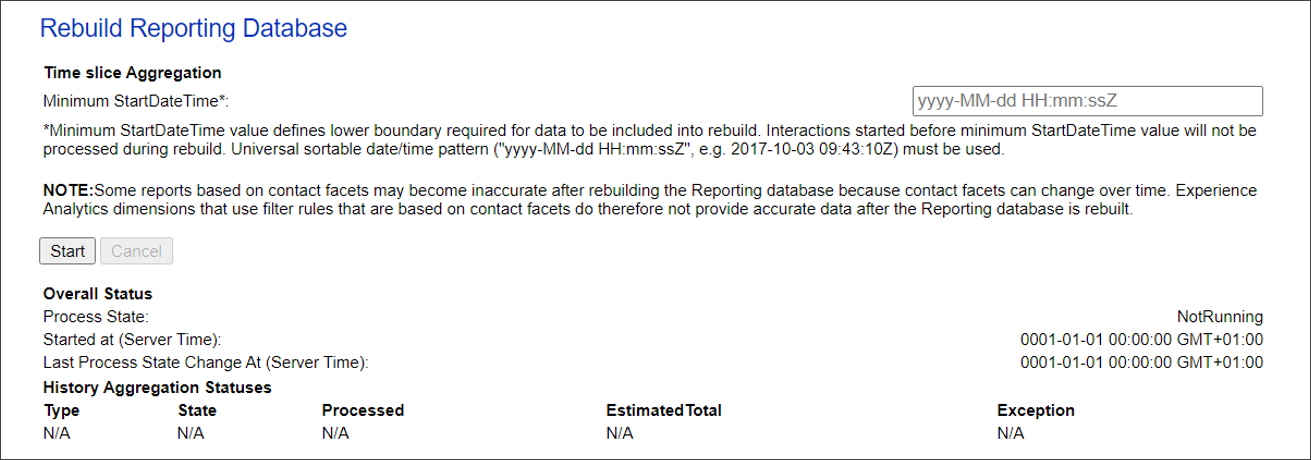
2. In the **Minimum StartDateTime** field, specify a start date and time and click **Start**.
> [!important]
> Some reports based on contact facets might become inaccurate after rebuilding the Reporting database. This is because contact facets can change over time and, as a result, Experience Analytic dimensions that use filter rules based on contact facets do not provide accurate data.