---
title: "Add a set of value accessors for the source file"
slug: "add-a-set-of-value-accessors-for-the-source-file"
abstract: "How to create value accessors in Sitecore Data Exchange Framework to read values from the source file."
---
# Add a set of value accessors for the source file
To read values from the source file, you must create a value accessor for each value. Each value accessor represents a specific value from a row in the source file. You group related value accessors into value accessor sets, which can contain one or more value accessors.
Create a folder for the value accessor set
Under a tenant, value accessor sets are organized by provider. Each provider has its own folder. You must create a folder to hold the value accessor sets for the new provider.
To create a folder for the value accessor set:
1. In the Content Editor, navigate to */sitecore/System/Data Exchange/File System Provider Test/Data Access/Value Accessor Sets/Providers*.
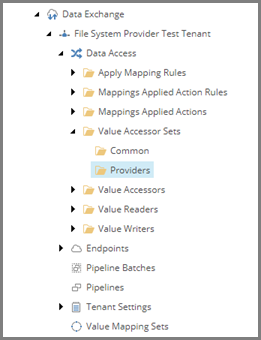
2. To add a new set, in the right-hand pane, on the **Folder** tab, click **File System Value Accessor Sets**.
> [!note]
> This template is a command template. It does not prompt for the item name. The command template automatically assigns the item the name *File System*.
Create a value accessor set
Next, you must create a value accessor set that represents all of the values you want to read from a row in the source file.
To create a value accessor set:
1. Navigate to the new *File System* folder.
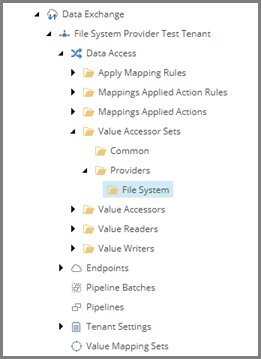
2. To add a new set, on the **Folder** tab, click **Array Value Accessor Set**. Name it *City Information File Fields*.
Create the value accessors
For each value you want to read from a row in the source file you must have a separate value accessor. When a row is read from the source file, it is split into an array. Each value accessor represents a position in that array.
To create the value accessors:
1. In the content tree, navigate to the *City Information File Fields* item.
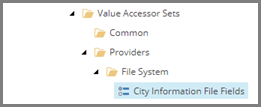
2. To add an accessor, on the **Folder** tab, click **Array Value Accessor**. Name it *Identifier from City Information File*.
3. In the right-hand pane, set the following field value:
| Field | Value |
| --- | --- |
| **Position** | *0* |
4. Save the item.
5. Repeat steps 1 to 4 to add two more Array Value Accessor items:
| Item name | Position value |
| --- | --- |
| *Country from City Information Item* | *1* |
| *City from City Information Item* | *2* |