---
title: "Add a set of value accessors for the target items"
slug: "add-a-set-of-value-accessors-for-the-target-items"
abstract: "How to create value accessors in Sitecore Data Exchange Framework to write read values to the target file."
---
# Add a set of value accessors for the target items
To write values to the Sitecore items (target items) that act as the target objects, you must create a value accessor in the tenant for each item. Each value accessor represents a specific field on the template used for the target items. You group related value accessors into a value accessor set that represents all items you want to read from the source. You organize the value accessor sets in folders under the data provider.
Create a folder for the value accessor set
Under a tenant, value accessor sets are organized by provider. Each provider has its own folder. You use a folder to hold the value accessor sets for the new provider.
To create a folder:
1. In the Content Editor, navigate to */sitecore/System/Data Exchange/File System Provider Test Tenant*.
2. Navigate to *Data Access/Value Accessor Sets/Providers*.
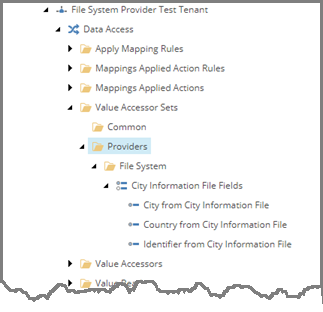
3. In the right-hand pane, click *Sitecore Value Accessor Sets*.
> [!note]
> This template is a command template. It does not prompt for the item name. Command templates assign the item name automatically.
Create a value accessor set
Next, you must create a value accessor set that represents all of the fields you want to write to on the target items.
To create a value accessor set:
1. In the content tree, navigate to the *Sitecore* provider.
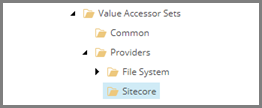
2. On the **Folder** tab, click **Sitecore Item Field Value Accessor Set** to create a new item, and name it *City Information Item Fields*.
Create the value accessors
For each value you want to write to a target item, you must have a separate value accessor. Each value accessor represents a field on the target item.
To create a value accessor:
1. In the content tree, navigate to the *City Information Item Fields* item.
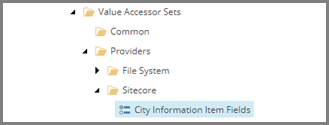
2. In the right-pane, on the **Folder** tab, click **Sitecore Item Field Value Accessor** to create a new item, and name it *Identifier on City Information Item*.
3. In the right-hand pane, set the following field value:
| Field | Value |
| --- | --- |
| **Field** | *Templates/User Defined/City Information/Data/Identifier* |
4. Save the item.
5. Repeat steps 1 to 4 to add two more Sitecore *Item Field Value Accessor* fields:
| Field name | Field value |
| --- | --- |
| *Country on City Information Item* | *Templates/User Defined/City Information/Data/Country* |
| *City on City Information Item* | *Templates/User Defined/City Information/Data/City* |