---
title: "Retrieving insert options for message types"
slug: "retrieving-insert-options-for-message-types"
abstract: "Configure advanced settings that define how insert options are retrieved by the EXM module and represented in the UI."
---
# Retrieving insert options for message types
In the manager root, you can configure [insert options](https://doc.sitecore.com/xp/en/developers/exm/91/email-experience-manager/configure-insert-options-for-message-types.html "Configure insert options for message types") for the EXM message types that affect the range of message templates available for each type. However, you can also configure more advanced settings to define how the module retrieves the insert options and represents them in the UI.
To access the advanced insert options settings, switch to the Core database and in the Content Editor go to the Create folder (*/sitecore/client/Applications/ECM/Component/Create*).
The Create folder contains folders that provide configuration options for each message type:
- Regular
- Subscription
- Automated
The configuration settings of the default insert options provider are specified in the Templates item that is located in each of the message type folders.
You can replace the default provider with a custom one and customize these options:
| Setting | Description |
| --- | --- |
| Type | The names of the provider data type and of the namespace in which the data type is defined, separated by a comma.
You can replace the default insert options provider with a custom one. |
| Method | The method that retrieves the insert options for the message type. |
| Visible | Controls whether the template is visible to users. The template is visible by default. Clear the check box to hide the template. |
| Index | Defines the display order of the template. |
For the Regular message type, you can also customize advanced settings for creating messages using the Import From HTML or Import From Design template.
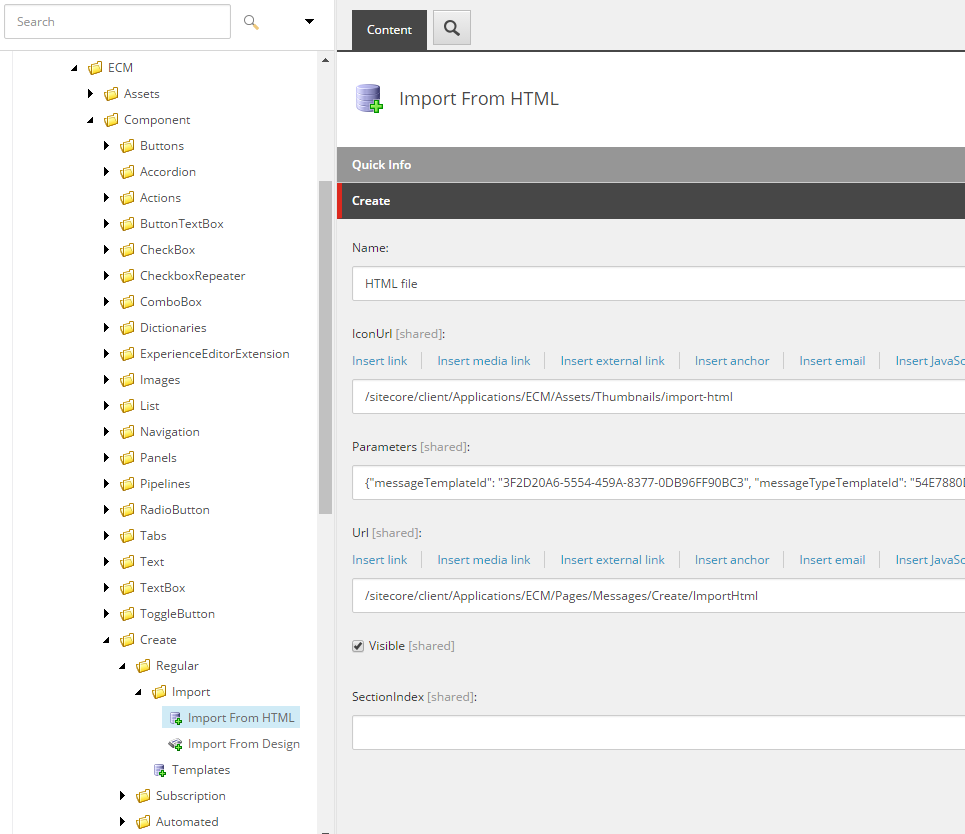
The Import From HTML and Import From Design items are located in the Import folder (/sitecore/client/Applications/ECM/Component/Create/Regular/Import) and provide the following settings:
| Setting | Description |
| --- | --- |
| IconURL | The path to the icon of the message template. |
| Parameters | Contains the following parameters in the JSON format:
- `messageTemplateId` – the ID of the message template item in the Master database.
- `messageTypeTemplateId` – the ID of the message type template in the Master database.
|
| URL | The path to the dedicated page for the message template. When a user selects the Import From HTML or Import From Design template, EXM redirects the user to the page defined in this setting. |
| Visible | Controls whether the template is visible to users. The template is visible by default. Clear the check box to hide the template. |
| SectionIndex | Defines the display order of the template. |