---
title: "Recommendations: Extending SXA"
slug: "recommendations--extending-sxa"
abstract: "Recommendations for extending SXA."
---
# Recommendations: Extending SXA
You might want to [extend SXA](https://doc.sitecore.com/xp/en/developers/sxa/105/sitecore-experience-accelerator/extending-sxa.html "Extending SXA"), for example, to add your own custom rendering to the SXA toolbox, add a theme, or a template. This topic describes some requirements and recommendations for extending SXA.
Never put custom items in SXA-controlled branches of the tree
When extending SXA, think about where to store your custom items. SXA overwrites the standard SXA sections during SXA updates. Therefore, placing custom items in tree branches controlled by SXA, can result in your instance being broken after an upgrade. We recommend that you:
- Place [custom modules](https://doc.sitecore.com/xp/en/developers/sxa/105/sitecore-experience-accelerator/create-a-new-sxa-module.html "Create a new SXA module") in a branch that is a sibling to the *Experience Accelerator* module root.
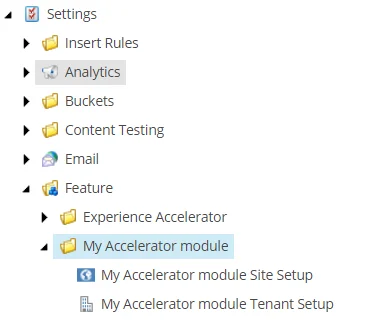
- Place [templates](https://doc.sitecore.com/xp/en/developers/sxa/105/sitecore-experience-accelerator/add-and-extend-an-sxa-template.html "Add and extend an SXA template") in folders that are siblings to the *Experience Accelerator*folder – never inside.
- Similarly, you must create a module-specific root item for all other areas, such as Renderings, Branches, Media.
Related topics:
- [Add and extend an SXA template](https://doc.sitecore.com/xp/en/developers/sxa/105/sitecore-experience-accelerator/add-and-extend-an-sxa-template.html "Add and extend an SXA template")
- [Create a new SXA module](https://doc.sitecore.com/xp/en/developers/sxa/105/sitecore-experience-accelerator/create-a-new-sxa-module.html "Create a new SXA module")
Do not modify OOTB SXA items
When extending SXA , always use the SXA extension points for custom functionality. For example, [create a custom data template](https://doc.sitecore.com/xp/en/developers/sxa/105/sitecore-experience-accelerator/add-and-extend-an-sxa-template.html "Add and extend an SXA template"). If this is not possible and you have a good reason for the extension, contact the SXA team to create extension point for you.
Related topics:
- [Extending SXA](https://doc.sitecore.com/xp/en/developers/sxa/105/sitecore-experience-accelerator/extending-sxa.html "Extending SXA")
- [Add and extend an SXA template](https://doc.sitecore.com/xp/en/developers/sxa/105/sitecore-experience-accelerator/add-and-extend-an-sxa-template.html "Add and extend an SXA template")
Do not replace the SXA MVC layout
The SXA MVC layout is the basis of grids, themes, and meta components, and SXA can depend on its presence for other common behavior. If you replace the layout with your custom implementation, you risk losing compatibility with future versions of SXA.
If you need to add custom non-visual elements to the layout, consider creating a meta rendering and add it to the [Meta Partial Design](https://doc.sitecore.com/xp/en/developers/sxa/105/sitecore-experience-accelerator/the-html-structure-of-pages-and-renderings.html "The HTML structure of pages and renderings"). If you have visual elements, consider using standard SXA renderings.
SXA provides multiple possibilities to extend the layout. For example, you can:
- Add non-visual extensions by using meta-partial designs.
- Add visual extensions by using regular partial designs.
- Add JavaScript and styling elements using the `assetService`[pipeline](https://doc.sitecore.com/xp/en/developers/sxa/105/sitecore-experience-accelerator/the-sxa-pipelines.html "The SXA pipelines").
- Define a [custom grid](https://doc.sitecore.com/xp/en/developers/sxa/105/sitecore-experience-accelerator/create-a-custom-grid.html "Create a custom grid") and define your custom markup of the `` tag.
Create an SXA module for your custom renderings
Place custom renderings in an SXA [module](https://doc.sitecore.com/xp/en/developers/sxa/105/sitecore-experience-accelerator/create-a-new-sxa-module.html "Create a new SXA module") that can be added to an existing site or used immediately in newly created sites.
You must:
- Provide [site/tenant scaffolding integration](https://doc.sitecore.com/xp/en/developers/sxa/105/sitecore-experience-accelerator/add-modules-to-site-and-site-collection-scaffolding.html "Add modules to site and site collection scaffolding") for your modules.
- Include data source definitions for your components (or re-use OOTB SXA data sources).
- Define site-relative queries for your data sources.
Related topics:
- [Extending SXA](https://doc.sitecore.com/xp/en/developers/sxa/105/sitecore-experience-accelerator/extending-sxa.html "Extending SXA")
- [Add and extend an SXA template](https://doc.sitecore.com/xp/en/developers/sxa/105/sitecore-experience-accelerator/add-and-extend-an-sxa-template.html "Add and extend an SXA template")
- [Create a new SXA module](https://doc.sitecore.com/xp/en/developers/sxa/105/sitecore-experience-accelerator/create-a-new-sxa-module.html "Create a new SXA module")
Follow Helix principles when adding functionality to your solution
Helix offers a set of official guidelines and recommended practices for Sitecore development. SXA follows the Sitecore Helix principles that contain development process recommendations for building, testing, extending, and maintaining Sitecore implementations.
We recommend that you:
- Do not add dependencies on SXA feature modules – but rather only on foundation modules. It is permitted to violate the rule while cloning renderings because you use the platform code to provide the new feature.
- Separate and divide your features into proper Helix modules.
- Provide [site/tenant scaffolding integration](https://doc.sitecore.com/xp/en/developers/sxa/105/sitecore-experience-accelerator/add-modules-to-site-and-site-collection-scaffolding.html "Add modules to site and site collection scaffolding") for your modules.
Related topics:
- [Extending SXA](https://doc.sitecore.com/xp/en/developers/sxa/105/sitecore-experience-accelerator/extending-sxa.html "Extending SXA")
- [Add and extend an SXA template](https://doc.sitecore.com/xp/en/developers/sxa/105/sitecore-experience-accelerator/add-and-extend-an-sxa-template.html "Add and extend an SXA template")
- [Create a new SXA module](https://doc.sitecore.com/xp/en/developers/sxa/105/sitecore-experience-accelerator/create-a-new-sxa-module.html "Create a new SXA module")
Base your custom templates for pages on the Page template
When you create a custom template that represents a page, you must select the *Page* template as your base template. Otherwise, certain functionality might not work.
Item ID: *Page*: {3F8A6A5D-7B1A-4566-8CD4-0A50F3030BD8}.
Item path: *sitecore/Templates/Foundation/Experience Accelerator/Multisite/Content/Page*.
Consider using existing renderings before building a new one
Check out the [flowchart](https://doc.sitecore.com/xp/en/developers/sxa/105/sitecore-experience-accelerator/flowchart-to-determine-whether-to-create-a-custom-rendering.html "Flowchart to determine whether to create a custom rendering") to help decide whether you need to create a custom component.
You can customize existing SXA renderings by using rendering variants and composites. If possible, always consider using variants and composites before building a custom rendering.
For example, with rendering variants you can: use a [reference item](https://doc.sitecore.com/xp/en/developers/sxa/105/sitecore-experience-accelerator/walkthrough--using-the-rendering-variant-reference-item-to-display-fields-from-a-linked-item.html "Walkthrough: Using the rendering variant reference item to display fields from a linked item") to display fields, use a [query item with a token](https://doc.sitecore.com/xp/en/developers/sxa/105/sitecore-experience-accelerator/walkthrough--using-a-query-to-render-items.html "Walkthrough: Using a query to render items") to render context items.
Related topics:
- [The SXA renderings and rendering variants](https://doc.sitecore.com/xp/en/users/sxa/105/sitecore-experience-accelerator/the-sxa-renderings-and-rendering-variants.html)
- [Create a rendering variant](https://doc.sitecore.com/xp/en/developers/sxa/105/sitecore-experience-accelerator/create-a-rendering-variant.html "Create a rendering variant")
Consider cloning existing renderings before building a new one
You can easily [clone SXA renderings](https://doc.sitecore.com/xp/en/developers/sxa/105/sitecore-experience-accelerator/copy-and-customize-a-rendering.html "Copy and customize a rendering") if you want to customize the HTML beyond what is possible using rendering variants. In the process, you can also add to their data sources and rendering parameters. If possible, always consider this approach before building a custom rendering for functionality that you can achieve with SXA OOTB components.
Limit scope of fields linking to items
For fields that support queries, you must limit the scope of items that editors can choose from.
For example, use:
- `query:$siteMedia` – for file or image fields.
- `query:$home` – for fields that link to pages.
- `query:$site` – for fields that can link to any item within your site.
The description of the [SXA pipelines](https://doc.sitecore.com/xp/en/developers/sxa/105/sitecore-experience-accelerator/the-sxa-pipelines.html "The SXA pipelines") includes a complete list of tokens and how to extend them.