---
title: "Set up security for a site collection and a site"
slug: "set-up-security-for-a-site-collection-and-a-site"
abstract: "Use the predefined SXA roles to manage user's access to items and content."
---
# Set up security for a site collection and a site
You can use the [predefined SXA roles](https://doc.sitecore.com/xp/en/developers/sxa/105/sitecore-experience-accelerator/the-sxa-security-roles.html "The SXA security roles") to manage user's access to items and content. Before you can assign these roles to users, you must set up security for the site collection and site.
> [!note]
> You can only set up security for sites after you set up the security for the site collection.
Set up security for a site collection
To set up security for a site collection:
1. Right-click the site collection, click **Scripts** and then click **Setup****Security**.
2. In the **Security domain** dialog box either:
- Click the Sitecore domain, and click **Proceed.**
- Click **Create new domain**, click **Proceed** and enter a domain name, and click **Create**.
> [!note]
> If you select a different domain than Sitecore, you must set the read/write permissions on the Languages node for one of the base roles or for the Everyone role of your domain.
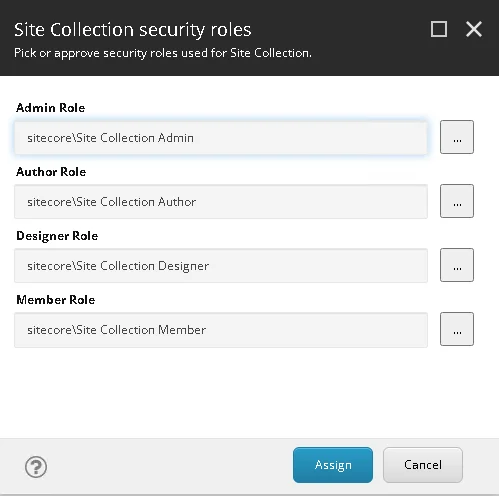
3. In the **Site collection security roles** dialog box:
- To add the default SXA roles, click **Assign**.
- To select a different role, click  and then click **Assign**.
> [!note]
> To clear the domain, or undo the security settings, click the site collection and in the Security section clear the Role domain field.
Set up security for a site
Before you can set up the security for a site, you must set up security for its site collection.
To set up security for a site:
1. Right-click the site, click **Scripts** and then click **Setup Security**.
2. In the **Security domain** dialog box either:
- Click the Sitecore domain, and click **Proceed**.
- Click **Create new domain**, click **Proceed**, enter a domain name, and then click **Create**.
> [!note]
> By default, the domain you selected for the site collection is preselected.
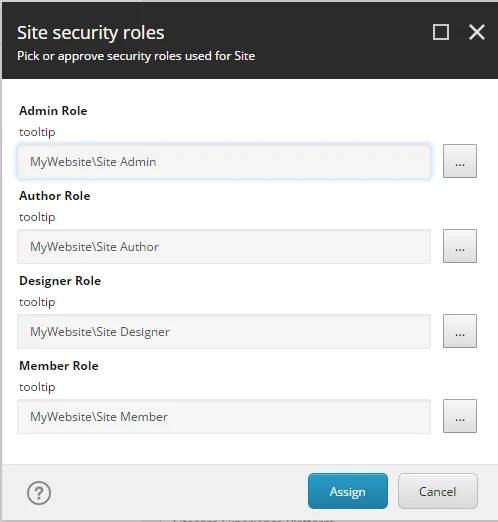
3. In the **Site security roles** dialog box:
- To add the default roles, click **Assign**.
- To select a different role, click  and then click **Assign.**
After you have configured security for your site collection and site, you can create new users and assign them to the Admin, Author, Designer role in the User Manager.
> [!note]
> To clear the domain, or undo the security settings, click the Site and in the Security section clear the Role domain field.