---
title: "Analyzing form performance"
slug: "analyzing-form-performance"
abstract: "View form performance on a form level and on an element level."
---
# Analyzing form performance
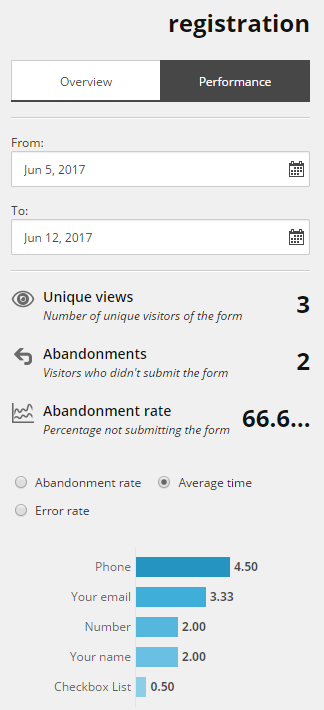
The **Performance** tab in the right pane of the Sitecore Forms dashboard provides information about how visitors interact with your forms. The tab contains a number of fields providing detailed information about a specific form. You can view form performance on a form level and on an element level.
Form performance
The analytics and reporting capabilities of Sitecore Forms enable you to evaluate your forms. On the **Performance** tab, you can see an overview of the performance of your form.
> [!note]
> If you run Sitecore Forms in CMS-only mode, any functionality that depends on data collection will be unavailable and you won't be able to see form results.
You can view:
- Date range – in the **From** and **To** fields, you can set the date range of the performance report that you want to view.
- Unique views – number of unique contacts.
- Abandonments – number of contacts who did not submit the form.
- Abandonment rate – percentage of contacts not submitting the form.
- Abandonment rate, Average time, Error rate – select the radio button to view the performance of the fields on the form.
Form field performance
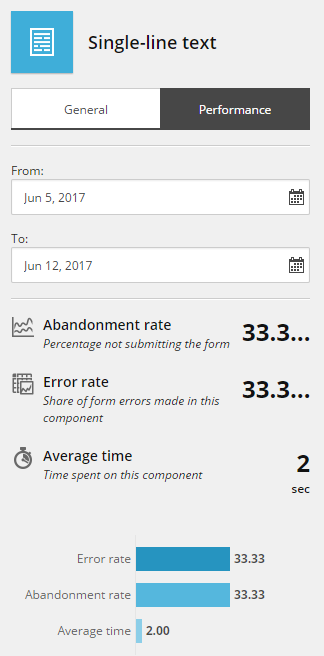
Sitecore Forms also captures the form field events. In this way, you can analyze the performance of a specific field. For example, if a single-line field shows a very high abandonment rate, it might not be clear to contacts what they are supposed to fill in and you could decide to phrase the field text differently.
> [!note]
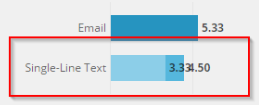
> If your performance report includes overlapping values for the same form element, this is caused by forms using the same field name for multiple instances of the form element.
>
> 
**Date** – use the **From** and **To** fields to set the date range for the performance report that you want to view.
**Abandonment rate** – percentage of contacts that left the form at this field.
**Error rate** – percentage of errors triggered by validation rules.
**Average time** – time spent on this element.
> [!note]
> You can specify whether the data of a specific field item is saved to the database by selecting the Allow save checkbox.