---
title: "Work with relationship definitions"
slug: "work-with-relationship-definitions"
abstract: "How to create and manage relationship definitions."
---
# Work with relationship definitions
The Relationships Definitions business tool enables you to create custom relationships, such as upsell or cross-sell relationships, between catalogs, categories, and sellable items.
> [!note]
> You must be assigned to the Relationship Administrator role to create a relationship definition.
Create a relationship definition
You can create a custom relationship definition to address specific business requirements.
To create a relationship definition:
1. In the left navigation pane, click **Relationship Definitions** to open the Relationship Definitions dashboard.
2. In the **Entities** section of the **Relationship Definitions** dashboard, click a relationship type:
- To create a new relationship definition for a catalog entity, click **Sitecore.Commerce.Plugin.Catalog.Catalog,Sitecore.Commerce.Plugin.Catalog**.
- To create a new relationship definition for a category entity, click **Sitecore.Commerce.Plugin.Catalog.Category,Sitecore.Commerce.Plugin.Catalog**.
- To create a new relationship definition for a category entity, click **Sitecore.Commerce.Plugin.Catalog.SellableItem,Sitecore.Commerce.Plugin.Catalog**.
3. In the **Relationship Definitions** section of the relationship entity details page, click **+**.
4. In the **Add Relationship Definition** dialog box, enter a name and display name. The description is optional.
> [!note]
> Ensure to conform to this [naming convention](https://doc.sitecore.com/xp/en/users/101/sitecore-experience-commerce/work-with-relationship-definitions.html#UUID-67846894-4ed1-a87f-4b2d-09209decc129_section-idm4616737398052831604695833509 "Naming convention for custom relationship definitions") when providing a Name for your custom relationship definition.
5. Select the target type from the **Target Type** drop-down list.
6. If you want a list of related entities to be automatically rendered on the Merchandising dashboard for a catalog, category, or sellable item, choose **Render List Automatically**.
### Naming convention for custom relationship definitions
Relationship definitions based on pre-defined entity types in the Habitat Master catalog (catalog, category, or sellable item entity types) must conform to the naming convention defined in the following table:
> [!note]
> If your Commerce solution implements relationship definitions for Commerce entities other that those listed in the following table, ensure to coordinate with your development team to make [required configuration changes](https://doc.sitecore.com/xp/en/developers/101/sitecore-experience-commerce/sharding-policies.html) in the relevant Commerce Engine policy set.
| Relationship | Source type | Naming convention |
| --- | --- | --- |
| Catalog-to-Category | Sitecore.Commerce.Plugin.Catalog.Category,Sitecore.Commerce.Plugin.Catalog | **Category.*?$*
For example: CatalogToCategory |
| Catalog-to-Sellable Item | Sitecore.Commerce.Plugin.Catalog.SellableItem,Sitecore.Commerce.Plugin.Catalog | **SellableItem.*?$*
For example: CatalogToSellableItem |
| Category-to-Category | Sitecore.Commerce.Plugin.Catalog.Category,Sitecore.Commerce.Plugin.Catalog | **Category.*?$*
For example: CategoryToCategory |
| Category-to-Sellable Item | Sitecore.Commerce.Plugin.Catalog.SellableItem,Sitecore.Commerce.Plugin.Catalog | **SellableItem.*?$*
For example: CategoryToSellableItem |
| Sellable Item-to-Sellable item | Sitecore.Commerce.Plugin.Catalog.SellableItem,Sitecore.Commerce.Plugin.Catalog | **SellableItem.*?$*
For example: SellableItemToSellableItem |
Associate a catalog, category, or sellable item to another entity
You can establish a relationship between a catalog, category, or sellable item and another entity type when a relationship definition exists between the two entity types.
> [!note]
> The following procedure uses an example based on the sample *Habitat\_Master* catalog, and shows how to associate a sellable item with another sellable item, for example, as a related product (using the predefined *RelatedSellableItemToSellableItem* relationship definition).
To associate a catalog entity with another entity:
1. On of the **Merchandising** dashboard, in the **Catalogs** section, click the name of a catalog, for example *Habitat_Master*.
2. Browse to the sellable item, for example, in the **Category** section, click *Departments*, *Phones*, and then in the **Sellable Items** section, click a sellable item, for example *Habitat Nomad 8GB 4G LTE*.
> [!note]
> You cannot change a sellable item that is in the published state. If the entity version is in the *published* state, you must [create a new version](https://doc.sitecore.com/xp/en/users/101/sitecore-experience-commerce/work-with-entity-versions.html "Work with entity versions") of the entity to edit.
3. In the section with the display name of the relationship, for example, in the *RelatedSellableItemToSellableItem* section, click the **Associate** icon and then, in the **Associate Entity** dialog box, **ID** field, type a word from the display name of sellable item you want to associate, and then select it from the list.
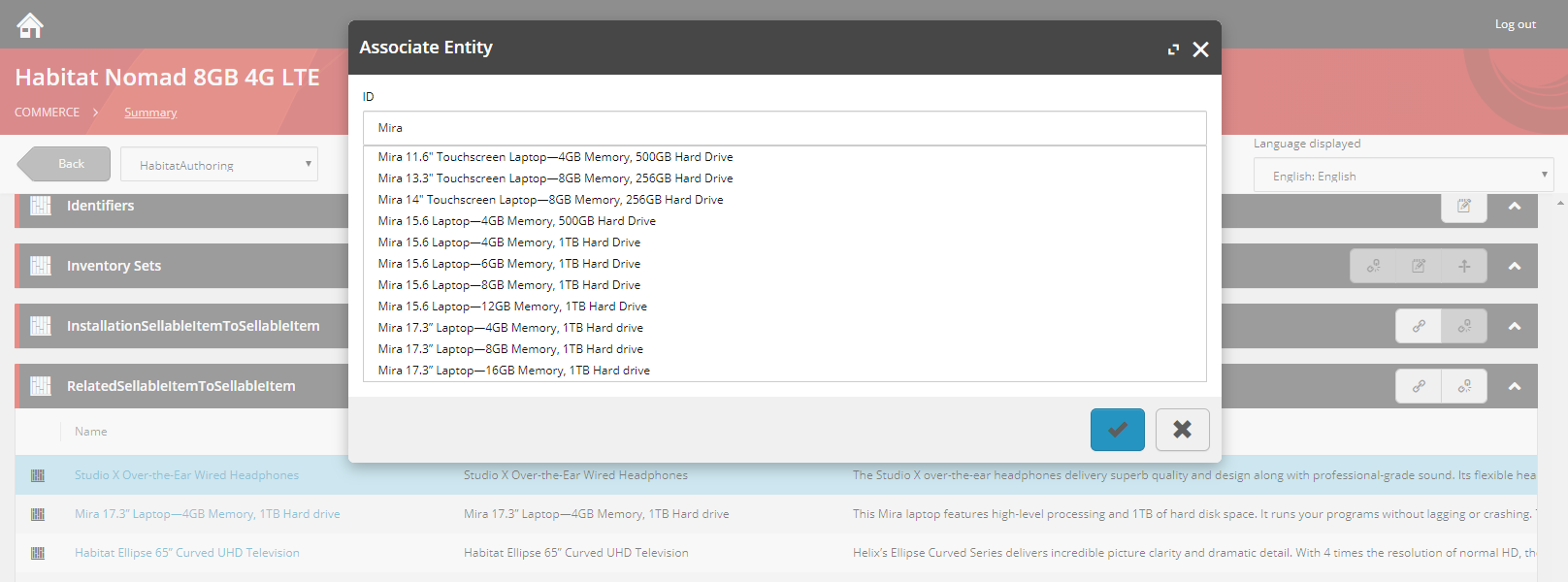
4. Click the check mark to save the association.