---
title: "Edit and delete a form"
slug: "edit-and-delete-a-form"
abstract: "Learn how to change and delete a form."
---
# Edit and delete a form
You use forms to collect information about your website visitors. Sitecore Forms enables you to build a form quickly. You can edit your form at any time. Occasionally, you may want to delete a form.
Edit a form
You can change the name, the form fields, and the styles of a form at any time.
To edit an existing form:
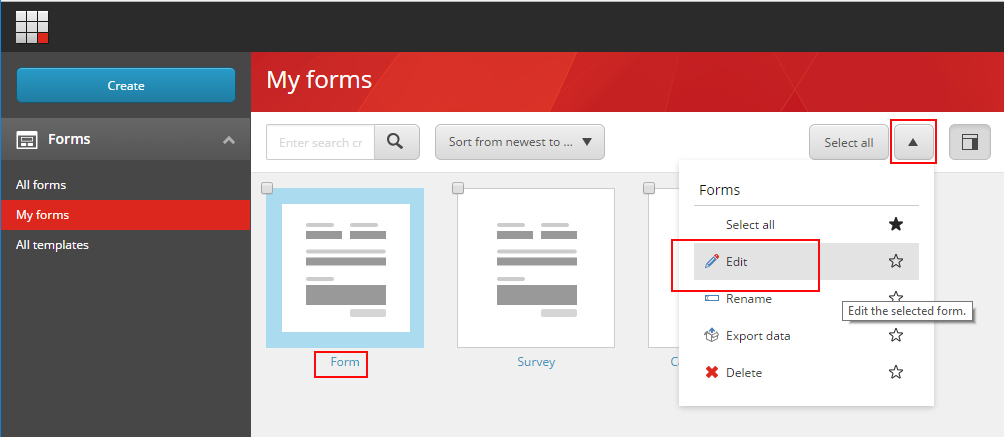
1. On the Forms dashboard, click **All forms** or **My forms**, and click the form that you want to edit.
2. To open the form for editing, either click the title or click the drop-down arrow, and then click **Edit**.
> [!note]
> If you edit a form that is in use on a web page, you must republish the item in Sitecore to see the changes.
Delete a form
Inevitably, you will want to delete a form from time to time.
> [!note]
> You cannot delete a form that is being used or referenced on a web page.
To delete an existing form:
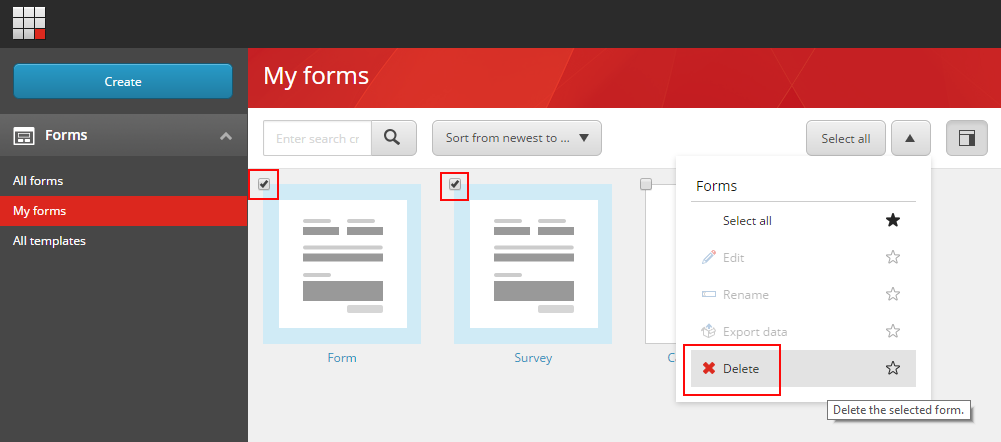
1. On the Forms dashboard, click **All forms** or **My forms**, and click the form that you want to delete.
> [!note]
> To delete several forms at the same time, select the forms that you want to delete in the upper-left corner.
2. Click the drop-down arrow and click **Delete**.
3. In the confirmation message dialog box, click **OK**.