---
title: "Overview of the Sitecore Launchpad"
slug: "overview-of-the-sitecore-launchpad"
abstract: "Overview of the Sitecore Launchpad and the functionality it contains."
---
# Overview of the Sitecore Launchpad
The Sitecore Launchpad is the central location for accessing all Sitecore functionality. You access the Launchpad by clicking the icon in the top left of the application window.
> [!note]
> The features and functions you see on the Sitecore Launchpad depend on the roles and permissions you have been assigned.
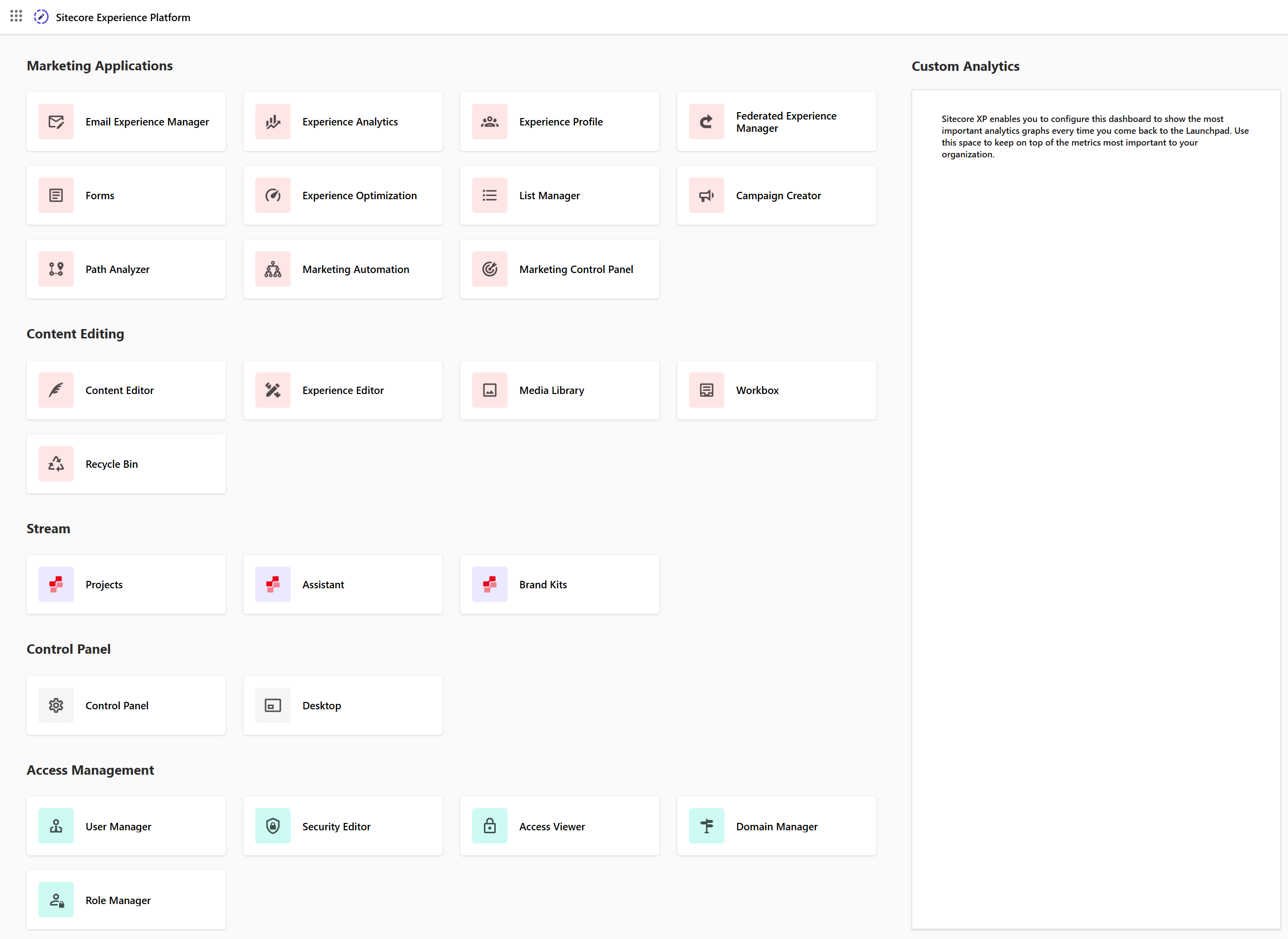
The Sitecore Launchpad is divided into five areas along with the Custom Analytics dashboard. For information about configuring the dashboard to show specific graphics, see [Configuring Experience Analytics reports](https://doc.sitecore.com/xp/en/users/104/sitecore-experience-platform/configuring-experience-analytics-reports.html "Configuring Experience Analytics reports").
Marketing Applications
The Marketing Applications area contains the features and functions that you require for digital marketing. This includes:
- [Email Experience Manager](https://doc.sitecore.com/xp/en/users/exm/104/email-experience-manager/en/introducing-the-email-experience-manager.html)
- [Experience Analytics](https://doc.sitecore.com/xp/en/users/104/sitecore-experience-platform/experience-analytics.html "Experience Analytics")
- [Experience Profile](https://doc.sitecore.com/xp/en/users/104/sitecore-experience-platform/experience-profile.html "Experience Profile")
- [Federated Experience Manager](https://doc.sitecore.com/xp/en/developers/104/sitecore-experience-platform/en/federated-experience-manager.html)
- [Forms](https://doc.sitecore.com/xp/en/users/104/sitecore-experience-platform/sitecore-forms.html "Sitecore Forms")
- [Experience Optimization](https://doc.sitecore.com/xp/en/users/104/sitecore-experience-platform/experience-optimization.html "Experience Optimization")
- [List Manager](https://doc.sitecore.com/xp/en/users/104/sitecore-experience-platform/the-list-manager.html "The List Manager")
- [Campaign Creator](https://doc.sitecore.com/xp/en/users/104/sitecore-experience-platform/the-campaign-creator.html "The Campaign Creator")
- [Path Analyzer](https://doc.sitecore.com/xp/en/users/104/sitecore-experience-platform/the-path-analyzer.html "The Path Analyzer")
- [Marketing Automation](https://doc.sitecore.com/xp/en/users/104/sitecore-experience-platform/marketing-automation.html "Marketing Automation")
- Marketing Control Panel
Content Editing
The Content Editing area contains all the features and functions that you require for [content authoring](https://doc.sitecore.com/xp/en/users/104/sitecore-experience-platform/content-authoring.html "Content authoring") including the [Content Editor](https://doc.sitecore.com/xp/en/users/104/sitecore-experience-platform/the-content-editor.html "The Content Editor"), the [Experience Editor](https://doc.sitecore.com/xp/en/users/104/sitecore-experience-platform/the-experience-editor.html "The Experience Editor"), and the [Media Library](https://doc.sitecore.com/xp/en/users/104/sitecore-experience-platform/the-media-library.html "The Media Library"). You can also access [PowerShell features](https://doc.sitecore.com/xp/en/developers/sxa/104/sitecore-experience-accelerator/en/the-sxa-script-library.html).
Stream
The Stream area contains [Sitecore Stream](https://doc.sitecore.com/stream/en/users/sitecore-stream/en/sitecore-stream.html) features that can be launched from the Sitecore Experience Platform. These include:
- [Projects](urn:resource:component:1710810/section-idm234776919791253)
- [Assistant](urn:resource:component:1710810/section-idm234776919575978)
- [Brand Kits](urn:resource:component:1710810/section-idm234776919466569)
> [!note]
> Projects is available with the Stream Free tier, while Assistant and Brand kits require a Stream Premium subscription. To learn more, contact your Account Manager.
>
> If your organization uses the Stream Free tier, the two Premium features will appear disabled in the Launchpad.
In addition to Stream features, several [AI capabilities](https://doc.sitecore.com/xp/en/users/104/sitecore-experience-platform/ai-in-experience-platform.html "AI in Experience Platform") are built into the Sitecore Experience Platform to help teams accelerate content generation, translation, content and media metadata extraction in both the Content Editor and Experience Editor. You must have the appropriate [AI roles assigned](https://doc.sitecore.com/xp/en/users/104/sitecore-experience-platform/add-or-remove-ai-roles-for-a-user.html "Add or remove AI roles for a user") to use these capabilities.
> [!important]
> To use AI in the Experience Platform, you must have:
>
> - A [Sitecore Stream](https://doc.sitecore.com/stream/en/users/sitecore-stream/en/sitecore-stream.html) subscription. Contact your Account Manager to get started.
>
> - [Sitecore Stream for Platform DXP module installed](https://doc.sitecore.com/xp/en/users/104/sitecore-experience-platform/install-and-configure-sitecore-stream-for-platform-dxp.html "Install and configure Sitecore Stream for Platform DXP").
>
> - Sitecore XM/XP version 10.2 or later.
Control Panel
The Control Panel area contains the Control Panel, which encompasses all [personal settings](https://doc.sitecore.com/xp/en/users/104/sitecore-experience-platform/change-your-personal-settings.html "Change your personal settings"), such as password and regional settings, administration tools, database functions, report features as well as security, [indexing](https://doc.sitecore.com/xp/en/developers/104/platform-administration-and-architecture/en/rebuild-search-indexes.html), and [analytics](https://doc.sitecore.com/xp/en/users/104/sitecore-experience-platform/deploy-marketing-definitions-and-taxonomies.html "Deploy marketing definitions and taxonomies"). You can also access the Sitecore Desktop.
Access Management
The Access Management section contains [security tools](https://doc.sitecore.com/xp/en/developers/104/platform-administration-and-architecture/en/the-security-tools.html) that allow you to manage users, security, domains, and roles.