---
title: "Create and edit a campaign activity"
slug: "create-and-edit-a-campaign-activity"
abstract: "You create campaigns in the Campaign Creator."
---
# Create and edit a campaign activity
In the Sitecore Experience Platform, a campaign is represented by one or more campaign activities.
After you create a campaign activity, you can associate attributes such as campaign groups, channels, and so on, with it. This helps you identify various aspects of the campaign that you can track in Experience Analytics.
This topic outlines how to:
- [Create a campaign activity](https://doc.sitecore.com/xp/en/users/91/sitecore-experience-platform/create-and-edit-a-campaign-activity.html#UUID-fa7cceee-301c-edfb-5609-897252690438_id__Create_a_campaign "Create a campaign activity")
- [Edit an existing campaign activity](https://doc.sitecore.com/xp/en/users/91/sitecore-experience-platform/create-and-edit-a-campaign-activity.html#UUID-fa7cceee-301c-edfb-5609-897252690438_id__Edit_an_existing "Edit an existing campaign activity")
Create a campaign activity
Campaign activities are the individual campaigns that run for a defined amount of time.
To create a campaign activity:
1. On the [Sitecore Launchpad](https://doc.sitecore.com/xp/en/users/91/sitecore-experience-platform/overview-of-the-sitecore-launchpad.html "Overview of the Sitecore Launchpad"), click **Campaign Creator**.
2. On the landing page, click **Create campaign**.
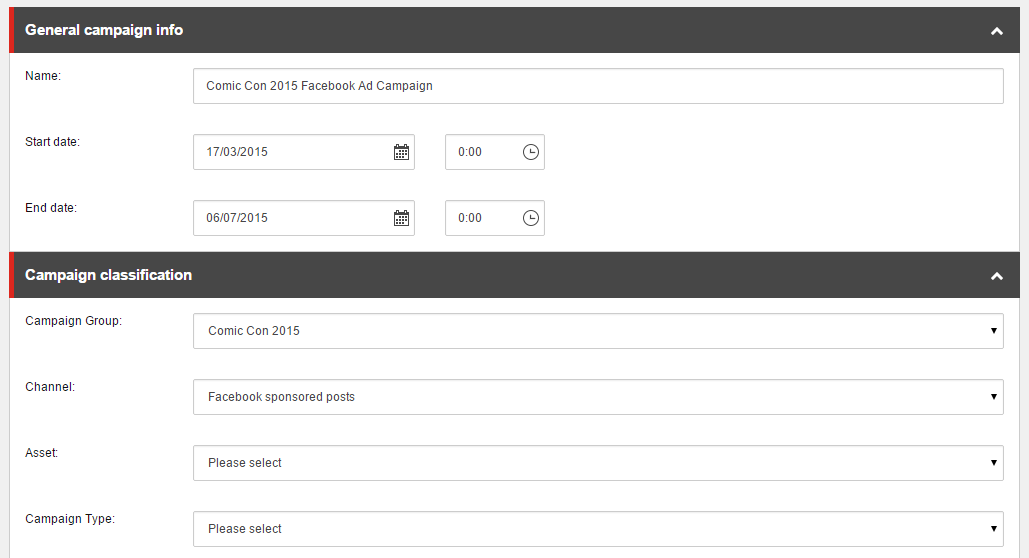
3. In the **General campaign info** section, in the Name field, enter a name for the campaign. To enter start and end dates, click the calendar icon and select a date from the calendar.
4. In the **Campaign classification** section, select the campaign classification attributes that you want to associate with the campaign activity by clicking the drop-down menu next to each attribute.
In this example, the Comic Con 2015 Campaign Group and the Facebook sponsored posts Channel have been added to the campaign activity.
5. Click **Save** to save the campaign activity.
Edit an existing campaign activity
Once you have created a campaign activity, you can edit the campaign's name, start and end dates, or the campaign classification information.
To edit an existing campaign:
1. On the **Campaign Creator** landing page, click the name of the campaign that you want to edit.
2. In the campaign panel, click Campaign activity.
3. On the campaign page, edit the field or fields that you want to change.
4. Click **Save** to save your changes.