---
title: "Configure the Import contacts wizard to include custom contact facets"
slug: "configure-the-import-contacts-wizard-to-include-custom-contact-facets"
abstract: "Configure the import of custom contact data from a CSV file."
---
# Configure the Import contacts wizard to include custom contact facets
In the List Manager, when you import contacts from a CSV file, you can map fields from the imported file to the following default Sitecore fields:
- Identifier
- Identifier source
- Email address
- First name
- Last name

If you need additional Sitecore fields to map the imported file fields to, you can extend the **Import contacts** wizard to include:
- **Predefined contact facets** – the [available predefined contact facets](https://doc.sitecore.com/xp/en/developers/93/sitecore-experience-platform/en/facets.html) that you can add to the **Import contacts** wizard are:
- PersonalInformation
- EmailAddressList
- AddressList
- PhoneNumberList
- ConsentInformation
- ListSubscriptions
- AutomationPlanExit
- AutomationPlanEnrollmentCache
- Avatar
- **New custom contacts facets** – you can [create a custom facet](https://doc.sitecore.com/xp/en/developers/93/sitecore-experience-platform/en/create-a-custom-facet.html) and then update the model configuration to include it in the **Import contacts** wizard.
Add a predefined facet as a mapping field
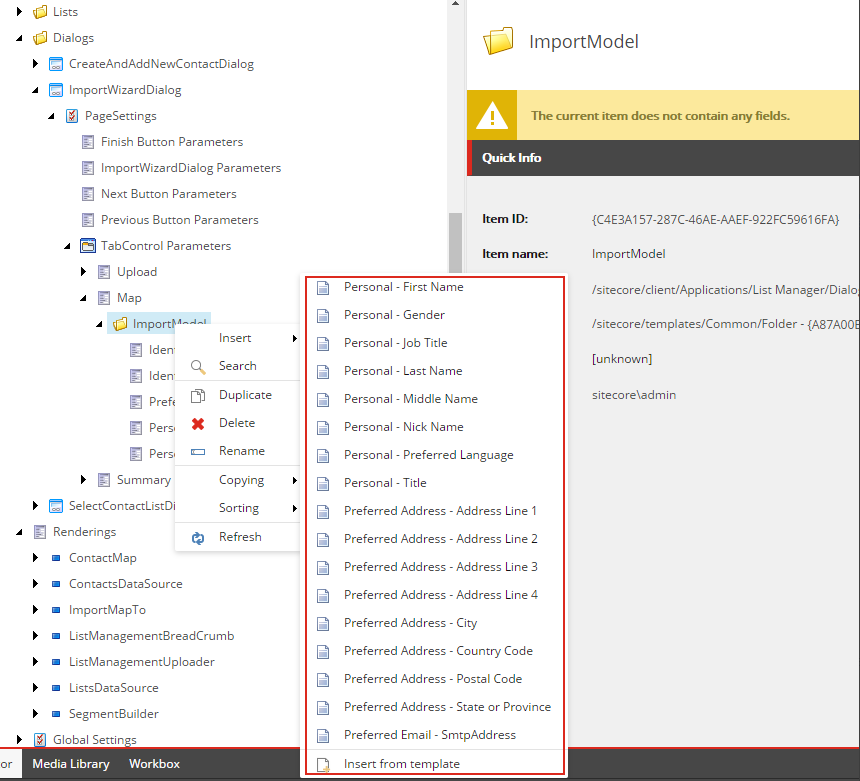
The List Manager provides a list of predefined contact mapping fields. To extend the **Import contacts** wizard, in the Core database, use branches to add one of the available mapping fields.
To add a predefined mapping field:
1. In the Core database, in the Content Editor, navigate to the */sitecore/client/Applications/List Manager/Dialogs/ImportWizardDialog/PageSettings/TabControl Parameters/Map/ImportModel* folder.
2. Right-click the `ImportModel` folder, click **Insert** and then click one of the predefined contact mapping fields.
Add a new facet as a mapping field
To extend the **Import contacts** wizard to display a predefined facet as a Sitecore mapping field, you create a new import model field for the predefined facet in the Content Editor.
To add a new facet as a mapping field:
1. In the Core database, in the Content Editor, navigate to the */sitecore/client/Applications/List Manager/Dialogs/ImportWizardDialog/PageSettings/TabControl Parameters/Map/ImportModel* folder.
2. Create a new Import model field item based on the */sitecore/client/Applications/List Manager/Templates/ImportModelField* template. To do this, in the `ImportModel` folder, duplicate one of the existing items.
3. To modify the new item, in the **FieldName** field, specify the name of the Sitecore mapping field to display in the **Import contacts** wizard.
4. In the **DataField** field, specify the key that the Facet Mapper uses to recognize the xConnect facet property of where to store the imported value. For example, name it *Personal_Suffix* and later use this key to fill the **Suffix** field of the Personal facet:
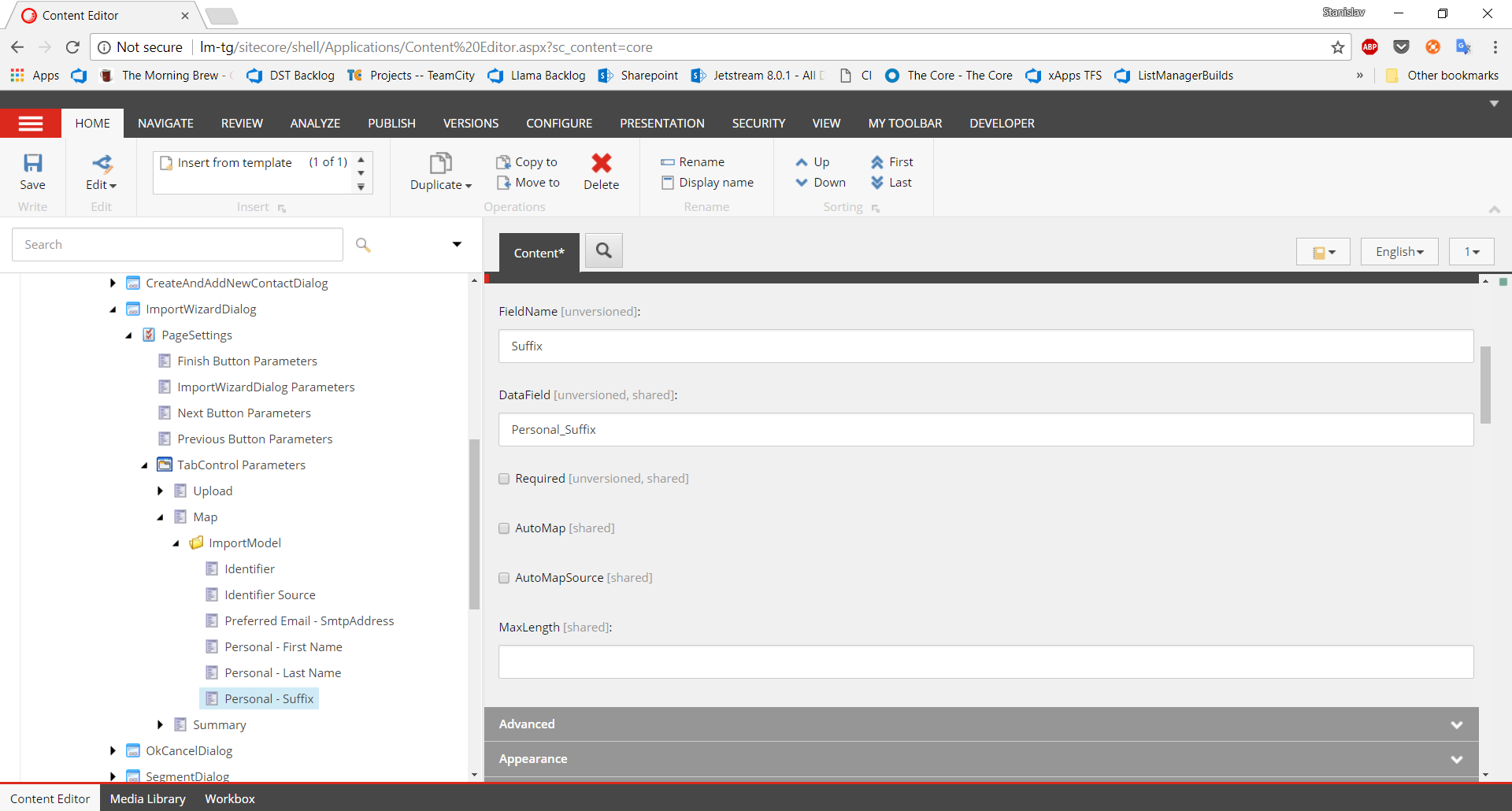
The **Required** field specifies if the field mapping must to be specified on the **Map** tab of the **Import contacts** wizard. This is a UI validation only. If you want to mark a mapping field as required, you must also add the mapping field to the list of required fields in the `Sitecore.ListManagement.config` file, in the `ListManagement.Import.RequiredFields` setting:
```xml
```
> [!note]
> During an import, if a required field is empty, the entire line from the import file is skipped. The default required fields for List Manager are: Identifier, Email, First name, and Last name.
Extend an existing import mapper
The List Manager provides a range of default facet mappers, however, if you want, you can extend these facet mappers. For example, the EmailAddressList facet contains an advanced dictionary of emails called Others.
In the following example, the code sample decorates the existing `PreferredEmailMapper` class to enable you to add personal and work emails to the `EmailAddressList.Others` dictionary.
To extend an existing Import mapper:
1. Create and implement the `ExtendedEmailFacetMapperSample` class to decorate the existing `PreferredEmailFacetMapper` class:
```csharp
public class ExtendedEmailFacetMapperSample : IFacetMapper
{
private readonly PreferredEmailFacetMapper mapper;
// Decorate the existing PreferredEmailMapper
public ExtendedEmailFacetMapperSample(
PreferredEmailFacetMapper mapper)
{
this.mapper = mapper;
}
public MappingResult Map(
string facetKey,
Facet facet,
ContactMappingInfo mappings,
string[] data)
{
// Call the existing email mapper to map all the basic email fields
var result = this.mapper.Map(facetKey, facet, mappings, data);
var facetMappedResult = result as FacetMapped;
if (facetMappedResult == null)
{
return result;
}
var partiallyMappedFacet = facetMappedResult.Facet as EmailAddressList;
if (partiallyMappedFacet == null)
{
return result;
}
// Set Personal email
var personalEmail = mappings.GetValue("Emails_Others_Personal", data);
if (!string.IsNullOrWhiteSpace(personalEmail))
{
partiallyMappedFacet.Others["Personal"] = new EmailAddress(personalEmail, false);
}
// Set Work email
var workEmail = mappings.GetValue("Emails_Others_Work", data);
if (!string.IsNullOrWhiteSpace(workEmail))
{
partiallyMappedFacet.Others["Work"] = new EmailAddress(workEmail, false);
}
return result;
}
}
```
2. Register the facet mapper in the `Sitecore.ListManagement.config` file under the `sitecore/import/facetMapper` section:
```xml
```
Create a new import mapper
If you cannot use any of the existing import mappers, you can create a custom import mapper, for example, a `PreferredAddressFacetMapper`.
To create a new import mapper:
1. Create a new `PreferredAddressFacetMapper` that implements `Sitecore.ListManagement.XConnect.Web.Import.IFacetMapper`:
```csharp
public class PreferredAddressFacetMapper : IFacetMapper
{
public PreferredAddressFacetMapper()
: this(CollectionModel.FacetKeys.AddressList)
{
}
public PreferredAddressFacetMapper(string facetName)
{
Assert.ArgumentNotNull(facetName, nameof(facetName));
this.FacetName = facetName;
}
public string FacetName { get; }
public MappingResult Map(
string facetKey,
Facet source,
ContactMappingInfo mappings,
string[] data)
{
if (facetKey != this.FacetName)
{
return new NoMatch();
}
var preferredAddress = new Address();
var addressLine1 = mappings.GetValue(nameof(preferredAddress.AddressLine1), data);
var addressLine2 = mappings.GetValue(nameof(preferredAddress.AddressLine2), data);
var addressLine3 = mappings.GetValue(nameof(preferredAddress.AddressLine3), data);
var addressLine4 = mappings.GetValue(nameof(preferredAddress.AddressLine4), data);
var city = mappings.GetValue(nameof(preferredAddress.City), data);
var country = mappings.GetValue(nameof(preferredAddress.CountryCode), data);
var postalCode = mappings.GetValue(nameof(preferredAddress.PostalCode), data);
var stateProvince = mappings.GetValue(nameof(preferredAddress.StateOrProvince), data);
if (!string.IsNullOrWhiteSpace(addressLine1)) { preferredAddress.AddressLine1 = addressLine1; }
if (!string.IsNullOrWhiteSpace(addressLine2)) { preferredAddress.AddressLine2 = addressLine1; }
if (!string.IsNullOrWhiteSpace(addressLine3)) { preferredAddress.AddressLine3 = addressLine1; }
if (!string.IsNullOrWhiteSpace(addressLine4)) { preferredAddress.AddressLine4 = addressLine1; }
if (!string.IsNullOrWhiteSpace(city)) { preferredAddress.City = city; }
if (!string.IsNullOrWhiteSpace(country)) { preferredAddress.CountryCode = country; }
if (!string.IsNullOrWhiteSpace(postalCode)) { preferredAddress.PostalCode = postalCode; }
if (!string.IsNullOrWhiteSpace(stateProvince)) { preferredAddress.StateOrProvince = stateProvince; }
var facet = source as AddressList ?? new AddressList(preferredAddress, "Preferred");
return new FacetMapped(facetKey, facet);
}
}
```
2. In the `Sitecore.ListManagement.config` file, under the `sitecore/import/facetMapper` section, register the mapper:
```xml
```
3. In the `Sitecore.ListManagement.config` file, add the `Addresses` facet name to extend the list of facets to map to.
```xml
```
> [!note]
> For this example, the PreferredAddressFacetMapper item in the Content Editor, in the DataField section should contain a key that relates to one of the properties of the `AddressList` facets, for example, `City`, `AddressLine1`, `CountryCode`, and so on.
Display custom fields in contact lists
To display a custom facet in the contact list, you must also [Add a column to the Contacts list](https://doc.sitecore.com/xp/en/users/93/sitecore-experience-platform/add-a-column-to-the-contacts-list.html "Add a column to the Contacts list").