---
title: "Improve page SEO"
slug: "improve-page-seo-624612"
abstract: "To help search engines determine how often to check a page, you can edit the sitemap settings."
---
# Improve page SEO
Everyone wants their site to show up on the first page of a search result. Fortunately, SXA enables you to easily follow the best practices for search engine optimization (SEO) and improve the way your site is ranked in search results.
This topic outlines how to:
Edit page SEO information
Although search engine ranking is continuously evolving, the secret to a good ranking is to make pages relevant. Search engines use your page titles, image captions, and keywords when ranking pages and therefore it is important that you use meaningful, descriptive, and relevant words for these fields. With SXA, you can edit the metadata for your pages in the Experience Editor.
To edit the SEO information of a page:
1. In the Experience Editor, go to the page you want to improve.
2. On the ribbon, on the **Experience Accelerator** tab, click **SEO**.
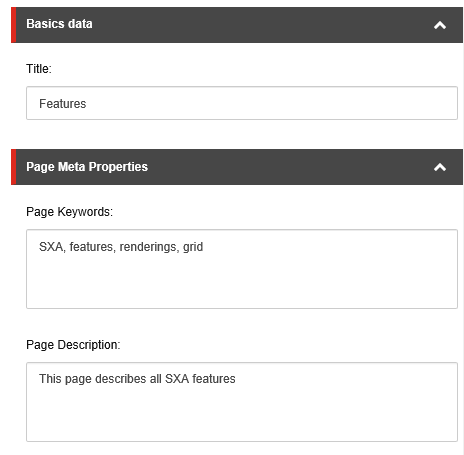
3. In the dialog box, edit the page title, page keywords, and page description.
4. Click **OK**.
Prioritize a page in the search engine sitemap
To help search engines determine how often to check a specific page on your site, you can change the priority and frequency settings for each page individually. You can indicate how often you update the page and how important the page is compared to the rest of your site. For example, a homepage changes daily, a blog post changes weekly, and an archived post changes yearly.
To configure sitemap behavior for a specific page:
1. In the Experience Editor, go to the page that you want to edit.
2. On the ribbon, on the **Experience Accelerator** tab, click **SEO**.
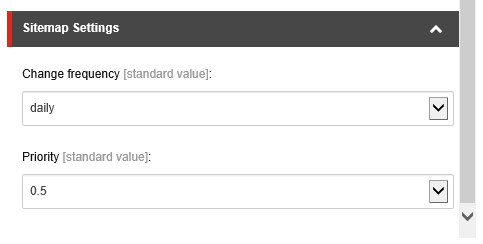
3. In the dialog box, in the **Sitemap Settings** section, in the **Change frequency** field, specify how often the page changes its content.
> [!note]
> If you want to exclude a page from the sitemap, set the Change Frequency to do not include.
4. In the **Priority** field, specify a number between 0.1 and 1.0 (with 0.1 being the lowest and 1.0 the highest) to indicate the importance of the page.
5. Click **OK** and then publish the page to update the sitemap.