---
title: "ウォークスルー:カスタムインデックスフィールドハンドラーを作成する"
slug: "walkthrough--create-a-custom-index-field-handler"
abstract: "デフォルトのSearchプラグインが新しいインデックスフィールドに適したハンドラタイプを提供していない場合、カスタムフィールドハンドラクラスの作成方法について。"
---
# ウォークスルー:カスタムインデックスフィールドハンドラーを作成する
デフォルトのSearchプラグインが新しいフィールドに合ったハンドラータイプを提供していない場合、カスタムフィールドハンドラークラスを作成できます。
このウォークスルーでは、以下の方法を説明します:
- 新しいフィールドをインデックスするために新しいフィールドハンドラを作成します。
- 新しいフィールドをCE Connect検索プロバイダーの設定に追加し、Sitecoreで検索可能にします。
## 新しいフィールドをインデックスするための新しいフィールドハンドラーを作成する
カスタムインデックスフィールド用の新しいフィールドハンドラを作成するには:
> !注現在の検索フィールドハンドラのアーキテクチャでは、パイプラインやコマンドのインスタンスを解決する機能がありません。ハンドラーがコンテキストに必要とする値を追加しなければなりません。
1. Sitecoreから継承するクラスを作成します [。Commerce.Plugin.Search。AbstractIndexFieldHandler](https://doc.sitecore.com/xp/ja/developers/101/sitecore-experience-commerce/the-sitecore-commerce-plugin-search-abstractindexfieldhandler-class.html "The Sitecore.Commerce.Plugin.Search.AbstractIndexFieldHandler class")クラスを使い、以下の例のようにComposeValueメソッドを実装します。
public class CustomFieldHandler : AbstractIndexFieldHandler
{
///
public override object ComposeValue(object source, ConcurrentDictionary context)
{
if (context == null || source == null || !(source is CatalogItemBase entity))
{
return null;
}
return $"Custom field handler value: {entity.Id}";
}
}
2. カスタムフィールドハンドラを検索インデックスに登録するには、展開で使用している検索プロバイダーの検索ポリシーセットに追加する必要があります。Solr(PlugIn.Search.Solr.PolicySet-1.0.0.json)のポリシーセットには、Sitecore.Commerce.Plugin.Search.ItemIndexablePolicy, Sitecore.Commerce.Plugin.Search型の2つのポリシーが含まれています。これらのポリシーは、接続されたSitecore XPサイトのマスターデータベースとWebデータベースを表します。両方のインデックスの “Fields” コレクションにカスタムフィールドハンドラーを追加し、新しいハンドラを登録し、コンテンツがマスターデータベースとWebデータベースの両方でインデックスされていることを確認します。
以下は、PlugIn.Search.Solr.PolicySet-1.0.0.jsonファイルに追加されたカスタムSolrフィールドハンドラー("Company.Project.Search.CustomFieldHandler, Company.Project")の例を示しています。
{
"$type": "Sitecore.Commerce.Plugin.Search.ItemIndexablePolicy,
Sitecore.Commerce.Plugin.Search",
"IndexName": "sitecore\_web\_index",
"FieldTypeMappers":
…
,
"Fields":
{
"$type":
"Sitecore.Commerce.Plugin.Search.Solr.SolrIndexFieldConfiguration,
Sitecore.Commerce.Plugin.Search.Solr",
"Name":
"customfield",
"Type":
"System.String",
"Handler": {
"$type": "Company.Project.Search.CustomFieldHandler, Company.Project"
}
}
}
3. 設定変更後、[Commerce Engine環境をブートストラップして](https://doc.sitecore.com/xp/ja/developers/101/sitecore-experience-commerce/bootstrap-the-commerce-engine.html "Bootstrap the Commerce Engine") 変更を適用してください。
4. IISマネージャー Microsoft、Commerce Engineのミニオンサービス(*CommerceMinions\_Sc*)を再起動してください。
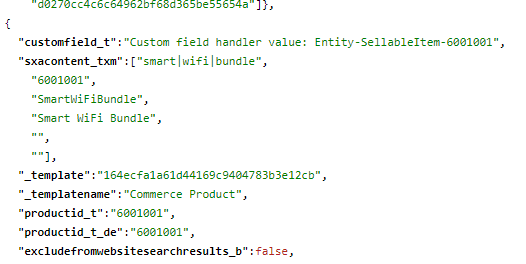
5. [インデックスSitecore XP手動で再構築します](https://doc.sitecore.com/xp/ja/developers/101/sitecore-experience-commerce/manually-rebuild-sitecore-xp-indexes.html "Manually rebuild Sitecore XP indexes")。インデックスを再構築した後、新しい検索ハンドラが検索インデックス上で確認されます。以下の例に示されています:
## CE Connect検索プロバイダー設定に新しいフィールドを追加する
新しいフィールドをSitecoreで検索可能にするには、CE Connectの検索プロバイダー設定に追加する必要があります。
CE Connectの検索プロバイダー設定に新しいフィールドを追加するには:
1. Sitecoreサービスインスタンスの \\App\_Config\\Include\\Y.Commerce.Engineフォルダで検索プロバイダーの設定ファイルを開きます。例えば、Sorlの場合はSitecore.Commerce.Engine.Connectors.Index.Solr.configファイルを開いてください。
2. FieldMapセクションで新しいfieldName定義を追加します。次の例では、"customfield"という新しいフィールドを追加します。
3. 変更を保存して [、Commerce Engineをブートストラップしてください](https://doc.sitecore.com/xp/ja/developers/101/sitecore-experience-commerce/bootstrap-the-commerce-engine.html "Bootstrap the Commerce Engine")。