---
title: "オーダーラインレンダリングのカスタマイズ"
slug: "customizing-the-order-lines-rendering"
abstract: "Order LinesレンダリングScribanテンプレートの概要。"
---
# オーダーラインレンダリングのカスタマイズ

[Order Lines](https://doc.sitecore.com/xp/en/users/100/sitecore-experience-commerce/commerce-orders-renderings.html)レンダリングには[Scriban](https://doc.sitecore.com/xp/ja/developers/102/sitecore-experience-commerce/working-with-scriban-templates.html "Working with Scriban templates")テンプレートというレンダリングバリアントが含まれています。Order Linesレンダリングには独自のデフォルトレンダリング[バリアントrootとデフォルトレンダリングバリアント](https://doc.sitecore.com/xp/en/users/93/sitecore-experience-commerce/en/using-rendering-variants-to-display-product-information.html)(*/sitecore/Content///Presentation/Rendering Variants/Order Lines*)があり、マークアップを生成するためにScribanテンプレートを使用します。Scribanテンプレートを変更することは可能ですが、ソフトウェアのアップグレード時にカスタマイズが上書きされないように、新しいカスタムレンダリングバリアントを作成するのが最善です。レンダリングの[ラベルを変更する](https://doc.sitecore.com/xp/ja/developers/102/sitecore-experience-commerce/modify-a-label-for-a-rendering-that-uses-a-scriban-template.html "Modify a label for a rendering that uses a Scriban template")ことも可能です。

> !note The Order Lines - 廃止されたレンダリングは既存サイトのみで利用可能で、レンダリングバリアントのScribanテンプレートではなくMVCビューに基づいています。

以下のコードは、デフォルトのレンダリングバリアント内で定義されたOrder LinesレンダリングのScribanテンプレートを示しています。製品名、バリアント情報、納品情報はMVCモデルに渡され、レンダリングバリアントや埋め込みアイテムo\_model(/xp/en/developers/sxa/100/sitecore-experience-accelerator/en/the-embedded-functions-for-the-scriban-template.html)を用いるScribanテンプレートで利用可能です。

{{ # Error message area }}
{{if o\_model.error\_message}}
<div class="error-message">
 {{ o\_model.error\_message }}
</div>
{{ # If there is no error, order lines will be rendered }}
{{ else }}
<div class="order-lines">
 {{ # Order lines header label }}
 <div class="order-lines-header">
 <h3 title="{{ o\_model.your\_products\_header\_tooltip }}">
 {{ sc\_field i\_datasource "Order Lines Header Label" }}
 </h3>
 </div>

 {{ # Order lines header, contains the column titles }}
 <div class="orderlines-header">
 <div class="orderlines-header-productdetails">
 {{ sc\_field i\_datasource "Product Details Label" }}
 </div>
 <div class="orderlines-header-unitprice">
 {{ sc\_field i\_datasource "Unit Price Label" }}
 </div>
 <div class="orderlines-header-quantity product-quantity-header">
 {{ sc\_field i\_datasource "Quantity Label" }}
 </div>
 <div class="orderlines-header-total line-total-header">
 {{ sc\_field i\_datasource "Total Label" }}
 </div>
 </div>

 {{ # Order lines body, the following <div> will render all the order lines }}
 <div class="orderlines-body">
 {{ # Loop through all the lines }}
 {{ for orderLine in o\_model.lines }}
 <div class="orderlines-item {{ if orderLine.is\_free\_gift }}freegift-item{{ end }}">
 <div class="orderlines-item-details">
 {{ # The following <div> contains the product name, variant information and delivery information }}
 <div class="orderlines-item-productdetails">
 {{ # The free gift label is rendered if the order line IsFreeGift property is true }}
 {{ if orderLine.is\_free\_gift }}
 <div class="orderlines-freegifttext">
 <span>{{ sc\_field i\_datasource "Free Gift Label" }}</span>
 </div>
 {{ end }}
 <div class="product-image">
 <img src="https://doc.sitecore.com/api/markdown-image/xp/ja/developers/102/sitecore-experience-commerce/%7B%7B%20orderLine.product/_master/_image%20|%20sc/_imagelink%20110%20110%20%7D%7D" />
 </div>
 <div class="orderlines-info">
 <a href="https://doc.sitecore.com/xp/ja/developers/102/sitecore-experience-commerce/%7B%7B%20orderLine.product/_url%20%7D%7D">
 <h4 class="product-name">{{ orderLine.product\_display\_name }}</h4>
 </a>

 {{ # The following <div> contains the product variant information }}
 <div class="product-variants">
 {{ for property in orderLine.properties }}
 <div class="product-variant">
 <span class="variant-label">
 {{
 if (object.has\_key o\_model.variant\_labels property.key)
 o\_model.variant\_labelsproperty.key
 else
 property.key
 end
 }}
 </span>
 <span class="variant-information">
 {{ property.value }}
 </span>
 </div>
 {{ end }}
 </div>

 {{ # The following <p> contains the delivery method information }}
 {{ if orderLine.shipping\_method\_name }}
 <p class="orderlines-delivery">
 <span>
 {{ sc\_field i\_datasource "Order Lines Delivery Label" }}:
 </span>
 <span class="shippingMethodName">
 {{ orderLine.shipping\_method\_name }}
 </span>
 </p>
 {{ end }}

 {{ # The following <div> contains the delivery address information }}
 {{ if orderLine.address }}
 <div class="orderlines-delivery-address">
 <span class="address-label">{{ sc\_field i\_datasource "Order Lines Address Label" }}:</span>
 <ul class="lineShippingAddress">
 <li>
 <span class="lineShippingAddressLine">
 {{ orderLine.address.address1 }},
 </span>
 <span class="lineShippingAddressCity">
 {{ orderLine.address.city }}
 </span>
 </li>
 <li>
 <span class="lineShippingAddressState">
 {{ orderLine.address.state }},
 </span>
 <span class="lineShippingAddressZipCode">
 {{ orderLine.address.zip\_postal\_code }},
 </span>
 <span class="lineShippingAddressCountry">
 {{ orderLine.address.country }}
 </span>
 </li>
 </ul>
 </div>

 {{ # The following <p> contains the electronic delivery email address information }}
 {{ if orderLine.electronic\_delivery\_email }}
 <p class="orderlines-email">{{ orderLine.electronic\_delivery\_email }}</p>
 {{ end }}
 {{ end }}
 </div>
 </div>

 {{ # The following <div> contains the unit price and discount offers applied }}
 {{ if !orderLine.is\_free\_gift }}
 <div class="orderlines-item-price unit-price">
 <span class="price-amount">{{ orderLine.price\_text }}</span>
 {{ if orderLine.discount\_offer\_names.size > 0 }}
 <span class="discount-details">
 <span>{{ sc\_field i\_datasource "Order Lines Discount Label" }}: </span>
 <span class="savings">{{ orderLine.discount\_offer\_names | array.join ", " }}</span>
 </span>
 {{ end }}
 </div>
 {{ end }}

 {{ # The following <div> contains the product quantity }}
 <div class="orderlines-item-quantity product-quantity">
 {{ orderLine.quantity\_text }}
 </div>

 {{ # The following <div> contains the total price and discount amount }}
 <div class="orderlines-item-total line-total">
 <h4 class="total-amount">{{ orderLine.total\_text }}</h4>
 {{ # If the order line is free gift, show the original price, otherwise show the discount }}
 {{ if orderLine.is\_free\_gift }}
 <span class="orderlines-freegiftlistprice">{{ orderLine.price\_text }}</span>
 {{ else if orderLine.line\_discount > 0 }}
 <span class="savings">
 <span>{{ sc\_field i\_datasource "Order Lines Discount Label" }} </span>
 <span class="discount">{{ orderLine.line\_discount\_text }}</span>
 </span>
 {{ end }}
 </div>
 </div>
 {{ # Item sublines, contains the sublines for the current product }}
 {{ if orderLine.sub\_lines }}
 <div class="orderlines-item-sublines">
 {{ # Loop through all the sublines }}
 {{ for subLine in orderLine.sub\_lines }}
 <div class="orderlines-subline-item">
 {{ # Placeholder for blank space }}
 <div class="orderlines-subline-image-space"></div>
 {{ # The following <div> contains the subline product image }}
 <div class="product-image">
 <a href="https://doc.sitecore.com/xp/ja/developers/102/sitecore-experience-commerce/%7B%7B%20subLine.product/_url%20%7D%7D">
 <img src="https://doc.sitecore.com/api/markdown-image/xp/ja/developers/102/sitecore-experience-commerce/%7B%7B%20subLine.product/_master/_image%20|%20sc/_imagelink%20110%20110%20%7D%7D" />
 </a>
 </div>
 {{ # The following <div> contains the subline product name and variant information }}
 <div class="orderlines-info">
 <a href="https://doc.sitecore.com/xp/ja/developers/102/sitecore-experience-commerce/%7B%7B%20subLine.product/_url%20%7D%7D">
 <h4 class="product-name">{{ subLine.product\_display\_name }}</h4>
 </a>
 <div class="product-variants">
 {{ for property in subLine.properties }}
 <div class="product-variant">
 <span class="variant-label">
 {{
 if (object.has\_key o\_model.variant\_labels property.key)
 o\_model.variant\_labelsproperty.key
 else
 property.key
 end
 }}
 </span>
 <span class="variant-information">
 {{ property.value }}
 </span>
 </div>
 {{ end }}
 </div>
 </div>
 {{ # The following <div> contains the subline product quantity }}
 <div class="product-quantity">
 {{ subLine.quantity\_text }}
 </div>
 {{ # Placeholder for blank space }}
 <div class="orderlines-subline-total-space"></div>
 </div>
 {{ end }}
 </div>
 {{ end }}
 </div>
 {{ end }}
 </div>
</div>
{{ end }}

## 順序線レンダリングモデル

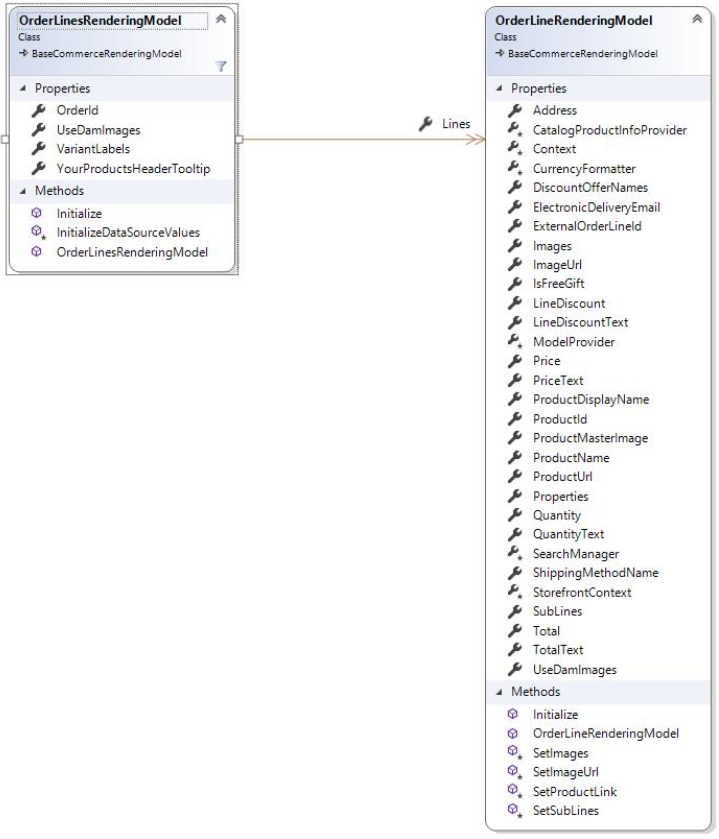
Order Lines Scribanテンプレートでは、埋め込みアイテムo\_modelを通じてOrderlinesRenderingModelモデルに含まれるプロパティやオブジェクトにアクセスできます。Order Linesレンダリングモデルは以下の図に示されています。
![Diagram of the Order Lines rendering model](https://doc.sitecore.com/api/markdown-image/xp/ja/developers/102/sitecore-experience-commerce/images/OrderLinesRenderingModel.png)