---
title: "ショッピングカートラインレンダリングのカスタマイズ"
slug: "customizing-the-shopping-cart-lines-rendering"
abstract: "ショッピングカートラインレンダリングScribanテンプレートの概要。"
---
# ショッピングカートラインレンダリングのカスタマイズ

[ショッピングカートライン](https://doc.sitecore.com/xp/en/users/100/sitecore-experience-commerce/commerce-cart-renderings.html)レンダリングには[、Scriban](https://doc.sitecore.com/xp/ja/developers/102/sitecore-experience-commerce/working-with-scriban-templates.html "Working with Scriban templates")テンプレートというレンダリングバリアントが含まれています。ショッピングカートラインレンダリングには独自のデフォルト[レンダリングバリアントrootとデフォルトレンダリングバリアント](https://doc.sitecore.com/xp/en/users/93/sitecore-experience-commerce/en/using-rendering-variants-to-display-product-information.html)(*/sitecore/Content///Presentation/Rendering Variants/Shopping Cart Lines*)があり、マークアップを生成するためにScribanテンプレートを使用します。Scribanテンプレートを変更することは可能ですが、ソフトウェアアップグレード時にカスタマイズが上書きされないように、新しいカスタムレンダリングバリアントを作成するのが最善です。また、関連するデータソース項目のレンダリングラベル[を変更する](https://doc.sitecore.com/xp/ja/developers/102/sitecore-experience-commerce/modify-a-label-for-a-rendering-that-uses-a-scriban-template.html "Modify a label for a rendering that uses a Scriban template")ことも可能です。

> !注ショッピングカートライン - 廃止されたレンダリングは既存サイトのみで利用可能で、Scribanテンプレートの代わりに標準ビューとコードバインドを使用しています。

以下のコードは、デフォルトのレンダリングバリアント内で定義されたショッピングカートラインレンダリング用のScribanテンプレートを示しています。ビューコンテンツ(ラベルテキストなど)はMVCモデルに渡され、Scribanコンテキスト内の埋め込みオブジェクトo\_model(/xp/en/developers/sxa/100/sitecore-experience-accelerator/en/the-embedded-items-and-objects-in-the-scriban-context.html) として利用可能です。一方、製品情報(製品詳細、単価、在庫など)はフロントエンドのKnockoutバインディングとAJAX呼び出しを使って入力されます。

{{ # Error message area }}
{{if o\_model.error\_message}}
<div class="error-message">
 {{ o\_model.error\_message }}
</div>
{{ # If there is no error, cart lines will be rendered }}
{{ else }}
<div class="shopping-cart-lines" data-bind="with: cart, visible: isVisible" style="display: none;">
 {{ # Cart lines header, contains the columns titles }}
 {{ if o\_model.display\_table\_header }}
 <div class="shoppingcart-header">
 <div title="{{ o\_model.product\_details\_tooltip }}" class="shoppingcart-header-productdetails">
 {{ sc\_field i\_datasource 'Product Details Label' }}
 </div>
 {{ if o\_model.display\_unit\_price\_column }}
 <div title="{{ o\_model.unit\_price\_tooltip }}" class="shoppingcart-header-unitprice">
 {{ sc\_field i\_datasource 'Unit Price Label' }}
 </div>
 {{ end }}
 {{ if o\_model.display\_quantity\_column }}
 <div title="{{ o\_model.quantity\_tooltip }}" class="shoppingcart-header-quantity">
 {{ sc\_field i\_datasource 'Quantity Label' }}
 </div>
 {{ end }}
 <div title="{{ o\_model.product\_total\_tooltip }}" class="shoppingcart-header-total">
 {{ sc\_field i\_datasource 'Total Label' }}
 </div>
 {{ if o\_model.display\_delete\_button\_column }}
 <div class="shoppingcart-header-delete">&nbsp;</div>
 {{ end }}
 </div>
 {{ end }}
 {{ # Cart lines body, the following <div> will render all the cart lines with respect to the configurations on the component properties }}
 <div class="shoppingcart-body" data-bind="foreach: cartLines">
 <div class="shoppingcart-item">
 <div class="shoppingcart-item-details">
 <div class="shoppingcart-item-productdetails">
 <div class="shoppingcart-freegifttext" data-bind="visible: isFreeGift">
 <span>{{ sc\_raw i\_datasource 'Free Gift Label' }}</span>
 </div>
 <div class="shoppingcart-image">
 <a data-bind="attr: { href: productUrl }">
 <img data-bind="attr: { src: image }" alt="" pid="image" />
 </a>
 </div>
 <div class="shoppingcart-info">
 <a data-bind="attr: { href: productUrl }">
 <h5 class="displayName" data-bind="text: displayName"></h5>
 </a>
 <div class="product-variant-information" data-bind="foreach: properties">
 <div class="variant-information">
 <span class="variant-label" data-bind="text: label"></span>
 <span class="variant-value" data-bind="text: value"></span>
 </div>
 </div>
 {{ # If the Display Shipping Information configuration on the component properties is enabled, the following section renders the cart line shipping information }}
 {{ if o\_model.display\_shipping\_information }}
 <p class="shoppingcart-delivery" data-bind="if: shippingMethodName">
 <span>{{ sc\_raw i\_datasource 'Delivery Label' }}</span>
 <span class="shippingMethodName" data-bind="text: shippingMethodName"></span>
 </p>
 <div class="shoppingcart-delivery" data-bind="if: address">
 <span>{{ sc\_raw i\_datasource 'Address Label' }}</span>
 <ul class="lineShippingAddress">
 <li>
 <span data-bind="text: address.Address1"></span>
 <span data-bind="text: address.City"></span>
 </li>
 <li>
 <span data-bind="text: address.State"></span>
 <span data-bind="text: address.ZipPostalCode"></span>
 </li>
 <li>
 <span data-bind="text: address.Country"></span>
 </li>
 </ul>
 </div>
 {{ end }}
 </div>
 </div>

 {{ # If the Display Unit Price configuration on the component properties is enabled, the following section renders the cart line unit price information }}
 {{ if o\_model.display\_unit\_price\_column }}
 <div class="shoppingcart-price" data-bind="visible: !isFreeGift">
 <span class="price" data-bind="text: linePrice"></span>
 <p data-bind="visible: discountOfferNames.length > 0">
 <span>{{ sc\_raw i\_datasource 'Discount Label' }}</span>
 <span data-bind="text: discountOfferNames" class="shoppingcart-saving"></span>
 </p>
 </div>
 {{ end }}

 {{ # If the Display Quantity configuration on the component properties is enabled, the following section renders the cart line quantity information }}
 {{ if o\_model.display\_quantity\_column }}
 <div class="shoppingcart-quantity">
 <div class="numeric-input-group" data-bind="visible: !isFreeGift">
 <button class="decrease"
 data-bind="event: { click: $parents1.decreaseQuantity }, disable: $parents1.quantityUpdating"
 style="display: none"></button>
 <input class="quantity" min="1" type="number" placeholder="1"
 data-bind="event: { change: $parents1.updateQuantity }, value: quantity, valueUpdate: 'input', fireChange:true, attr: {'data-ajax-lineitemid': externalCartLineId}, disable: $parents1.quantityUpdating">
 <button class="increase"
 data-bind="event: { click: $parents1.increaseQuantity } , disable: $parents1.quantityUpdating"
 style="display: none"></button>
 </div>
 <div class="display-quantity" data-bind="visible: isFreeGift">
 <span>{{ sc\_raw i\_datasource 'Quantity Label' }}: </span>
 <span class="quantity" data-bind="text: quantity"></span>
 </div>
 </div>
 {{ end }}
 {{ # The following section renders the line total }}
 <div class="shoppingcart-total">
 <span class="total" data-bind="text: lineTotal"></span>
 <p data-bind="visible: discountOfferNames.length > 0 && !isFreeGift">
 <span>{{ sc\_raw i\_datasource 'Savings Label' }}</span>
 <span data-bind="text: lineItemDiscount" class="shoppingcart-total-saving"></span>
 </p>
 <span class="shoppingcart-freegiftlistprice" data-bind="text: linePrice, visible: isFreeGift"></span>
 </div>
 {{ # If the Display Delete Button configuration on the component properties is enabled, the following section renders the cart line delete button information }}
 {{ if o\_model.display\_delete\_button\_column }}
 <div class="shoppingcart-delete">
 <a class="remove-line" data-bind="attr: {'data-ajax-lineitemid': externalCartLineId}">
 <span data-bind="click: $parents1.removeItem"></span>
 </a>
 </div>
 {{ end }}
 </div>
 {{ # If the Display Sublines configuration on the component properties is enabled, the following section renders the cart line sublines information }}
 {{ if o\_model.display\_sub\_lines }}
 <div class="shoppingcart-item-sublines" data-bind="foreach: sublines, visible: sublines().length > 0">
 <div class="shoppingcart-subline-item">
 <div class="shoppingcart-subline-image-space"></div>
 <div class="shoppingcart-image">
 <a data-bind="attr: { href: productUrl }">
 <img data-bind="attr: { src: image }" alt="" pid="image" />
 </a>
 </div>
 <div class="shoppingcart-info">
 <a data-bind="attr: { href: productUrl }">
 <h5 class="displayName" data-bind="text: displayName"></h5>
 </a>
 <div class="product-variant-information" data-bind="foreach: properties">
 <div class="variant-information">
 <span class="variant-label" data-bind="text: label"></span>
 <span class="variant-value" data-bind="text: value"></span>
 </div>
 </div>
 </div>
 {{ if o\_model.display\_quantity\_column }}
 <div class="shoppingcart-quantity">
 <span>{{ sc\_raw i\_datasource 'Quantity Label' }}: </span>
 <span class="quantity" data-bind="text: quantity"></span>
 </div>
 {{ end }}
 <div class="shoppingcart-subline-total-space"></div>
 {{ if o\_model.display\_delete\_button\_column }}
 <div class="shoppingcart-subline-delete-space"></div>
 {{ end }}
 </div>
 </div>
 {{ end }}
 </div>
 </div>
</div>
{{ end }}

## ショッピングカートラインレンダリングモデル

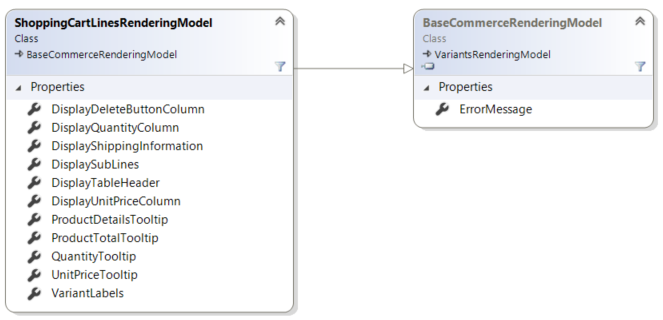
ショッピングカートラインのスクリバンテンプレートでは、埋め込まれたアイテムo\_modelを通じてShoppingCartLinesRenderingModelモデルに含まれるプロパティやオブジェクトにアクセスできます。ショッピングカートラインレンダリングモデルのクラス図は以下の図に示されています。
![Diagram of the Shopping Cart Lines rendering model](https://doc.sitecore.com/api/markdown-image/xp/ja/developers/102/sitecore-experience-commerce/images/ShoppingCartLinesRenderingModel.png)

## ショッピングカートラインのコールシーケンス

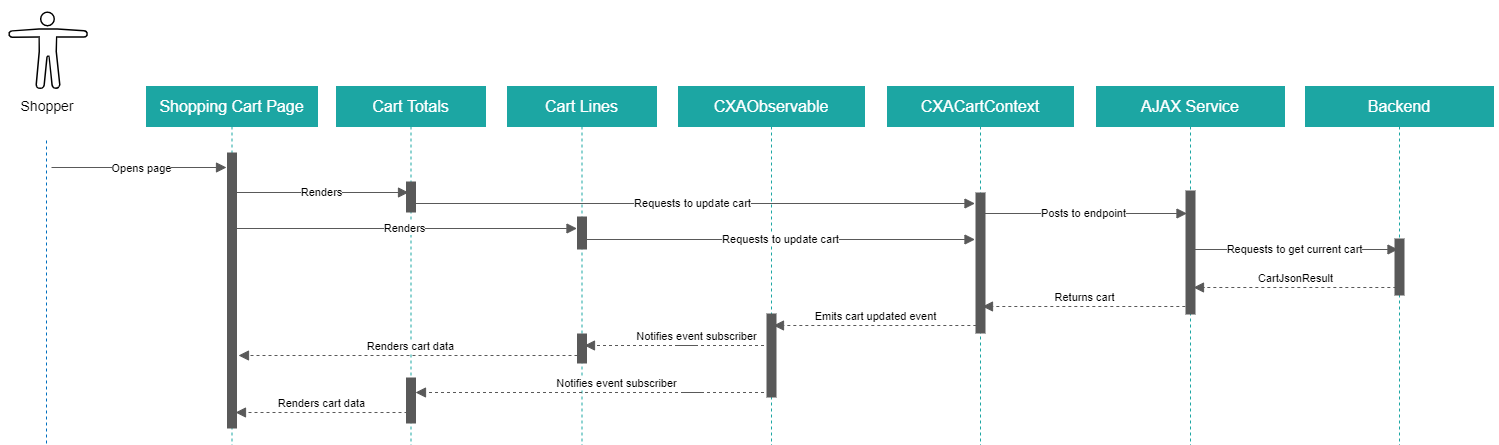
以下のシーケンス図は、買い物客がショッピングカートラインと交換した際の通話の大まかなビューを示しています。

> !注このシーケンス図は手動の無料ギフト選択に適用されており、無料ギフトがカートに追加された際の処理は反映していません。
![Shopping Cart Lines sequence diagram](https://doc.sitecore.com/api/markdown-image/xp/ja/developers/102/sitecore-experience-commerce/images/Visio_ShoppingCartLines.png)