---
title: "スケールされた環境でAPI認証キーを設定する"
slug: "configure-api-authentication-keys-in-a-scaled-environment"
abstract: "Sitecore xDBレポートサービスおよびxDB処理サーバーでAPI認証鍵を設定する方法。"
---
# スケールされた環境でAPI認証キーを設定する
**適用対象**
xDB Processing and Content Management。
**Sitecoreインストールフレームワーク(SIF)**
SIFはデフォルトでセキュリティキーを設定し **ません** 。しかしインストール時には、 [Reporting Service APIキー](https://doc.sitecore.com/xp/ja/developers/103/platform-administration-and-architecture/configure-api-authentication-keys-in-a-scaled-environment.html#UUID-e6837a61-c479-0f1e-7bf7-a1c10df48643_section-id235407846424883) が自動的に生成・適用されます。
**Azure Toolkit**
セキュリティキーはARMテンプレートに入力される際にデフォルトで設定されます。
スケールされたSitecore環境でサーバー間の安全な通信を確保するために、クライアントからの各リクエストはxDB Processingサーバー上で認証されなければなりません。例えば、リモートのProcessingサーバーと通信する必要があるContent Managementサーバー上の場合です。スケール環境では、認証済みの当事者のみがリモートサーバー上のデータにアクセスできます。
各サーバーリクエストごとに、Sitecore.Analytics.Commons.ApiKeyHttpTransportFactoryクラスはリクエストされたページにカスタムHTTPヘッダーを追加します。ヘッダーにはAPI認証キーが含まれており、これはConnectionStrings.configファイルに保存されます。
各サーバーで認証プロセス中に使用できるAPI認証キーを入力しなければなりません。リクエストを成功裏に認証するには、キーが同一でなければなりません。例えば、Processingサーバーの鍵はContent Managementサーバーに保存されている鍵と一致していなければ、データを正常に取得できません。
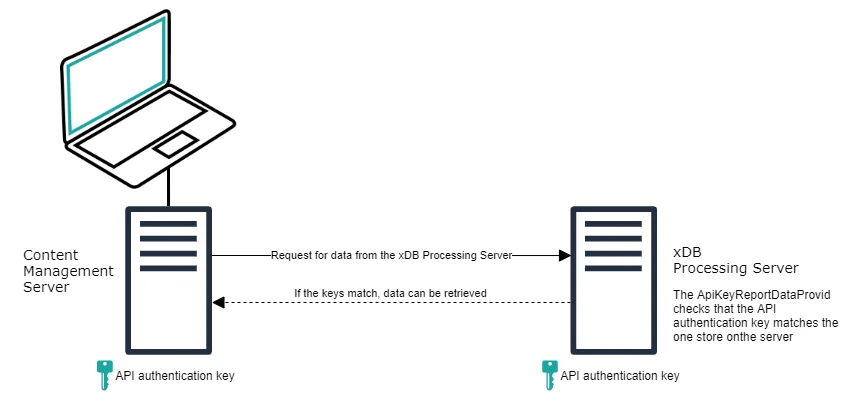
サーバー認証プロセスは以下の通りです:
- Content Managementクライアントは Sitecore.Analytics.Commons.ApiKeyHttpTransportFactory クラスを使って処理サーバーからデータを要求します。
- 処理サーバーがリクエストを受信すると、 ApiKeyReportDataProvider クラスはHTTPヘッダーのAPI認証キーが処理サーバーに保存されているものと一致しているか(大文字を区別して)チェックします。
- 2つのキーが一致すれば、リクエストの処理を継続でき、データが取得されてContent Managementクライアントに返送されます。
- 認証キーが一致しない場合、サーバーは403(禁止)ステータスコードを返します。
> !重要ウェブサイト全体でHTTPSを使用してください。 Sitecore.Xdb.Remote.Client.configファイルでは、RequireHttpsがデフォルトで有効で、すべての本番環境で有効にしておくべきです。HTTPは本番サーバーには十分に安全ではなく、ローカルテストや開発インスタンスでのみ使用すべきです。
## レポートサービスAPIキー
Reporting ServiceのAPIキーは、インストール時にSitecoreインストールフレームワーク(SIF)によって自動的に生成・適用されます。XPトポロジーをインストールする際、SIFは標準パラメータ/変数パターンを用いてReportingService.ApiKeyを設定します。インストーストーラーがReportingServiceApiKeyパラメータで値を提供すれば、SIFがそれを適用します。そうでない場合は、SIFが安全なランダムな32文字キーを生成し、それをすべての関連ロール(CM、処理など)に適用します。この動作により、Reporting Service APIキーは、ユーザーが提供した構成またはSIFが生成したデフォルトによって常に入力されます。
## オプション#1:共有API認証キーの設定
以下の節では、Content ManagementとProcessingサーバー間でAPI認証キーを設定する方法について説明します。この場合、ProcessingとContent Managementは同じ認証キーを使用します。
### Content Managementサーバー上で
Content ManagementサーバーでAPI認証キーを設定するには:
1. Content ManagementサーバーでWebsite\\App\_Configフォルダに移動し、ConnectionString.configファイルを開いてください。
2. ConnectionStrings.configファイルでreporting.apikey接続文字列を見つけ、ASCII文字列をキーとして入力します(デフォルト最小32文字)。キーは数字やテキストの組み合わせでいくつも構いません。
例えば:
> !重要選択した文字列は、Sitecore.Xdb.Remote.Client.configファイルの属性で指定された最小のAPIキー長MinimalApiKeyLength準拠しなければなりません。
### 処理サーバー上で
処理サーバーでAPI認証鍵を設定するには:
1. 処理サーバーで Website\\App\_Config フォルダに移動し、 ConnectionStrings.config ファイルを開きます。
2. ConnectionStrings.configファイルにreporting.apikey接続文字列を追加します。キーはContent Managementサーバーと一致しなければなりません。
## オプション#2:処理用の別個のAPI認証キーを設定する
以下のセクションでは、Content ManagementとProcessing間で異なるAPI認証キーを設定する方法について説明します。
### Content Managementサーバー上で
Content Managementサーバー、または処理サーバーからデータ要求を行っている他のサーバー上で:
1. Sitecore.Xdb.Remote.Client.configファイル内で次のセクションを見つけ、connectionStringNameパラメータを新しい値に設定します。例えば、processing.apikey:
/~/v81/processing/reportingstoragemanager/
processing.apikey
X-Processing-Api-Key
32
2. ConnectionStrings.configファイルにAPI認証キーを追加します:
例えば:
### 処理サーバー上で
処理サーバーでAPI認証鍵を設定するには:
1. Sitecore.Xdb.Remote.Client.configファイル内で、以下のセクションを見つけて、示す通りconnectionStringNameパラメータを更新してください。
X-Processing-Api-Key
processing.apikey
2. ConnectionStrings.configファイルに新しいAPI認証キーを追加します:
3. もし存在する場合はreporting.apikeyファイルからConnectionStrings.configファイルから削除してください。
## オプション構成
### オプションContent Managementサーバー構成
以下の表は、必要に応じて後で調整可能なSitecore.Xdb.Remote.Client.configファイルのデフォルトパラメータ設定を示しています。処理のために異なるパラメータ設定を設定できます。
> !注AzureでSitecore動かしているなら、設定はApp\_Config/Sitecore/Azure/Sitecore.Xdb.Remote.Client.CM.configファイルにあります。
パラメータ
概要
ServiceUrl
すべてのリクエストで使うサービスホストURLです。処理サーバーのホスト名が変わった場合はこれを更新してください。
ConnectionStringName
API認証キーを含む接続文字列の名前です。
ヘッダー名
リクエストに含めるヘッダーの名前。両方のサーバーで同じヘッダー名を使用します。例えば、X-Processing-Api-Keyなどです。
最小ApiKeyLength
これはAPI認証キーの最小鍵長を指定します。短すぎるとリクエストは送信されません。長い鍵の方が安全です。
RequireHttps
ブールスイッチはデフォルトで「true」に設定されています。本番環境では必ずHTTPSを使いましょう。もし「true」に設定されていて、そのスキーマが HTTPSでなければ例外が発生します。
これらの構成パラメータはSitecore.Xdb.Remote.Client.configファイルの以下のセクションに記載されています。
/~/v81/processing/reportingstoragemanager/
reporting.apikey
X-Processing-Api-Key
32
### オプションのプロセッシングサーバー構成
パラメータ
概要
ConnectionStringName
正しいAPI認証キーを含む接続文字列の名前(これはリクエストを行っているサーバーのキーと一致するはずです)。
ヘッダー名
受信サーバーリクエストで確認するためのヘッダーの名前。
X-Processing-Api-Key
processing.apikey