検索結果のブースティング

Version:
日本語翻訳に関する免責事項

このページの翻訳はAIによって自動的に行われました。可能な限り正確な翻訳を心掛けていますが、原文と異なる表現や解釈が含まれる場合があります。正確で公式な情報については、必ず英語の原文をご参照ください。

特定のアイテムとフィールドをインデックス作成時にインデックス化するときに、それらをブーストできます。これらのアイテムとフィールドは、他のアイテムとフィールドよりもスコアが高くなります。たとえば、ブースティングを使用して、書店で最も人気の高い書籍や最も売れた書籍を検索結果で宣伝できます。

ブースティングは、アイテムレベルまたはフィールドレベルで適用できます。

フィールド レベル ブースティングを使用して、一部のフィールドの一致が他のフィールドの一致よりも重要度が高いか低いかを指定します。たとえば、書店の場合、書籍製品アイテムにはTitleSummaryForewordの3つのフィールドがあります。検索時には、Forewordフィールドの一致は、TitleフィールドとSummaryフィールドの一致よりも重要度が低い必要があります。

メモ

また、クエリ時にブースティングを適用することもできます。このブーストは、インデックス作成時にブーストしたアイテムまたはフィールドに対しても有効になります。

構成

ブーストは、Website\App_Config\IncludeフォルダーのSitecore.ContentSearch.configで構成します。ブースティングを設定する際は、次の点に注意してください。

  • Boostのデフォルト値は1です

  • 1より大きい値を指定すると、結果が上部に上昇します。

  • 1未満の値を指定すると、結果が一番下に移動します。

    <configuration xmlns:patch="http://www.sitecore.net/xmlconfig/">
      <sitecore>
        ...
        <pipelines>
          <!-- RESOLVE FIELD LEVEL BOOSTING
               Pipeline for resolving boosting rules on fields.
               Arguments: (Item) Item being indexed
               Example : Boost search results by a field value.
          -->
          <indexing.resolveFieldBoost help="Processors should derive from 
                    Sitecore.ContentSearch.Pipelines.ResolveBoost.ResolveFieldBoost.
                    BaseResolveFieldBoostPipelineProcessor">
             <processor type="Sitecore.ContentSearch.Pipelines.ResolveBoost
                    .ResolveFieldBoost.SystemFieldFilter, Sitecore.ContentSearch"/>
             <processor type="Sitecore.ContentSearch.Pipelines.ResolveBoost.
                     ResolveFieldBoost.FieldDefinitionItemResolver, Sitecore.ContentSearch"/>
             <processor type="Sitecore.ContentSearch.Pipelines.ResolveBoost.
                     ResolveFieldBoost.StaticFieldBoostResolver, Sitecore.ContentSearch"/>
          </indexing.resolveFieldBoost>
          <!-- RESOLVE ITEM LEVEL BOOSTING
               Pipeline for resolving boosting rules on items.
               Arguments: (Item) Item being indexed
               Example : Boost search results by an Item Template.
          -->
          <indexing.resolveItemBoost help="Processors should derive from
                  Sitecore.ContentSearch.Pipelines.ResolveBoost.
                  ResolveItemBoost.BaseResolveItemBoostPipelineProcessor">
            <processor type="Sitecore.ContentSearch.Pipelines.ResolveBoost.
                    ResolveItemBoost.ItemLocationFilter, Sitecore.ContentSearch">
               <includedLocations hint="list">
                  <content>/sitecore/content</content>
                  <media>/sitecore/media library</media>
               </includedLocations>
            </processor>
            <processor type="Sitecore.ContentSearch.Pipelines.ResolveBoost.
                    ResolveItemBoost.StaticItemBoostResolver, Sitecore.ContentSearch"/>
            <processor type="Sitecore.ContentSearch.Pipelines.ResolveBoost.
                    ResolveItemBoost.LocalRuleBasedItemBoostResolver, Sitecore.ContentSearch"/>
            <processor type="Sitecore.ContentSearch.Pipelines.ResolveBoost.
                    ResolveItemBoost.GlobalRuleBasedItemBoostResolver, Sitecore.ContentSearch"/>
          </indexing.resolveItemBoost>
        </pipelines>
        <!-- BOOSTING MANAGER
             The manager class controlling the boosting resolution logic
        -->
        <boostingManager defaultProvider="default" enabled="true">
          <providers>
            <clear/>
            <add name="default" type="Sitecore.ContentSearch.Boosting.
                    PipelineBasedBoostingProvider, Sitecore.ContentSearch"/>
          </providers>
        </boostingManager>
        ...
      </sitecore>
    </configuration>
手記

設定ファイルを直接変更しないでください。代わりに、実行時に必要な変更を実行する パッチ ファイル を作成する必要があります。

フィールドレベルのブースティング

indexing.resolveFieldBoostパイプラインは、フィールド レベルのブースティングを解決します。このパイプラインでは、次のプロセッサが有効になります。

<processor type="Sitecore.ContentSearch.Pipelines.ResolveBoost.
   ResolveFieldBoost.SystemFieldFilter, Sitecore.ContentSearch"/>
<processor type="Sitecore.ContentSearch.Pipelines.ResolveBoost.
  ResolveFieldBoost.FieldDefinitionItemResolver, Sitecore.ContentSearch"/>
<processor type="Sitecore.ContentSearch.Pipelines.ResolveBoost.
  ResolveFieldBoost.StaticFieldBoostResolver, Sitecore.ContentSearch"/>

SystemFieldFilterプロセッサは、すべてのシステム・フィールド (名前が「__」文字で始まるフィールド) が無視されるようにします。

FieldDefinitionItemResolverプロセッサは、ブースト値を提供するフィールド定義項目を解決します。

テンプレート定義アイテムが解決されると、StaticFieldBoostResolverが開始されます。このプロセッサは、フィールド定義項目からブースト値を読み取ります。

アイテムのIndexingセクションを表示するには、Content EditorViewタブでStandard Fieldsチェックボックスをオンにする必要があります。

アイテム レベルのブースティング

indexing.resolveItemBoostパイプラインは、項目レベルのブースティングを解決します。このパイプラインでは、次のプロセッサが有効になります。

<processor type="Sitecore.ContentSearch.Pipelines.ResolveBoost.
      ResolveItemBoost.ItemLocationFilter, Sitecore.ContentSearch">
    <includedLocations hint="list">
      <content>/sitecore/content</content>
      <media>/sitecore/media library</media>
    </includedLocations>
</processor>
<processor type="Sitecore.ContentSearch.Pipelines.ResolveBoost.
      ResolveItemBoost.StaticItemBoostResolver, Sitecore.ContentSearch"/>
<processor type="Sitecore.ContentSearch.Pipelines.ResolveBoost.
      ResolveItemBoost.LocalRuleBasedItemBoostResolver, Sitecore.ContentSearch"/>
<processor type="Sitecore.ContentSearch.Pipelines.ResolveBoost.
      ResolveItemBoost.GlobalRuleBasedItemBoostResolver, Sitecore.ContentSearch"/>

ItemLocationFilterプロセッサは、指定された場所にあるアイテムのみがパイプラインによって処理されるようにします。このリストは、次の方法で拡張できます。

<includedLocations hint="list">
   <content>/sitecore/content</content>
   <media>/sitecore/media library</media>
   <custom>/sitecore/custom</custom>
</includedLocations>

StaticItemBoostResolverプロセッサは、インデックス付き項目のブースト値を読み取ります。

この値は、__Standard Valuesフィールドを使用して、テンプレートに基づくすべてのアイテムに設定することもできます. アイテムのIndexingセクションを表示するには、Content EditorViewタブでStandard Fieldsチェック ボックスをオンにする必要があります。Boost Valueフィールドはこのセクションにあります。

ルールベースのブースティング

LocalRuleBasedItemBoostResolverプロセッサとGlobalRuleBasedItemBoostResolverプロセッサは、インデックス付きアイテムに対してルールベースのブースティングを提供します。これら2つのプロセッサは、どちらもルール エンジンを使用して実行されます。彼らはさまざまな場所でブースティングルールを調べます。

  • LocalRuleBasedItemBoostResolverプロセッサは、IndexingセクションのBoosting rulesフィールドからルールを読み取ります。

    Boosting rulesフィールドのソースは、すべてのブースティングルールが管理されている次の場所に制限されています。

    /sitecore/system/Settings/Rules/Indexing and Search/Item Rules

    このブースティング ルールのセットは、他のフィールド値と同様に、__Standard Valuesレベルで設定することもできます。

  • GlobalRuleBasedItemBoostResolverプロセッサは、/sitecore/system/Settings/IndexingSearch/Rules/Global Rulesで作成されたすべてのブースティング ルールを処理します。

パフォーマンス上の理由から、可能な限りローカルのブースティングルールを使用してください。

ブースティングルールを作成する

アイテムごとにローカルで使用されるブースティング ルール、またはグローバル ルールを作成できます。グローバル ブースティング ルールはGlobal Rulesアイテムの子として作成し、ローカル ブースティング ルールはItem Rulesアイテムの子として作成します。

ブースティングルールを作成するには:

  1. コンテンツ ツリーで次の項目に移動します。

    /sitecore/system/Settings/Rules/Indexing and Search/

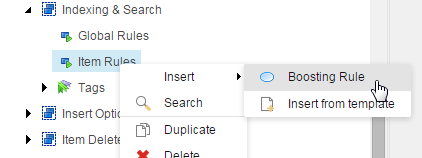
  2. 新しいローカル項目ルールを作成するには、Item Rules項目を右クリックし、Insert,Boosting Ruleをクリックします。
  3. Messageダイアログで、新しいルールの名前を入力します。たとえば、英語のすべての項目をブーストするブースティング ルールを作成できます。
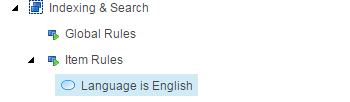
  4. 新しいルールを選択し、DataセクションでEdit ruleをクリックします。 Rule Set Editorが開きます。
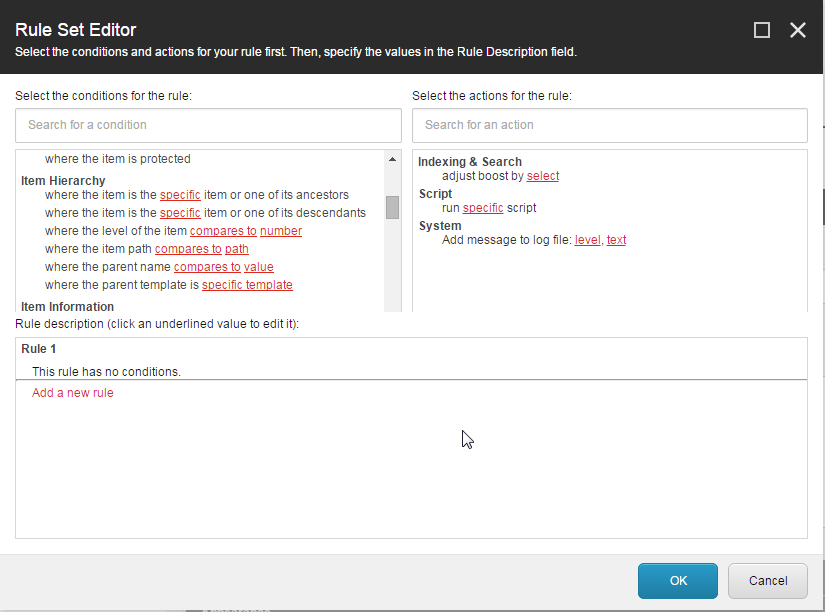
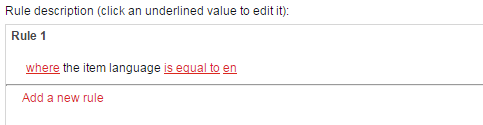
  5. ルールの条件を選択します。たとえば、英語のすべての項目をブーストするルールを作成するには、Item Versionセクションで、リストから項目の言語が値と比較される場所条件を選択し、条件を次のように編集します。
  6. Indexing & Searchセクションで、selectによるブーストの調整アクションを選択します。
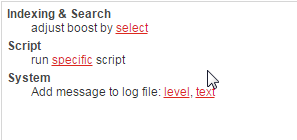
  7. ルールの説明 セクションで、選択をクリックし、ブースト値を調整します。ブースト値は、正または負の数値のいずれかです。

この記事を改善するための提案がある場合は、 お知らせください!