
アクティビティタイプを作成する
このページの翻訳はAIによって自動的に行われました。可能な限り正確な翻訳を心掛けていますが、原文と異なる表現や解釈が含まれる場合があります。正確で公式な情報については、必ず英語の原文をご参照ください。
このトピックでは、SymposiumReminderというカスタムマーケティングオートメーション活動タイプの作成と設定方法を説明します。 SymposiumReminderは、マーケティングメールの受信を拒否したかどうかに応じて、連絡先を「真」または「偽」 の経路 に進める役割を担います。
!重要アクティビティタイプは単一のデフォルトパスまたはtrue/falseパスを定義しなければなりません。追加のカスタムパスを定義することはできません。
!注アクティビティタイプでカスタムファセットを使う場合、モデルを自動化エンジンに デプロイ しなければなりません。
SymposiumReminder活動の種類も以下の通りです:
- 外部サービスを利用して、職務名に基づいて連絡先の役割を判断します。
- 外部サービスを利用して、連絡先の希望するメールアドレスにメールを送信します。「差出人」メールアドレスは NoReplyAddress パラメータで設定可能です。
IActivityを実装するクラスを作成します
カスタムSymposiumReminderアクティビティと2つのカスタムサービスを実装するために:
-
IActivityを実装するクラスを作成してくださいSymposiumReminder :
using System; using Sitecore.XConnect.Collection.Model; using Sitecore.Xdb.MarketingAutomation.Core.Processing.Plan; using Sitecore.Framework.Conditions; using System.Collections.Generic; using Documentation.Examples.Services; using Sitecore.Xdb.MarketingAutomation.Core.Activity;
namespace Documentation.Examples { public class SymposiumReminder : IActivity { // Parameters public string NoReplyAddress { get; set; }
public IJobService JobService { get; set; }
public IEmailService EmailService { get; set; }
public IActivityServices Services { get; set; }
// Custom service
public SymposiumReminder(IJobService jobService, IEmailService emailService) { EmailService = emailService; JobService = jobService; }
public ActivityResult Invoke(IContactProcessingContext context) { Condition.Requires(context.Contact).IsNotNull(); string preferredMail = String.Empty;
if (context.Contact.Emails() != null && !context.Contact.ConsentInformation().DoNotMarket) { preferredMail = context.Contact.Emails().PreferredEmail.SmtpAddress;
string subject = "Join us at Symposium!";
// Change e-mail subject depending on job title if (context.Contact.Personal() != null) { if (JobService.IsJobInCategory(context.Contact.Personal().JobTitle, JobService.DeveloperCategory)) { subject = "Geek out with us at Symposium!"; } else if (JobService.IsJobInCategory(context.Contact.Personal().JobTitle, JobService.ExecutiveCategory)) { subject = "Magnify your marketing with Sitecore Experience Cloud"; } }
EmailService.SendMail(preferredMail, NoReplyAddress, subject);
// Move to "true" path return new SuccessMove("true"); }
// Move to "false" path return new SuccessMove("false"); } } }
-
SymposiumReminder活動タイプが依存するカスタムサービス、IJobServiceとIEmailServiceを作成します。もしあなたのアクティビティタイプがカスタムサービスに依存していなければ、このステップを省略しても構いません。
using System.Collections.Generic;
namespace Documentation.Examples.Services { public interface IEmailService { void SendMail(string to, string from, string subject); }
public class EmailService : IEmailService { public void SendMail(string to, string from, string subject) { // E-mail sending logic here } }
public interface IJobService { string DeveloperCategory { get; } string MarketerCategory { get; } string ExecutiveCategory { get; }
bool IsJobInCategory(string job, string category); }
public class JobService : IJobService { public string DeveloperCategory { get { return "developer"; } } public string MarketerCategory { get { return "marketer"; } } public string ExecutiveCategory { get { return "executive"; } }
private List
DeveloperJobTitles { get; set; } private List MarketerJobTitles { get; set; } private List ExecutiveJobTitles { get; set; } public JobService() { DeveloperJobTitles = new List
() { "developer", "software developer", "software engineer" }; MarketerJobTitles = new List
() { "marketer", "digital strategist", "marketing manager" }; ExecutiveJobTitles = new List
() { "ceo", "coo", "cdo" }; } public bool IsJobInCategory(string job, string category) { if (category == DeveloperCategory) { return DeveloperJobTitles.Contains(job.ToLowerInvariant()); }
if (category == MarketerCategory) { return MarketerJobTitles.Contains(job.ToLowerInvariant()); }
if (category == ExecutiveCategory) { return ExecutiveJobTitles.Contains(job.ToLowerInvariant()); }
return false; } } }
シンポジウムリマインダーパス
SymposiumReminderは2つの経路を定義しています。
- true
- false
各パスはSitecoreのアクティビティタイプのディスクリプタの下に対応するパス項目を持っています。関連項目:
シンポジウムリマインダーサービス
このSymposiumReminderは2つのカスタムサービスに依存しています。
- IJobService 連絡先の職種名をリスト内の項目と照合する責任があります。
- IEmailService メール送信を担当します。例えば、ブランドがEmail Experience Managerを使用していない場合などです。
両方のサービスはコンストラクタを通じて注入され、Automation Engine内のアクティビティタイプの構成に含まれていなければなりません。関連項目:
SymposiumReminderパラメータ
SymposiumReminderは単一のカスタムパラメータを定義しています:
- NoReplyAddress
このパラメータはアクティビティタイプのディスクリプタに対応するパラメータ項目を持ち、SymposiumReminder型を使用するアクティビティが計画に追加された際に自動化プラン定義マネージャーによって設定されます。関連項目:
シンポジウムリマインダー結果
SymposiumReminderは、連絡先がマーケティングメールの受信を拒否しているかどうかに応じて、返信SuccessMove("true")またはSuccessMove("false")を返します。
関連項目:
Sitecoreでアクティビティディスクリプタを作成する
各アクティビティタイプごとにSitecoreでアクティビティディスクリプタを作成する必要があります。アクティビティディスクリプタはマーケティングオートメーションUIで使用され、Activity Type Descriptor Locator APIを使ってアクセスされます。
-
コンテンツエディターを開き、/sitecore/system/Settings/Analytics/Marketing Automation/Activity Typesに移動します。
-
アクティビティ タイプ項目を 右クリックして、アクティビティタイプを挿入>。
-
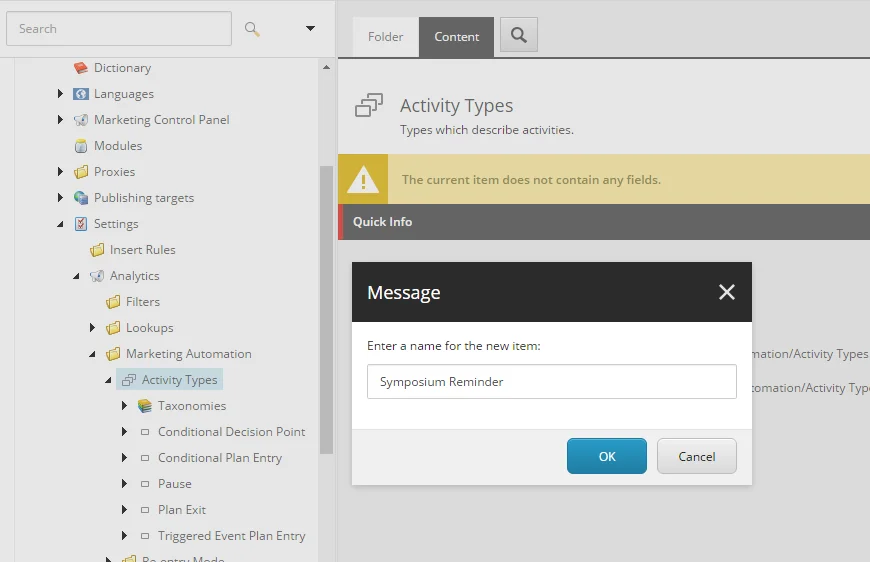
新しいアクティビティタイプには、シン ポジウムリマインダーのように、アクティビティタイプクラスに対応する名前を付けます。
-
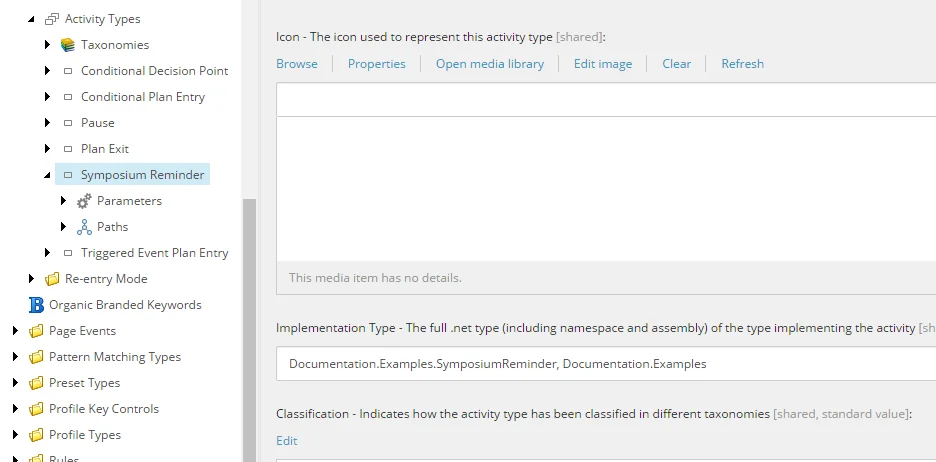
実装タイプeを指定します(このフィールドの値は自動化エンジン構成のimplementationTypeパラメータの値と一致するはずです):
-
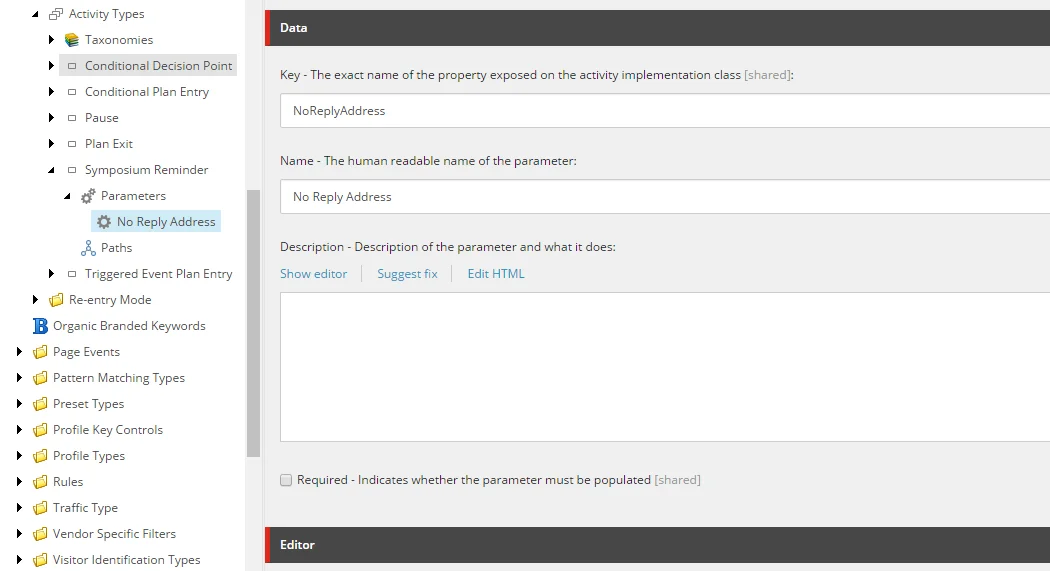
パラメータ サブアイテム を右クリックし、「 No Reply Address」というパラメータ項目を挿入します。この場合、パラメータはデフォルトに戻され必須ではありません。
-
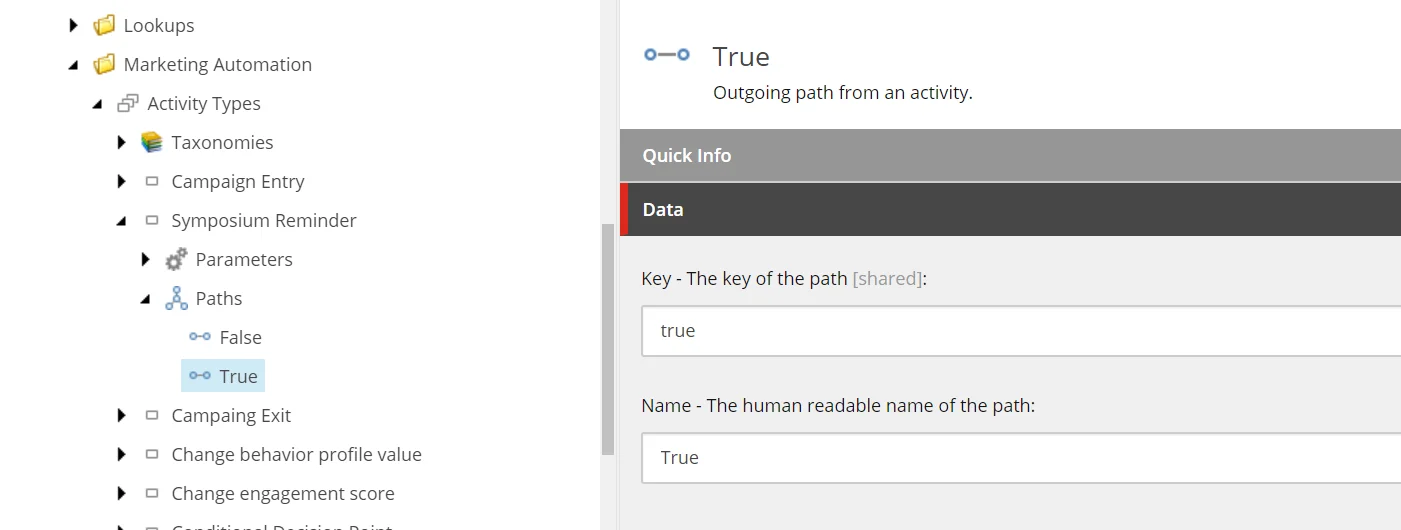
パスのサブアイテムを右クリックし、2つのパスアイテムを挿入します。各パスアイテム は 、アクティビティタイプ で使用されるキーを 定義しなければなりません:
マーケティングオートメーションエンジンにアクティビティタイプを追加してください
活動はマーケティングオートメーションエンジンの設定で登録されなければなりません。
-
Automation Engineのルートにある以下のフォルダに移動します: \App_Data\Config\sitecore\MarketingAutomation
!ヒントローカルインスタンスでは、オートメーションエンジンは C:\path\to\xconnect\App_data\jobs\continuous\AutomationEngine
-
新しいXMLファイルを作成し、sc.MarketingAutomation.ActivityTypes.xmlを拡張し、カスタムアクティビティを登録します:
Sitecore.Xdb.MarketingAutomation.Locator.ActivityTypeRegistration, Sitecore.Xdb.MarketingAutomation Singleton {A21EA3B7-6CE4-4C5D-AFE4-50F2D0ECE197} Documentation.Examples.SymposiumReminder, Documentation.Examples !注IdノードはSitecoreにおけるアクティビティ記述子項目のIDです。
-
アクティビティDLL(この場合はDocumentation.Examples.dll)をマーケティングオートメーションエンジンのルートにデプロイします。
マーケティングオートメーションエンジンにアクティビティタイプのサービスを追加してください
SymposiumReminder活動は2つの外部サービスに依存しています。これらのサービスは自動化エンジンに登録されなければなりません。
-
Automation Engineのルートにある以下のフォルダに移動します: \App_Data\Config\sitecore\MarketingAutomation
!ヒントローカルインスタンスでは、オートメーションエンジンはC:\path\to\xconnect\App_data\jobs\continuous\AutomationEngineの下に位置しています
-
カスタムサービスを拡張し登録する新しいXMLファイルsc.MarketingAutomation.ActivityServices.xml作成してください。カスタムサービスを使っていない場合は、このステップを省略しても構いません。
Documentation.Examples.IEmailService, Documentation.Examples Documentation.Examples.EmailService, Documentation.Examples Singleton Documentation.Examples.IJobService, Documentation.Examples Documentation.Examples.JobService, Documentation.Examples Singleton !注ノード名は一意でなければなりません。例えば、Documentation.EmailServiceノードは1つしか存在できません。ノード名はあなた次第で、サービスの完全な名前空間である必要はありません。
-
アクティビティサービスDLL(この場合はDocumentation.Examples.dll)をマーケティングオートメーションエンジンのルートに展開します。
面が負荷されていることを確認してください
アクティビティ内でコンタクトを評価する際には、以下のファセットが利用可能でなければなりません。C:\path\to\xconnect\App_data\jobs\continuous\AutomationEngine\App_Data\Config\sitecore\MarketingAutomation\sc.MarketingAutomation.ContactLoader.xml設定ファイルのIncludeFacetNamesセクションにファセットキーをパッチしてください: