
ConditionItemアクティビティタイプ
このページの翻訳はAIによって自動的に行われました。可能な限り正確な翻訳を心掛けていますが、原文と異なる表現や解釈が含まれる場合があります。正確で公式な情報については、必ず英語の原文をご参照ください。
ConditionItemアクティビティタイプは、マーケティングオートメーションがコンタクトをキャンペーンに登録する際のロジックを定義するのに役立ちます。
ConditionItemアクティビティタイプを使って、連絡のやり取りやタイムアウトを待ってから、2つの異なるマーケティング活動のどちらかを決めます。例えば、連絡先にニュースレターの登録を提案できます。連絡先が登録したら、Yesの道を進み感謝のメッセージを送ることができます。もしその連絡先が一定期間登録しなかったり何もしなかったりしたら、Noの道を進むことができます。
項目構成
ConditionItemアクティビティタイプは以下の構造を含みます。
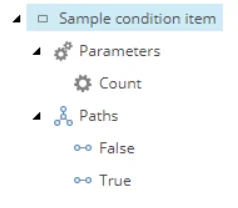
性質
ConditionItemアクティビティタイプは以下のプロパティを持ちます:
入る経路
1
アウトイングパス
2
タイトルとサブタイトル
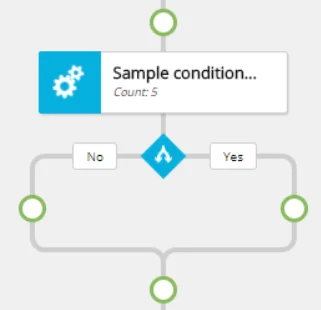
アクティビティタイプのパラメータが定義されると表示されます。
論理的立場
他の ConditionItem 活動の出る経路の前後に。
サポートされているCSSクラス
ConditionItemアクティビティタイプは以下のCSSクラスをサポートしています:
CSSクラス
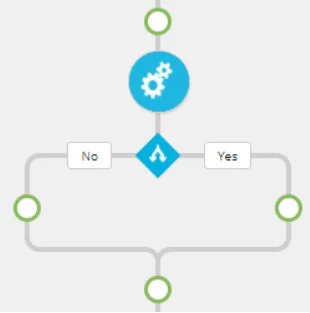
未定義
定義
listener
TypeScript実装のサンプル
これはConditionItemアクティビティタイプのサンプル実装です:
sample/src/sample-condition-item-activity-type.ts
import { ConditionItem } from '@sitecore/ma-core';
export class SampleConditionItemActivityType extends ConditionItem {
getVisual(): string { const subTitle = this.isDefined ? 'Count: ' + this.editorParams.count : ''; const cssClass = this.isDefined ? '' : 'undefined';
// The CSS class can only be listener. return `

Sample condition item ${subTitle}
get isDefined(): boolean { /* The editorParams property value is the object that is serialized from the activity editor. If the activity is undefined, the editorParams property will evaluate to {}. */ return Boolean(this.editorParams.count); } }