---
title: "SXAインデックスの設定"
slug: "configure-sxa-indexing"
abstract: "サイトや言語ごとにインデックスを定義してください。"
---
# SXAインデックスの設定
SXAは特定の言語やサイトごとにインデックスを定義できます。これは、インデックスを小さく保ちパフォーマンスを向上させたいときにデータを分離したいときに便利です。
## インデックスを追加
インデックスを追加すると:
1. */sitecore/content/Tenant/Site/Settings/Site Grouping/Site*へナビゲート。
2. インデックス **セクション** で、サイトのインデックス仕様を入力します。必ずデータベースの後にスラッシュで始めてください。その後、言語を指定するか、すべての言語を含めるために\*を使うことができます。
例えば、サイト固有の索引を作成したり、英語とスペイン語を分けたりすることができます:
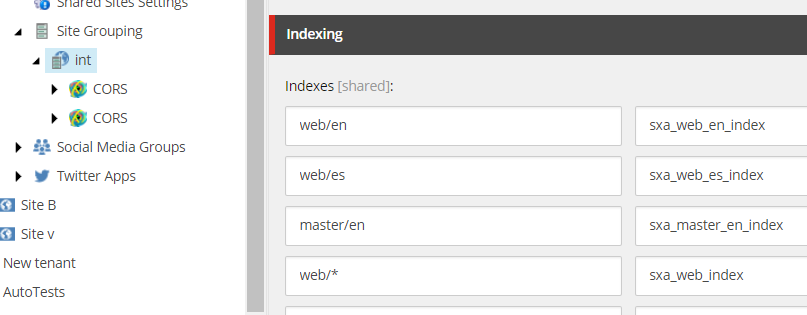
> !注SXA検索インデックスを特定の言語の項目を含めたい場合、クローラー用の言語パラメータを追加する必要があります:
>
> マスター /サイトコア EN
3. 検索プロバイダーの設定ファイルにアクセスして、作成したインデックスを追加してください。例えば、Solrを使っている場合は、C:\\inetpub\\wwwroot\\Site\\Website\\App\_Config\\Include\\Z.Foundation.Overrides\\Sitecore.XA.Foundation.Search.Solrに行きインデックスを追加します。
デフォルトのクローラーパスは /sitecoreです。カスタムインデックスでアイテムクローラーパスをデフォルトパスとは異なるパス(例: /sitecore/content/TenantA/SiteA/Home/NewFolder)を使うように設定すると、以下のような影響があります。
- そのパスのアイテムのみがインデックスされます。
- カスタムインデックスにはテンプレートは含まれません。
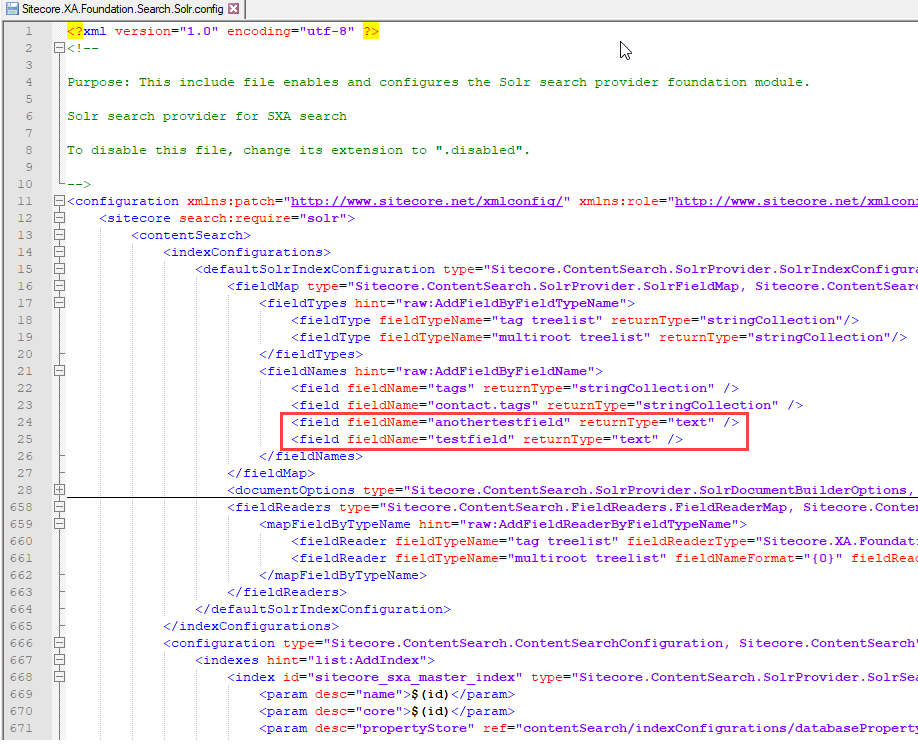
インデックスにテンプレートが欠けていると、フィールド型の解決ロジックに影響を与える可能性があります。場合によってはフィールド型が見つからず、検索やフィルタリング時に問題が発生することがあります。これを解決するには、設定ファイル内のすべてのカスタムフィールドを手動で定義し、Sitecoreが使用するタイプ(文字列、整数、テキストなど)を把握できるようにします。
> !注Sitecoreのインデックス作成に関する一般的な情報については、[プラットフォームのドキュメント](https://doc.sitecore.com/xp/en/developers/103/platform-administration-and-architecture/configure-indexing.html)をご参照ください。
## カスタムインデックスの設定
SXA固有のフィールドはすべてのインデックスに自動的に含まれるわけではありません。カスタムインデックスを使用しつつSXAの検索機能も使いたい場合は、SXA固有のフィールドを含めるようにカスタムインデックスを設定する必要があります。
SXA固有のフィールドをインデックスに追加するには:
1. インデックス設定で、カスタムインデックスを定義するindexノードを見つけてください。
2. documentOptionsノード内で、次のコードを追加します:
Sitecore.XA.Foundation.Search.ComputedFields.Site, Sitecore.XA.Foundation.Search
Sitecore.XA.Foundation.Search.ComputedFields.HasLayout, Sitecore.XA.Foundation.Search
Sitecore.XA.Foundation.Search.ComputedFields.Searchable, Sitecore.XA.Foundation.Search
Sitecore.XA.Foundation.Search.ComputedFields.ParentName, Sitecore.XA.Foundation.Search
Sitecore.XA.Foundation.Search.ComputedFields.Level, Sitecore.XA.Foundation.Search
Sitecore.XA.Foundation.Search.ComputedFields.ParentTemplate, Sitecore.XA.Foundation.Search
3. 変更を保存してインデックスを再構築します。