Personalization in JSS Next.js applications
The Next.js XM Cloud add-on includes an example setup for projects using the embedded personalization feature of SitecoreAI. It uses Next.js Middleware architecture to enable personalization at the edge, combined with the Events package in the Sitecore Cloud SDK for page view events in the browser.
The XM Cloud add-on is automatically included in all SitecoreAI projects created using a foundation template, so you don't need to manually configure anything to enable personalization. For other projects, you can enable the add-on using the JSS initializer.
Some code examples, images, and UI labels may still use XM Cloud while engineering assets are being updated.
This add-on includes the following elements for supporting personalization:
- A Next.js Middleware plugin that calls the Cloud SDK.
- A React component for page view events using the Cloud SDK.
- A Page Props Factory plugin.
- Additional environment variables for configuration.
The personalization tooling in the XM Cloud add-on is only one piece of the embedded personalization feature of SitecoreAI. You must use other tools in the suite to accomplish other tasks. For example:
-
Use SitecoreAI Pages Personalize to create personalized page variants. When published, these variants are stored on the page layout data in Sitecore Experience Edge.
-
Use SitecoreAI Page builder Analyze to view page view events.
Some code examples, images, and UI labels may still use XM Cloud while engineering assets are being updated.
Architecture overview
The following diagram shows how JSS establishes which version of a personalized page to render each time someone visits that page, based on the conditions associated with the personalization. In this diagram, the middleware used to communicate with Sitecore Personalize is Cloud SDK.
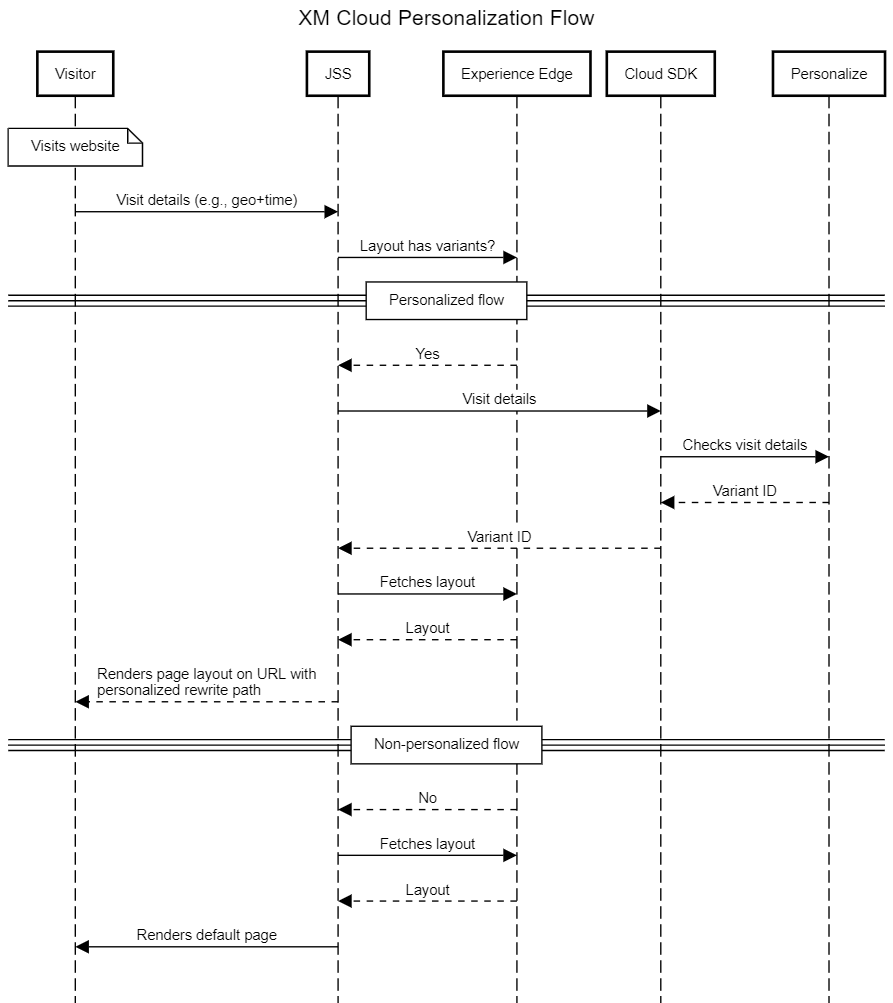
Personalize identifies the page variant to display based on the context of the site visit, such as the visitor's geolocation details and their local time. It returns a page variant by rewriting the page path (personalized rewrite path).
The Next.js app parses the personalized rewrite path to get the details of the page variant. It then renders the layout and displays the correct personalized page to the visitor.
In the browser, the Cloud SDK captures page view events.
Understanding the personalized rewrite path
The personalization implementation in the Next.js XM Cloud add-on uses a rewrite path to identify personalized page variants.
Some code examples, images, and UI labels may still use XM Cloud while engineering assets are being updated.
The rewrite path is:
- Set by Personalize Middleware to the identified page variant.
- Read by the Next.js app to manipulate the layout and feed to page view events.
- Used to enable static generation for personalized page variants.
The personalization implementation encapsulates the logic for these processes so that you don't have to manipulate this path directly. However, it's helpful to understand in case of troubleshooting or customizations.
The structure of the personalized rewrite path is:
For example, a page with the path /foo/bar and the personalized variant 1234 , is represented by the path /_variantId_1234/foo/bar.
APIs
The XM Cloud add-on uses the following code artifacts to render personalized page variants:
Some code examples, images, and UI labels may still use XM Cloud while engineering assets are being updated.
PersonalizeMiddleware
The PersonalizeMiddleware is a Next.js middleware handler that enables page personalization.
The middleware:
-
Makes a call to Experience Edge to get personalization information about the page, including variants.
The following example query requests a page variant ID for personalization:
-
Calls the personalization endpoint with request or user context to determine the page variant to display.
The following example response includes a page variant ID as requested:
-
Rewrites the response to the specific page variant using the personalized rewrite path.
normalizePersonalizedRewrite
The normalizePersonalizedRewrite function removes personalization data from a personalized rewrite path so that layout data can be appropriately retrieved. The function is used by the Page Props Factory extractPath function defined in the src\lib\page-props-factory\extract-path.ts file of a Next.js application with the Personalize add-on installed.
getPersonalizedRewriteData
The getPersonalizedRewriteData function extracts personalization data (variantId) from a personalized rewrite path. The Page Props Factory plugin for personalization, defined in the src/lib/papge-props-factory/plugins/personalize.ts file, passes the data to the personalizeLayout function.
personalizeLayout
The personalizeLayout function modifies layout data to use a specific variant based on the provided variantId parameter instead of the default layout. The function also sets the variantId property on the Sitecore context.
CdpHelper
The CdpHelper class provides the getPageVariantId function that gets the page variant identifier in the format required for the pageVariantId parameter of a page view event.
Environment variables
You use environment variables to configure personalization in a JSS Next.js app.
The following table lists the environment variables specific to the personalization functionality. You must populate all the required variables with values specific to your project/environment.
- Variable: Description
NEXT_PUBLIC_PERSONALIZE_SCOPE: Optional.Unique page identifiers are used to run personalization flows and analytics. However, if pages are created through site serialization, identical page identifiers may exist across different SitecoreAI environments.Use this variable to isolate personalization data between such SitecoreAI environments. It creates a unique page personalization identifier for each environment.PERSONALIZE_MIDDLEWARE_CDP_TIMEOUT: Optional.Value is in milliseconds. It allows fine-tuning timeout for CDP calls within the personalization middleware. If the timeout is exceeded, the user sees the default page.PERSONALIZE_MIDDLEWARE_EDGE_TIMEOUT: Optional.The value is in milliseconds. This setting allows you to fine-tune the timeout for Experience Edge calls within the personalization middleware. If the timeout is exceeded, the user sees the default page.
You must add points of sale to Site identifiers to use them in analytics.
Automatic provisioning of CDP tenants and Point of Sale management is only possible if you create a new project in SitecoreAI using a foundation template.