- Concepts
Route handling and data fetching in Content SDK apps
In SitecoreAI, each page is represented by a content item in the content tree. The structure of the tree defines the URL structure of the website. Content authors control URLs by organizing items hierarchically. For example:
The above hierarchical structure results in the following URL mappings:
Content SDK apps are expected to fully support SitecoreAI URL mapping.
Site hostnames and URL mapping rules (for example, casing, whitespace handling) are defined in XML configs. Discuss with your Sitecore developers whether customization is needed. Custom routing in SitecoreAI requires coordination between front-end and back-end teams.
It might require you to implement the same custom routing on the Sitecore back end to allow editing of the custom-routed site.
When possible, use hierarchical routes for clarity and consistency—for example, /products/shoes/running instead of a flat structure like /runningshoes.
Route resolution
Content SDK for Angular utilizes the built-in routing logic for both browser (app.routes.ts) and server router resolution (app.routes.server.ts). Page routes will be resolved to the catch-all route and uses loaders to load page data.
Data Fetching Flow
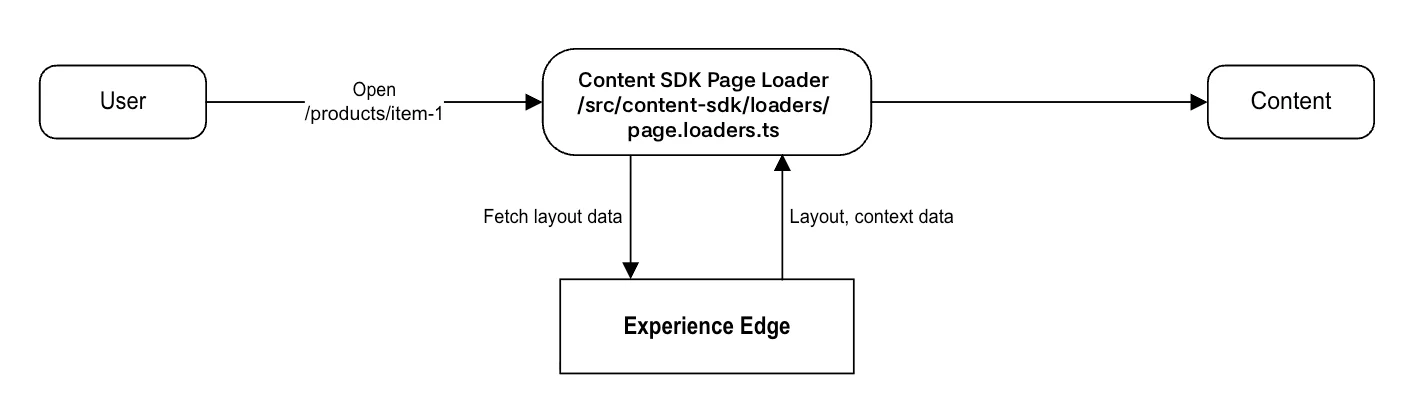
When a route is resolved, data is fetched from the Edge or Preview API using GraphQL via the SitecoreClient in the Content SDK Page loader. This includes route-specific data. The following scenario depicts the typical flow when a user navigates to https://site-1-hostname/products/item-1.
- The user navigates to
/products/item-1. - Route resolver converts the path into a Sitecore route (for example,
/products/item-1) - GraphQL query is issued to the GraphQL endpoint
https://edge-platform.sitecorecloud.io/v1/content/api/graphql/v1?sitecoreContextId=${sitecoreEdgeContextId}. - The query retrieves:
- Route layout definition
- Component fields
- Context data (language, site, and so on.)
- The data is passed to the rendering layer (for example, Placeholders and Components)