Customizing the Commerce Search Results rendering
The Commerce Search Results rendering variant includes a renderer in the form of a Scriban template.
The Scriban template is responsible for rendering the markup for the individual product cards. It is executed within a loop that iterates over the product items. To change the markup generated for the product cards, you can modify the Scriban template. It is best to create a new custom rendering variant in this case so that the customization does not get overridden during software upgrades. You can also modify the labels for the rendering.
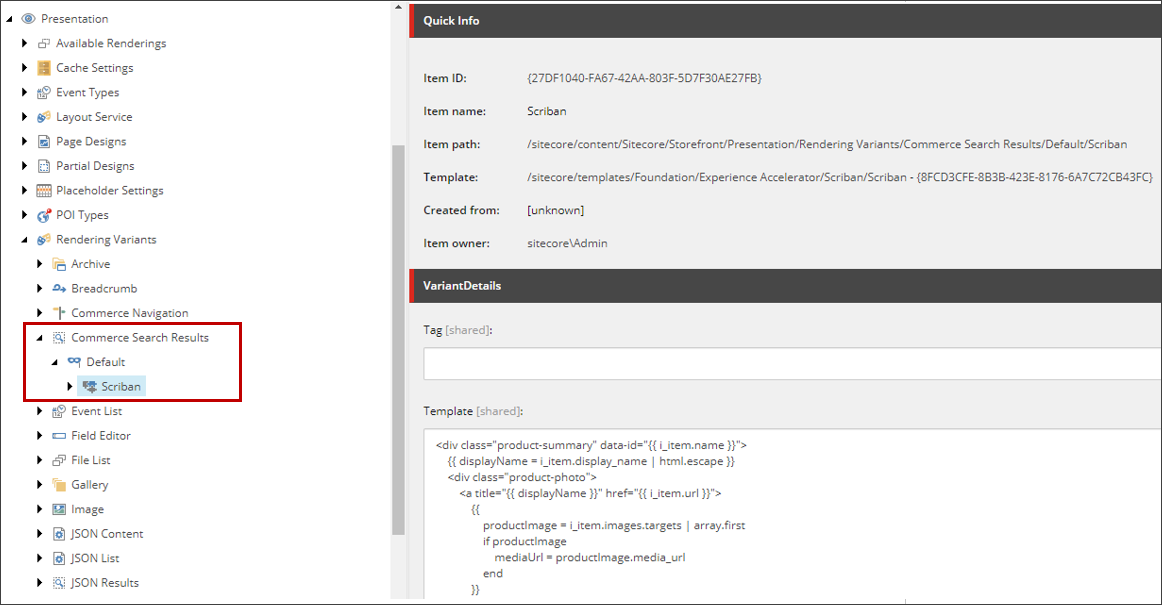
The following table details key properties of the Commerce Search Results rendering Scriban template.
| Property or Variable | Description |
|---|---|
i_item | The i_item property is the current item in the context of the rendering variant. Often, an equivalent to the i_datasource item but, in this case, it is exposing catalog data for the individual items.In the default implementation, it is assumed that items are all of type products, but items can also be bundles, categories, or variants. The i_item item is used to store various types of data in this template. For example, the i_item.name property stores the Product ID and is assigned to a data attribute named id, and the i_item.url property stores the link to the product detail page and is assigned to the href attribute. |
o_model | The o_model property is passed to the MVC Controller rendering. This means the name of the catalog and the product bundle ID are passed to the MVC Controller. The o_model property is also used to pass along price and promotion information. |
displayName | The displayName variable is used in various contexts. For example, it is initialized to i_item.display_name, which stores the Display Name of the product. The variable is passed into the built-in function html.escape so that the returned string is a text block.It is also assigned to the title attribute in the anchor tag. The i_item.url property, which stores the link to the product page, is assigned to the href attribute. The displayName variable is also assigned as text for the anchor tag. |
sc_imagelink | The image link is retrieved using the sc_imagelink function on a CatalogProductImage object. Configure the source for catalog images and the result either comes from the Media Library or Digital Asset Management system depending on the settings you define. The function expects a parameter object of type CatalogProductImage that represents the product image and the o_model.master_product_image property that contains the CatalogProductImage object for the main/hero product image. |
sc_translate | This function is used to display items defined in the Dictionary Domain of the site (sitecore/Content/ |
i_item.brand | This property stores the brand name of the product and is displayed in the <div> element. |
The following code shows the Commerce Search Results rendering Scriban template defined within the default rendering variant.
The Commerce Search Results rendering is a clone of the SXA Search Results rendering specific to Commerce. It has its own default rendering variant root and default rendering variant (/sitecore/Content/
You can change the labels used with the Commerce Search Results rendering.
Product Summary View model
When search results are processed, the price and stock information is retrieved from the Commerce Engine and converted to the ProductSummaryViewModel model to be rendered inside Scriban template (accessed through the o_model variable).
