Marketing Automation Engine
Version:
The Marketing Automation Engine is a stand-alone service that is responsible for enrolling contacts in plans and activities. The default location of the Marketing Automation Engine in a single instance developer environment is:
C:\path\to\xconnect\App_data\jobs\continuous\AutomationEngine
You can run the Marketing Automation Engine as a Windows Service, a console application (for development) or as a Web Job in Azure.
Note
Refer to the business user documentation for information about using the Marketing Automation interface.
Data flow
The following diagram demonstrates the flow of data through the Marketing Automation Engine.
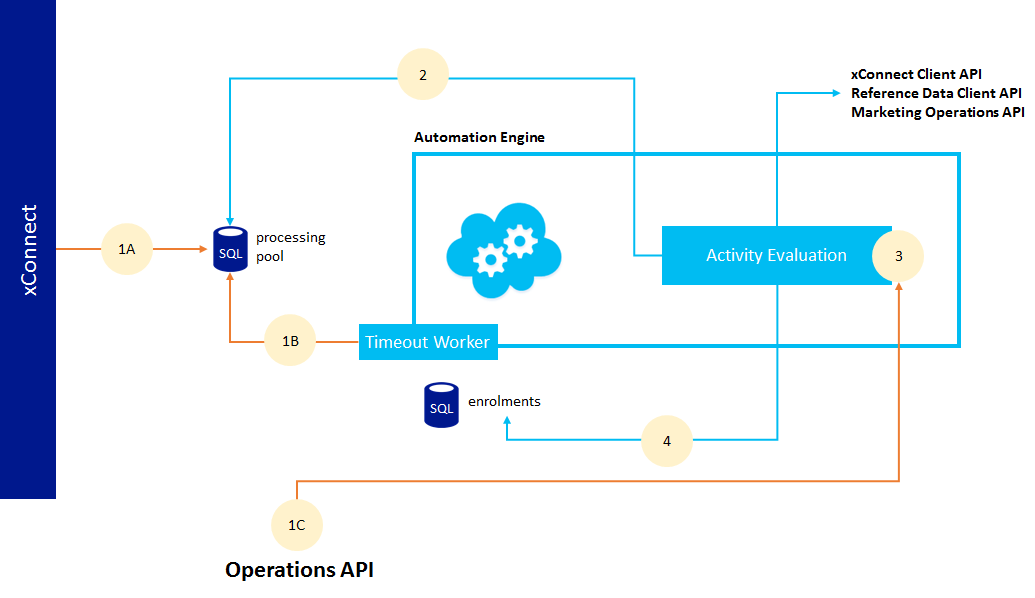
- Contact enrollment in a plan or activity is triggered in the following ways:
- The engine creates a new entity (contact or interaction) in xConnect, and adds an entry to the automation processing pool (1A).
- The timeout worker regularly evaluates all paused activities and adds an entry to the processing pool (1B).
- The engine uses the Operations API to manage enrollment directly, bypassing the processing pool. Live event detection uses the Operations API (1C).
- The Marketing Automation Engine processes the processing pool entries according to their priority number.
- The Marketing Automation Engine evaluates each enrollment. Every activity has an activity type that defines the logic that the engine executes when it enrolls a contact in that activity. This includes evaluating conditions.
- The engine returns a result and updates the contact’s enrollment in the enrollment database.
Activity types and conditions
Developers can extend the Marketing Automation Engine in the following ways:
- Add a custom activity type
- Add custom conditions, which can be used by conditional activities
If you have suggestions for improving this article, let us know!