Walkthrough: Using Apache Tika to extract media content for indexing
You can use Apache Tika to extract media content for indexing as an alternative to the other ways to do this.
This walkthrough describes how to:
- Set up Apache Tika
- Make Apache Tika the primary media content extraction provider
- Verify that indexing works
Set up Apache Tika
It is a prerequisite that you have set up Solr and that Solr is running without problems.
To set up Apache Tika:
-
Download Apache Tika and save the
tika-server-x.x.jarfile to the folder you want to run Tika from.NoteApache Tika 1.22 has reached end-of-life and is no longer supported or actively maintained. If you still need version 1.22, you can download it from the Apache archive. We strongly recommend using a supported version—Tika 2.9.x (requires Java 8) or Tika 3.x (requires Java 11+)—which include critical security fixes and enhancements.
-
In the folder where you saved the file, open a PowerShell prompt and start Apache Tika:
NoteIf you do not specify
hostandport, Apache Tika uses the defaults of localhost and 9998. -
To confirm that Apache Tika is running, browse to the Tika server URL,
http://<Tikahostname>:<portnumber>. If the server is running, you can see a Welcome message. -
Go to the Sitecore Admin page (
https://<sitecoreinstance>/sitecore/admin/showconfig.aspx) and check thatTikaMediaFileTextExtractorhas been added to the<contentExtraction>node: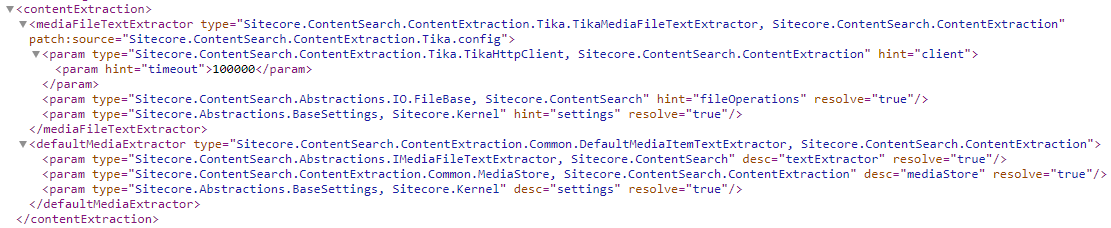
Make Apache Tika the primary media content extraction provider
You can configure Apache Tika as your primary media content extraction provider.
To enable Apache Tika as the primary media content extraction provider:
-
Open the
App_Config\ConnectionStrings.configfile, and add this connection string: -
Restart Sitecore.
Verify that indexing works
After setting up and enabling Apache Tika, it is a good idea to verify that indexing works correctly.
To verify that indexing works:
- On the Sitecore Launchpad, click Control Panel and rebuild indexes.
- In the Content Editor, perform a simple search, for example for the Home item.