Configure the infrastructure repository to use branch policy
Version:
To make the infrastructure repository work properly, you must configure it to use branch policy. To interact with pull requests within the infrastructure pipeline, your organization must also have REST API access. When running on pull request branches, the infrastructure pipeline posts a summary of the terraform plan changes that must be reviewed before merging them into the main branch.
Configure branch policy
Configure branch policy
To configure branch policy for your repository:
- Go to Project Settings, Repos, Repositories and select your branch.
- Click your repository and on the Policies tab set the following policy:
- Require a minimum number of reviewers: 1
- Check for comment resolution: required
- Go to Build validation, select your infrastructure pipeline and set the following:
- Trigger: automatic
- Policy requirement: required
Enable REST API access
Enable REST API access
To enable REST API access:
-
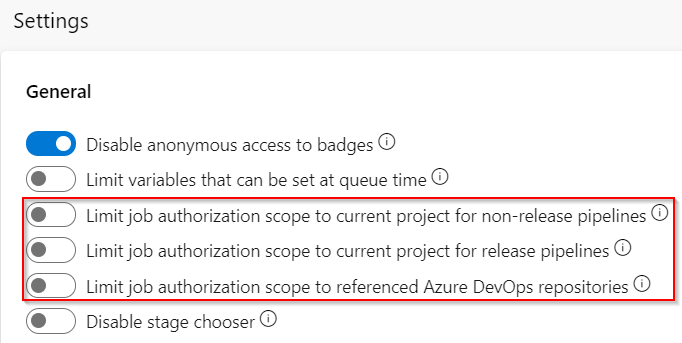
Go to Organization Settings, Pipelines, Settings, General and disable the following three options:
- Limit job authorization scope to current project for non-release pipelines.
- Limit job authorization scope to current project for release pipelines.
- Limit job authorization scope to referenced Azure DevOps repositories.
-
Go to Project Settings, Repos, Repositories, Permissions, Users, click the project build service user and set the Contribute to pull requests field to Allow.
If you have suggestions for improving this article, let us know!