Sitecore Documentation
  • Learn
  • Downloads
  • Changelog
  • Roadmap
XP
Sitecore Experience Platform
    • Configuring the Campaign Creator
    • The Key Behavior Cache settings, pipelines, and methods
    • Configure the List Manager for a scaled environment
    • Enable the export of custom facets to a CSV file
        • Federated Experience Manager - a functional overview
            • Page tracking in FXM
            • Session tracking in FXM
            • Browser and session compatibility in FXM
            • JavaScript-server interaction
  • The Sitecore Social Connected module
  1. Diagrams
  1. Sitecore Experience Platform
  2. Digital marketing 
  3. The Federated Experience Manager
  4. Diagrams
  5. JavaScript-server interaction

JavaScript-server interaction

Version:

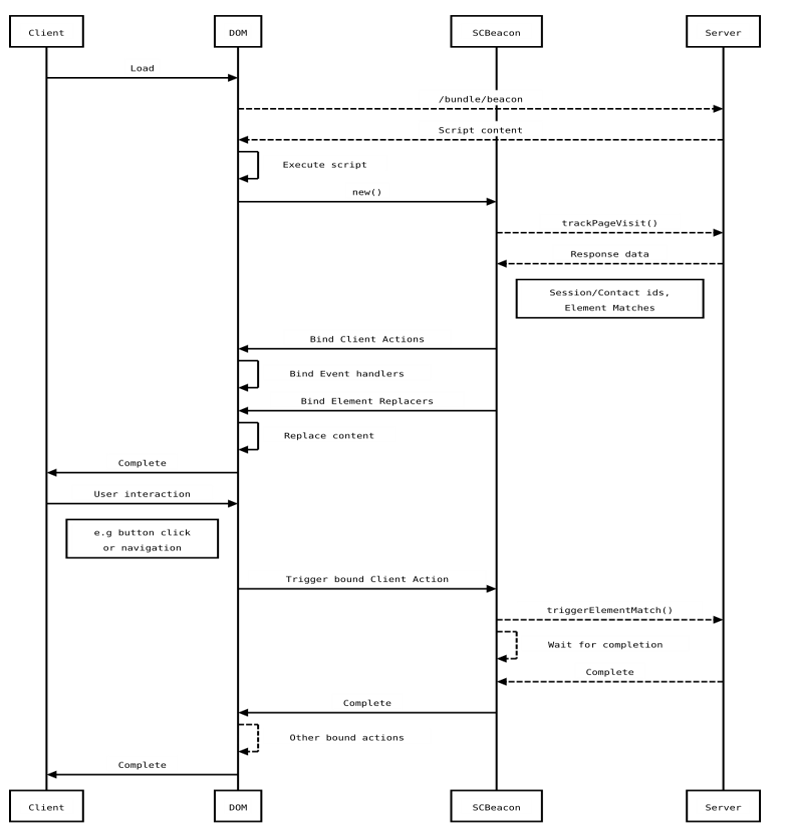
The following diagram describes the process flow of the JavaScript used by Federated Experience Manager (FXM):
If you have suggestions for improving this article, let us know!

Documentation Assistant

This assistant uses AI to generate responses based on Sitecore documentation. While it has access to official sources, answers may be incomplete or inaccurate and should not be considered official advice or support.
Powered by
k
kapa.ai
Protected by reCAPTCHA

© Copyright 2026, Sitecore A/S or a Sitecore affiliated company.
All rights reserved.

Privacy policySitecore Trust CenterTerms of use