Product Bundle structure
The Product Bundle rendering consists of the Bundle Header component and the Bundle Groups Container component. It is based on the SXA rendering variant and extended with the ModelReference component.
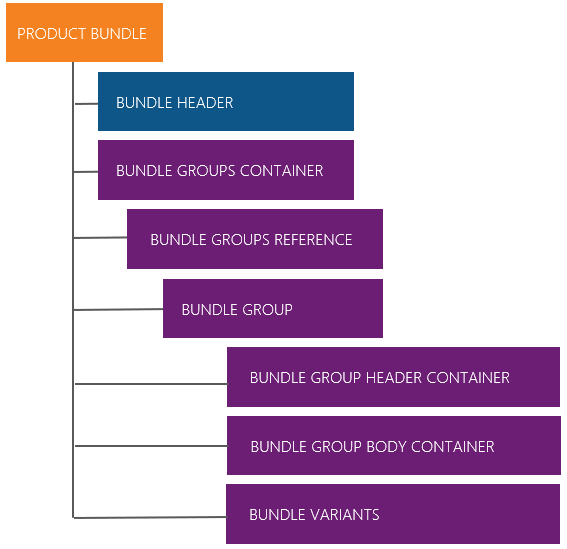
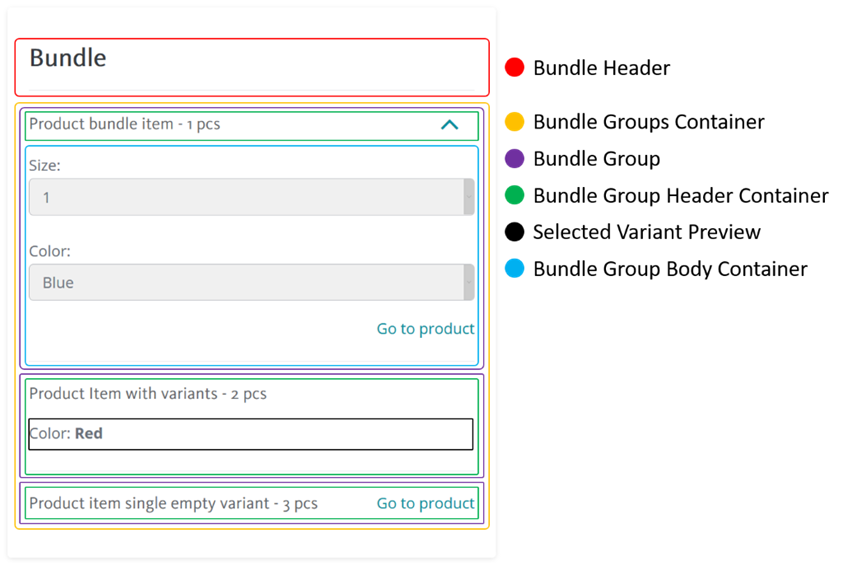
The following diagram shows a high-level view of the HTML structure of the product bundle component.
To work with the Product Bundle component in the Content Editor, go to sitecore/Content/<tenant>/<site>/Presentation/Rendering Variants/Product Bundles.
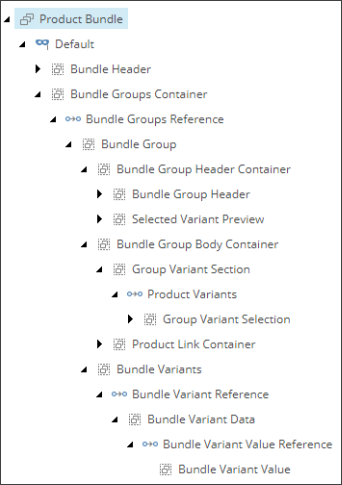
You can add new field renderer items to the Product Bundle rendering variant hierarchy as long as you do not reuse existing CSS classes and you can move items in the hierarchy as long as you are not breaking a parent/child relationship.
The NVelocity template is not used in the Product Bundle definition.
The Bundle Header component
The Bundle Header component contains the label for the product bundle and information related to the product bundle. During the initialization of the JavaScript component, the associated data attributes are stored and used when needed.
| Item | Description | Type | CSS Class |
|---|---|---|---|
| Bundle Header | This section contains the label for the product bundle as well as the following data attributes:
| VariantSection | bundle-header |
The Bundle Groups Container component
The Bundle Groups Container component is the container for all bundle line items:
| Item | Description | Type | CSS class |
|---|---|---|---|
| Bundle Groups Container | Container for bundle line items. | VariantSection | bundle-groups-container |
| Bundle Group Reference | The model reference that iterates through the Pass Through Field field ( LineItems) to populate bundle line item details within the markup. | ModelReference | |
| Bundle Group | This section contains a single bundle line item and the following data attributes:
| VariantSection | bundle-group |
| Bundle Group Header Container | This section is the container for the bundle line item detail such as its name and selected variants. It also contains a handler for hiding and showing the Bundle Group Body Container. It contains the following data attribute:
| VariantSection | bundle-group-header-container |
| Bundle Group Header | This section contains the label for the bundle line item and the arrow handler to toggle the Bundle Group Body Container. | VariantSection | bundle-group-header |
| Selected Variant Preview | This section contains the labels for the variants selected and contains the following data attribute:
| VariantSection | selected-variant-preview |
| Bundle Group Body Container | This section is the container for the variants drop-down selection and the navigation link to the bundle line item. | VariantSection | bundle-group-body-container |
| Group Variant Section | This section contains the drop-down selection list for the variant. | VariantSection | group-variant-section |
| Product Variants | The model reference that iterates through the Pass Through Field VariantSelections to populate variant combination information into the drop-down selection. | ModelReference | |
| Group Variant Selection | This section contains the actual drop-down list of the available variants for the bundle line item. | VariantSection | group-variant-selection |
| Product Link Container | This section contains the navigation link to the bundle line item. | VariantSection | product-link-container |
| Bundle Variants | This section contains the meta data of all valid variant combinations available for the bundle line item. The variant combination is populated only once during the JavaScript component initialization.
| VariantSection |
|
| Bundle Variant Reference | The model reference that iterates through the Pass Through Field (ValidProductVariants) to generate valid variant combinations. | ModelReference | |
| Bundle Variant Data | This section contains a single valid variant combination and has the following data attribute:
| VariantSection | bundle-variant-combination |
| Bundle Variant Value Reference | The model reference that iterates through the Pass Through Field (Variants) to generate valid variants. | ModelReference | |
| Bundle Variant Value | This section contains the variant key and value of a valid variant and has the following data attributes:
| VariantSection | bundle-variant-combination-value |
The items listed in the table are referenced by the JavaScript component through the class name; therefore, you must avoid changing existing class names. You can, however, add a new element or class name.