Engagement automation actions
The EXM module provides two engagement automation actions in the default installation:
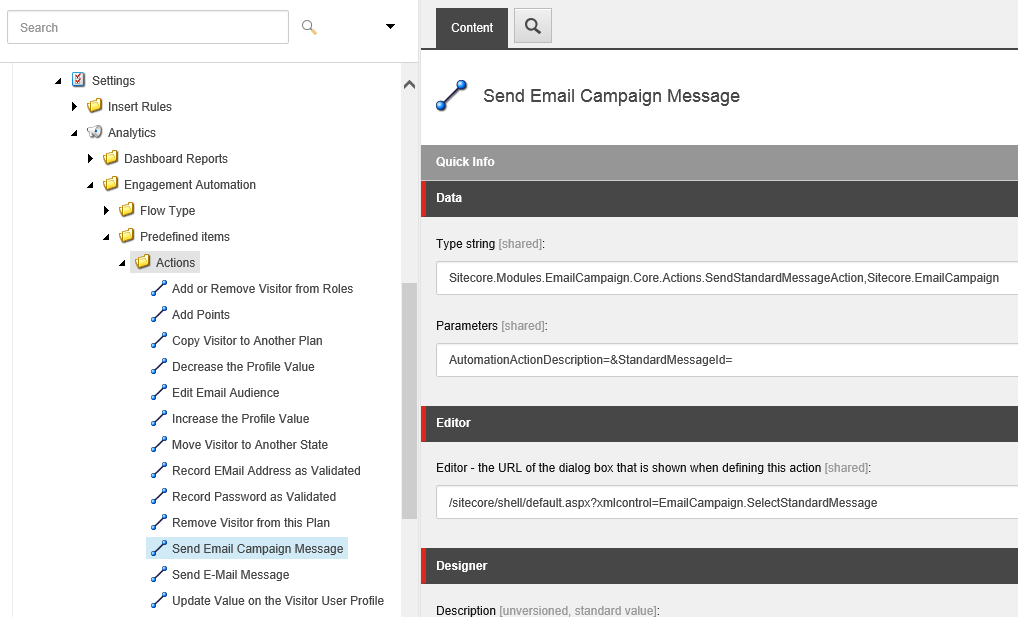
The Engagement Plan Monitor performs these actions on the visitors who meet the conditions that you specify in the engagement plan. The items of both actions are stored in the Actions folder at:
/sitecore/system/settings/analytics/engagement automation/predefined items/actions
You can configure both actions directly in the engagement plan.
Send Email Campaign Message
Send Email Campaign Message
The Send Email Campaign Message automation action lets you send triggered messages to the visitors who meet a specific condition.
This action has the following parameters:
|
Parameter name |
Description |
|---|---|
|
|
The action description. |
|
|
The ID of a triggered message to be sent. |
Edit Email Audience
Edit Email Audience
The Edit Email Audience automation action lets you copy and move the visitors who meet a specific condition between recipient lists.
This action has the following parameters:
|
Parameter name |
Description |
|---|---|
|
|
The action description. |
|
|
The recipient list to which the visitors should be added. This parameter can take more than one recipient list name. |
|
|
The recipient list from which the visitors should be removed.This parameter can take more than one recipient list name. |
|
|
A Boolean parameter that determines whether or not to send a confirmation mail to the visitors whose mailing list subscription has changed. |
|
|
The ID of the manager root for the current action. The module uses subscription confirmation pages and notification emails from the manager root that you define. |
To perform the Edit Email Audience action, at least one value must be set for either the subscribe or the unsubscribe parameter.
Custom implementation of the engagement automation actions
Custom implementation of the engagement automation actions
To use a custom implementation of an engagement automation action, open the action in the Content Editor and then on the Content tab, edit the following fields:
|
Field name |
Section name |
Customization |
|---|---|---|
|
Type string |
Data |
To modify the action behavior, specify your custom class and Alternatively, you can modify the class that is specified in this field by default directly in the corresponding |
|
Parameters |
Data |
To change the action parameters, replace the default parameters with your custom ones. |
|
Editor |
Editor |
To show a custom dialog box when defining the action in the engagement plan, specify its URL. |