Configure insert options for message types
Version:
You can change the message templates that marketers can choose from when they create a new email campaign.
To change message templates available for the Regular email campaign or the Automated email campaign:
-
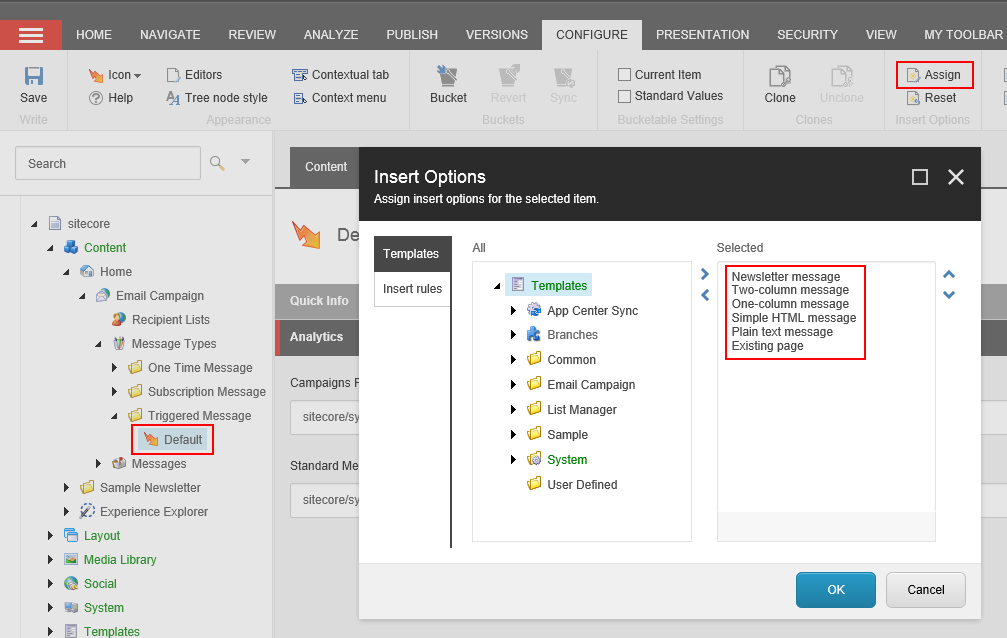
In the Content Editor, select the Default item of the relevant message type:
-
Regular email campaign – /sitecore/content/Home/Email Campaign/Message Types/One Time Message/Default
-
Automated email campaign – /sitecore/content/Home/Email Campaign/Message Types/Triggered Message/Default
-
-
On the ribbon, in the Configure tab, click Assign.
-
In the Insert Options dialog box, change the range of message templates and then click OK to assign the new insert options.